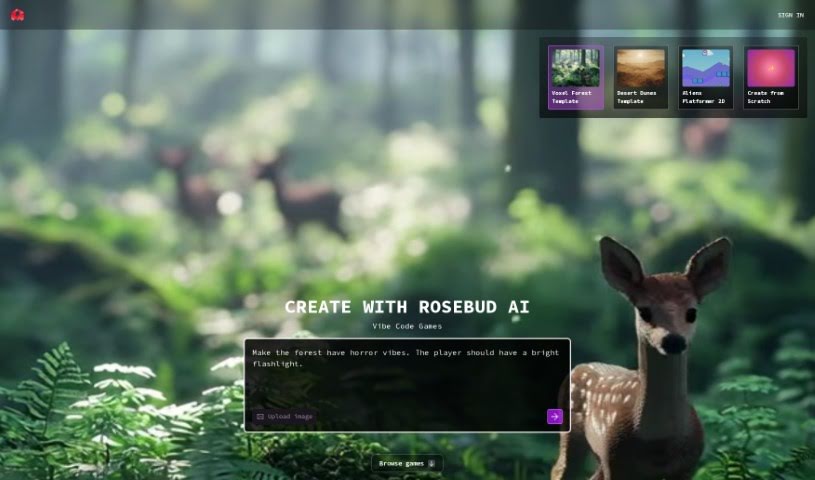
Screenshot of Rosebud AI

Rosebud AI

Discover what Rosebud AI is and how to use it effectively in 2025. We'll explore its features and see how it stacks up against other game development tools.

Screenshot

What is Rosebud AI?

Rosebud AI is a platform designed to help you bring your game ideas to life, turning your descriptions into actual game code with AI’s help. You just tell the AI what kind of game you’re imagining, and it can generate the code for a browser-based game that you can share with friends right away. The platform lets you create games in 2D, 3D, and even Voxel styles, giving you the tools to design your own assets and code. Plus, you can really flesh out your AI characters by defining their personalities, backstories, and feelings through simple prompts. Essentially, Rosebud AI aims to give you full creative control while taking care of the tricky technical bits of game development.

Who created Rosebud AI?

Rosebud was built to make it super easy for people to go from just describing a game to actually having its code. It first launched on November 12, 2019. While the founder’s name and specific company details aren’t readily available in the information I have, Rosebud is a really cool tool. It lets you create games by having creative conversations with AI characters. You can make browser-based games, enjoy an easy-to-use interface, customize almost everything, and it even supports multiple languages. You can design game assets and write code with the help of Rosie, the platform’s AI assistant.

What is Rosebud AI used for?

Rosebud AI is incredibly versatile for game creation. You can:

  • Build games in 2D, 3D, and Voxel styles.
  • Create both the assets and the code for your games.
  • Generate unique character models and other visual elements.
  • Design AI characters, including their traits, storylines, and emotions.
  • Develop AI characters specifically for chatting.
  • Customize character traits, storylines, and emotions using AI prompts.
  • Create visual assets for Non-Player Characters (NPCs) based on your descriptions.
  • Go from a simple text description all the way to functional game code.
  • Help students learn game development by creating games through creative conversations.
  • Engage in conversations with AI characters and experience interactive stories.
  • Play games that have been developed with AI assistance.
  • Benefit from AI-powered rapid iteration to quickly test ideas.
  • Use any errors encountered as inspiration for new directions.
  • Upload or design your own sprite sheets with AI’s help.
  • Create visual assets for NPCs by simply providing prompts.
  • Tell stories through creative conversations with AI characters.
  • Explore games that other community members have created.
  • Play games made with the Rosebud AI Game Maker.
  • Bring NPCs to life with unique character models.
  • Generate backgrounds and other visual elements for your NPCs.
  • Maintain full creative control while letting the AI handle the complex technicalities.
  • Personalize AI characters with elements like music and interactive features.

Who is Rosebud AI for?

Rosebud AI is a fantastic tool for a variety of creative individuals and professionals:

  • Game developers
  • Educators and teachers
  • Web developers
  • Creative writers
  • Creators of interactive stories
  • AI specialists

How to use Rosebud AI?

Getting started with Rosebud is straightforward. Here’s a breakdown of how to use it:

  1. Understand the Platform: Rosebud is essentially a place where you describe the game you want to build to an AI. This AI then generates the necessary code for you. The games you create are browser-based, meaning you can share them with friends instantly.
  2. Getting Started: To stay in the loop on events and potentially get early access as a Beta user, you should join the Rosebud Discord server. Being an active part of the community can really help you get closer to accessing the platform.
  3. Unique Features:
    • You can create games in 2D, 3D, and Voxel styles.
    • The platform allows you to craft both game assets and code.
    • Keep an eye out for a future feature that will let you upload or design your own sprite sheets with AI assistance.
  4. Customizing AI Characters: You can really shape your characters by defining their traits, backstories, and emotions. Just prompt the AI with your ideas! This feature gives you a lot of creative freedom, letting the AI manage the more complex technical aspects.
  5. Creating AI Characters for Chatting: Need an AI character to chat with? You can generate one quickly using the provided character template. You can customize its description, add an image, and even include interactive elements like music to make the experience more personal.
  6. Creating Visual Assets for NPCs: It’s easy to create visual assets for your NPCs by simply describing what you envision to the AI. You can generate unique character models, backgrounds, and other visual elements based on your specific requests, allowing for a high degree of customization and creativity.

These steps should give you a good idea of how to use Rosebud to develop games efficiently and creatively. Don’t forget to get involved with the community for the latest updates and better access!

Related AI Tools

Discover more tools in similar categories that might interest you

Stay Updated with AI Tools

Get weekly updates on the latest AI tools, trends, and insights delivered to your inbox

Join 25,000+ AI enthusiasts. No spam, unsubscribe anytime.