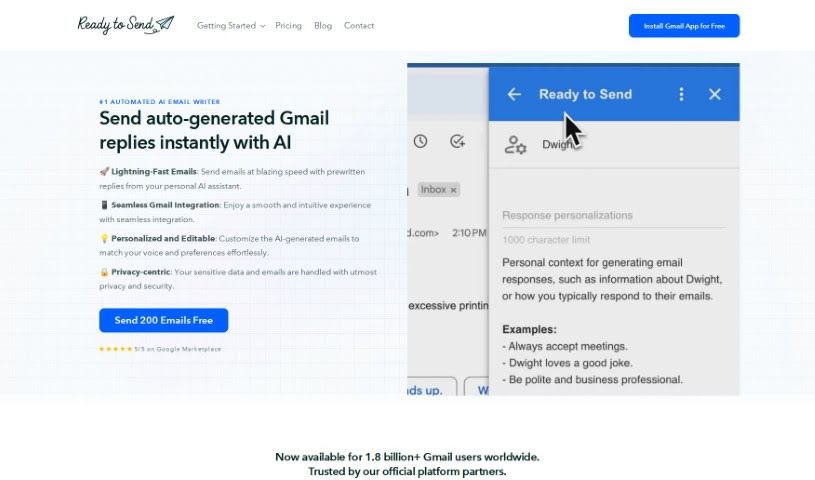
Screenshot of Ready to Send

Ready to Send

Discover what Ready to Send is and how to use it effectively in 2025. We'll explore its features and see how it stacks up against other email writing tools.

Screenshot

What is Ready to Send?

Ready to Send is a smart add-on for Gmail that uses AI to help you draft email replies much faster. It is your personal email assistant. It looks at the new emails you get and then writes a personalized draft response for you, based on what the email says. This really cuts down on the time you spend typing out replies manually. It’s great for boosting how quickly you can get back to people, making you more productive, and even automating some customer support messages. Plus, you can always tweak the drafts it creates to make sure they sound just right.

Ready to Send is built with security in mind, handling over 100 languages and sticking to data protection rules. It works smoothly on all your devices and with different email programs, so you’re always ready to send a quick reply.

Who created Ready to Send?

Ready To Send Overview:

Ready To Send is an AI-powered Gmail add-on that’s designed to automate the process of drafting email replies. A team of developers created it, and it officially launched on July 23, 2023. The tool works by scanning your incoming emails and then generating personalized draft responses for you, usually within minutes. It integrates seamlessly with various devices and email clients. Importantly, it really prioritizes your data privacy – it doesn’t store your emails and follows all the necessary data protection regulations. Ready To Send can handle more than 100 languages and is smart enough to tell the difference between different kinds of emails, like promotions versus personal messages. This all helps you manage your inbox more efficiently and automate customer support replies. You’re always in control, though; you can review, edit, and personalize the auto-generated responses to make sure they perfectly match your communication style and boost your productivity.

What is Ready to Send used for?

Ready to Send helps you in a bunch of ways:

  • Boost your productivity: Get more done by automating repetitive tasks.
  • Personalize your emails: Craft replies that sound like you.
  • Handle many languages: It supports over 100 languages, so you can communicate globally.
  • Get personalized responses: Draft replies that are tailored to the specific email.
  • Automate email drafting: Let AI handle the initial writing.
  • Manage your inbox efficiently: Keep your inbox organized and under control.
  • Respond to emails quickly: Speed up your reply times.
  • Automate customer support: Handle common customer inquiries automatically.
  • Achieve Inbox Zero: Make progress towards an empty inbox.
  • Differentiate email types: It can tell the difference between promotions and personal emails.
  • Enhance communication velocity: Get your messages out faster.
  • Transform inbox management: Change how you handle your email.
  • Compose new emails: It can also help you start new emails from scratch.
  • Swiftly generate draft responses: Get a starting point for replies in no time.
  • Language detection: It figures out the language of incoming emails.
  • Automate the entire drafting process: Streamline how you write emails.
  • Increase email response efficiency: Get faster at replying.
  • Productivity enhancement: Make your work easier by automating replies.
  • Help achieve Inbox Zero status: Stay on top of your emails.
  • Efficient inbox management for professionals and businesses: Keep work emails organized.
  • Data privacy and security: Your information is protected.
  • Generate draft messages quickly: Get a head start on writing.
  • Manage your inbox efficiently: Keep things tidy.
  • Personal email responses: Craft replies that feel personal.
  • Effortless productivity: Make your work smoother.
  • Customize responses: Adjust drafts to fit your exact needs.
  • Automate perfect customer support responses: Ensure consistent, high-quality support.

Who is Ready to Send for?

  • Professionals
  • Businesses
  • Pretty much everyone!
  • Individuals

How to use Ready to Send?

Using Ready to Send is pretty straightforward. Here’s a quick rundown:

  1. What it is: Ready to Send is an AI-powered Gmail add-on that automatically writes email replies for you. No complicated setup or credit card needed to get started.
  2. How it works: It scans your emails, writes a draft reply that sounds like you, and then puts it right in your inbox so you can review and edit it.
  3. Key benefits: It makes replying to emails much faster, automates the process, and supports over 100 languages.
  4. Security first: Your data privacy is a top priority. It doesn’t store your emails and follows all the important data protection rules.
  5. Make it your own: The responses it generates are highly customizable. You can tweak them to perfectly match your voice and tone, making your communication feel authentic.
  6. Getting started: You can install it from the Google Workspace Marketplace. You get to generate your first 200 drafts for free! After that, you can edit or ask for new responses. You can also use it to compose entirely new emails and automate those customer support messages.
  7. Works everywhere: It supports various email clients like Gmail, Outlook, and Apple Mail, and it works smoothly across all your devices.
  8. Personalize your instructions: You can give it specific instructions for emails, set up conditional responses for different situations, and really boost your productivity by automating common tasks.
  9. Review and send: You’ll have prewritten replies waiting for you to check. This means super-charged productivity for professionals, businesses, and individuals alike.
  10. Ready to go? Head over to the Google Marketplace, download Ready to Send, and try out those first 200 free emails to see how it can help you!

Related AI Tools

Discover more tools in similar categories that might interest you

Stay Updated with AI Tools

Get weekly updates on the latest AI tools, trends, and insights delivered to your inbox

Join 25,000+ AI enthusiasts. No spam, unsubscribe anytime.