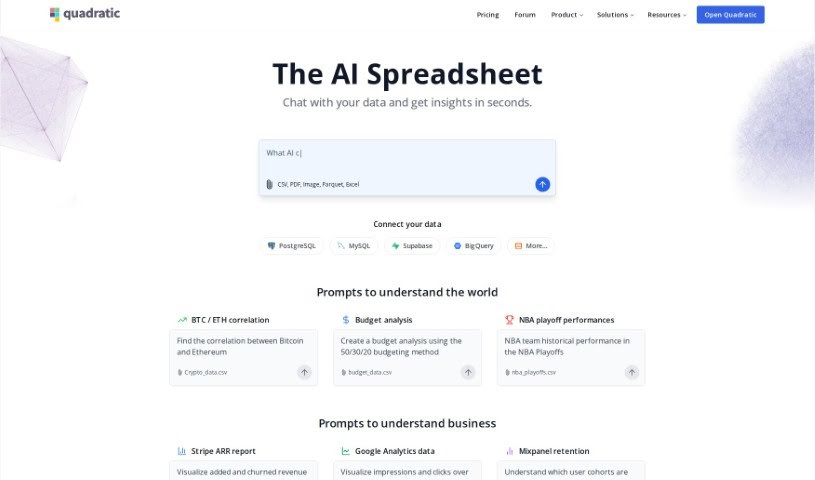
Screenshot of Quadratic

Quadratic

Discover Quadratic, a modern data spreadsheet, and learn how to use its powerful features effectively in 2025. We'll explore its capabilities, compare it to Excel tools, and show you how it streamlines data analysis for professionals.

Screenshot

What is Quadratic?

Quadratic is a really neat, modern data spreadsheet. It is a blend – it’s got the familiar simplicity of traditional spreadsheets, but it also packs in the advanced power you’d expect from programming languages and database management systems. It all happens right in your web browser, giving you a huge, expansive canvas to work with even really large datasets, and it handles them efficiently. This tool is built for people who work with data every day, like data scientists, business analysts, and engineers. It even offers AI-enhanced autocomplete suggestions, powered by GPT 4.0, to make writing code and formulas a breeze. Quadratic currently supports Python, and they’re planning to add SQL and JavaScript soon, which will make manipulating and analyzing your data even more seamless. You can also collaborate with others in real-time, thanks to its multiplayer functionality. Plus, it includes data visualization tools like Plotly, and direct SQL queries are on the way. The team really focused on performance, so you get a smooth, fast user experience thanks to technologies like Web Assembly and WebGL.

Who created Quadratic?

Quadratic was developed by a team that’s really pushing the boundaries for data spreadsheets. The company behind it is all about speed, making things comfortable, and creating a great user experience. Their goal is to make working with data not just efficient, but genuinely enjoyable. You’ll find features like real-time multiplayer collaboration, AI-powered autocomplete specifically for Python, and integrations with Python, with SQL and JavaScript coming soon. They also offer data visualization tools and ensure high performance by using Web Assembly and WebGL technologies. Essentially, they’ve built this platform to help data scientists, business analysts, and engineers analyze and compute data more effectively.

Who is Quadratic for?

  • Data scientists
  • Business analysts
  • Engineers

How to use Quadratic?

To get the most out of Quadratic, here’s a simple breakdown:

  1. Getting Started: Quadratic is an online tool, so you just access it through your web browser. It gives you an infinite canvas, which is great for manipulating data.

  2. What it Can Do:

    • AI Help: Quadratic has AI features, using GPT 4.0, that suggest completions for your data entries, formulas, and code. It really speeds things up.
    • Code Support: You can use Python for complex data tasks, and they’re adding SQL and JavaScript support soon, which will be super handy.
    • Work Together: You can edit spreadsheets and collaborate with other people online in real-time. It’s like Google Sheets but for more advanced data work.
    • See Your Data: You can create interactive charts and graphs using libraries like Plotly, making your data easier to understand.
    • Fast Performance: Quadratic runs smoothly because it uses technologies like Web Assembly and WebGL.
  3. Everyday Use:

    • Longer Formulas: You can write formulas that span multiple lines, making them much easier to read and manage.
    • Run Code: You can write code directly in the spreadsheet and see the results right there.
    • Easy Importing: Drag and drop your files to import and manage data without any hassle.
    • Connect to APIs: You can pull data from external APIs, and Quadratic will automatically keep it updated.
  4. What’s Next: They’re planning to add the ability to run direct SQL queries, which will make it even easier to get data straight from databases.

  5. Your Ideas Matter: The team at Quadratic really values feedback from users to help guide what they build next.

By following these steps, you can really make the most of Quadratic’s built-in features and collaborative environment for all your data analysis and computation needs.

Related AI Tools

Discover more tools in similar categories that might interest you

Stay Updated with AI Tools

Get weekly updates on the latest AI tools, trends, and insights delivered to your inbox

Join 25,000+ AI enthusiasts. No spam, unsubscribe anytime.