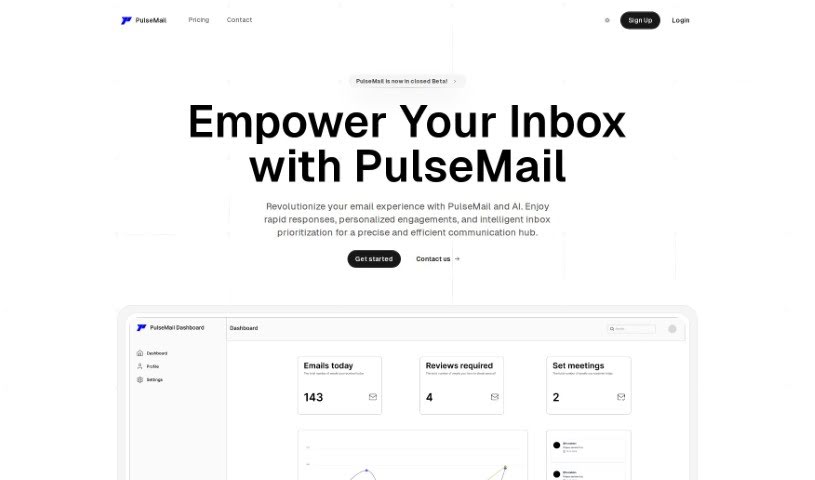
Screenshot of Pulsemail

Pulsemail

Discover what Pulsemail is and how to use it effectively in 2025. We'll explore its features and see how it stacks up against other email writing tools.

Screenshot

What is Pulsemail?

PulseMail is an AI-powered assistant designed to make managing your emails and communicating much smoother. It is your smart helper for email. It’s really good at summarizing and prioritizing your most important messages, taking care of meeting-related tasks automatically, letting you create your own custom replies, and giving you insights into how well your emails are performing with its real-time analytics. Plus, it works nicely with the tools you’re already using. PulseMail helps you be more productive by saving you time and making your communication sharper, all while keeping your information private and adapting to different writing styles so your automated responses feel personal. It’s a great fit for small business owners or anyone who just wants a more organized and efficient inbox.

Who created Pulsemail?

PulseMail was developed by a forward-thinking team, spearheaded by its founder, who wanted to completely change how we handle email. This company is all about offering smart email solutions that help you focus on what matters most, handle meeting replies automatically, and give you a personalized communication experience. PulseMail’s AI is designed to learn and adapt to various writing styles, which means its automated responses feel natural and personal. By connecting smoothly with the tools you already use, PulseMail really boosts productivity and efficiency for both individuals and businesses.

What is Pulsemail used for?

PulseMail helps you in a bunch of ways:

  • Intelligent Email Prioritization: It automatically sorts and prioritizes your emails, so you can easily focus on the most critical messages and keep your workflow running smoothly.
  • Automated Meeting Management: It can spot meeting requests and handle the email responses for you, whether you need to confirm, decline, or suggest a different time.
  • Seamless Personalization: You can easily customize replies to keep your communications feeling personal and natural.
  • In-depth Performance Insights: Get real-time analytics and daily stats to help you understand and improve how people engage with your emails.
  • Ecosystem Integration: It connects smoothly with your existing tools to boost productivity and make your communication processes more streamlined.

PulseMail is also great for:

  • Small Business Efficiency: It offers small businesses smart email automation, intelligent inbox management, easy workflow integration, and valuable insights to save time and increase productivity.
  • Individual Inbox Organization: If you’re looking for a more organized inbox, PulseMail helps by providing personalized and natural-sounding automated responses.
  • Privacy Protection: It’s built to adapt to different writing styles, ensuring that even automated messages feel personal and natural.
  • Revolutionizing Email Management: It truly changes how email is managed by saving time, offering useful data insights, and handling your emails efficiently.
  • Real-Time Analytics: This feature helps you refine your communication strategies by tracking response rates and engagement.

Who is Pulsemail for?

  • Small business owners
  • Individuals looking for a more organized inbox
  • Anyone who wants to improve their email management

How to use Pulsemail?

Here’s how you can get the most out of Pulsemail:

  1. Smart Email Prioritization: PulseMail automatically sorts and prioritizes your emails based on what’s most important. This helps you focus on critical messages, making your workflow much more efficient.
  2. Automated Meeting Management: When the tool detects a meeting request, it gives you options right on the dashboard. You can easily confirm, decline, or suggest new times, which automates those email responses for you.
  3. Seamless Personalization: You can easily customize your replies. This helps ensure that your communications always maintain a personal touch and feel natural.
  4. Performance Insights: Take advantage of real-time analytics and daily statistics. These insights are great for improving how you engage people with your emails, refining your communication, and keeping track of your response rates.
  5. Ecosystem Integration: PulseMail connects smoothly with the tools and platforms you’re already using. This integration is key to boosting your overall productivity and streamlining your communication processes.

By following these steps, you can really harness PulseMail’s power. It’s a fantastic way to change how you manage email, save valuable time, and boost your productivity in a really effective way.

Related AI Tools

Discover more tools in similar categories that might interest you

Stay Updated with AI Tools

Get weekly updates on the latest AI tools, trends, and insights delivered to your inbox

Join 25,000+ AI enthusiasts. No spam, unsubscribe anytime.