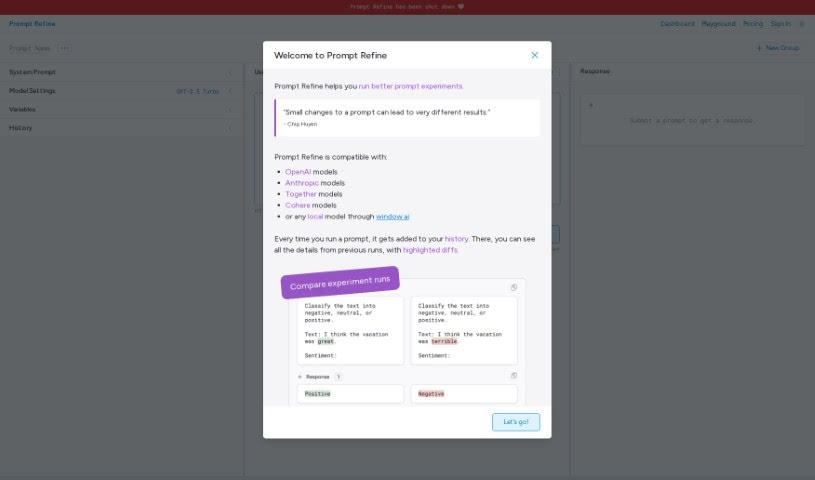
Screenshot of Prompt Refine

Prompt Refine

Discover what Prompt Refine is and how to use it to improve your AI prompts in 2025. We'll explore its features, how it stacks up against other documentation tools, and provide practical tips for getting the most out of it.

Screenshot

What is Prompt Refine?

Prompt Refine is a really handy tool designed to help you systematically improve the prompts you use with Language Models (LLMs). It is your personal prompt engineer! With Prompt Refine, you can easily generate, manage, and experiment with all sorts of different prompts. It lets you run prompt experiments, keep track of how well they’re performing, and compare the results with what you got last time. You can even use variables to create different versions of your prompts and see exactly how those changes affect the AI’s responses. Prompt Refine plays nicely with a bunch of AI models, including those from OpenAI, Anthropic, Together, and Cohere. Plus, if you like to have more control, you can even use local AI models with Prompt Refine, which really opens up possibilities for customization. Once you’re done experimenting, you can export your runs in CSV format, making it super easy to dive deeper into the data and analyze everything.

The ‘Welcome to Prompt Refine’ message is a great starting point. It quickly shows you the platform’s key features: how it stores your experiment runs, the models it’s compatible with, how you can use folders to keep your experiments organized, and its prompt versioning system, which is inspired by Chip Huyen. Prompt Refine makes it simple to compare your experiment runs side-by-side, track performance, and really see the differences from your last attempt. Using folders is a smart way to manage your experiment history, letting you switch between testing different prompts much more efficiently. Right now, in the beta version, you can make up to 10 runs. Prompt Refine really embraces Chip Huyen’s idea about prompt versioning by helping you track how your prompts perform, explore different variations, and notice how even small tweaks can lead to surprisingly different outcomes.

Who created Prompt Refine?

Prompt Refine was actually created by @marissamary. This AI tool first launched on June 27, 2024, with the goal of helping users get better at systematically improving their Language Model (LLM) prompts. As we mentioned, users can generate, manage, and experiment with different prompts using Prompt Refine. If you’re part of a team, the company behind Prompt Refine offers a team plan. This plan comes with 10 million tokens each month, access for up to 20 people, and helpful email support. If you want to learn more or have any questions, you can always reach out to the creator directly on Twitter via her handle, [@marissamary].

What is Prompt Refine used for?

Prompt Refine is incredibly versatile and can help with a variety of tasks:

  • Summarizing large documents and making sure to cite your sources correctly.
  • Rewriting text so it matches a specific style or tone.
  • Answering questions accurately based on information found within a given text.
  • Providing feedback on how to improve someone’s writing.
  • Brainstorming ideas and thinking through different considerations.
  • Producing initial drafts for reports and presentations.

Who is Prompt Refine for?

Prompt Refine is a fantastic tool for anyone who works with AI language models and wants to improve their results. This includes:

  • Summarizers who need to condense information accurately.
  • Text rewriters looking to adapt content for different purposes.
  • QA assistants who need reliable answers from text.
  • Writing feedback providers aiming to help others improve.
  • Idea generators seeking inspiration and new angles.
  • Report and presentation creators who need to get started quickly.
  • It’s also great for summarizing large documents and citing sources, rewriting text in a certain style, answering questions based on a text, giving feedback on how to improve writing, brainstorming ideas and considerations, and producing first drafts of reports and presentations.

How to use Prompt Refine?

To really make the most of Prompt Refine, here’s a straightforward guide:

  1. Experiment with Prompts: Start by running prompt experiments. This is your main way to optimize the prompts you’re using with LLMs.
  2. Track Performance: Keep a close eye on the outcomes of your prompt experiments. It’s really helpful to compare these results with what you got from previous runs.
  3. Create Prompt Variants: Use variables to generate different versions of your prompts. Then, you can observe how these variations affect the AI-generated responses.
  4. Organize Experiments: Make sure to use folders! They’re key for managing your prompt experiments efficiently and letting you switch between testing different prompts seamlessly.
  5. Model Compatibility: Remember that Prompt Refine works with a variety of AI models. This includes popular ones like OpenAI, Anthropic, Together, and Cohere models.
  6. Customization: Don’t forget you can incorporate local AI models. This really helps enhance the flexibility of how you create your prompts.
  7. Export Data: When you’re ready, export your experiment runs in CSV format. This is super useful for any further analysis you might want to do.
  8. Feedback and Support: If you have any feedback or run into issues, please use the Feedback form available on the Prompt Refine website. Your input is valuable!
  9. Stay Updated: To keep up with the latest developments and updates for Prompt Refine, make sure to follow @promptrefine on Twitter.

By following these steps, you’ll be able to effectively use Prompt Refine’s features. You can refine your prompts, experiment with different variations, and ultimately enhance the quality of the responses you get from AI.

Related AI Tools

Discover more tools in similar categories that might interest you

Stay Updated with AI Tools

Get weekly updates on the latest AI tools, trends, and insights delivered to your inbox

Join 25,000+ AI enthusiasts. No spam, unsubscribe anytime.