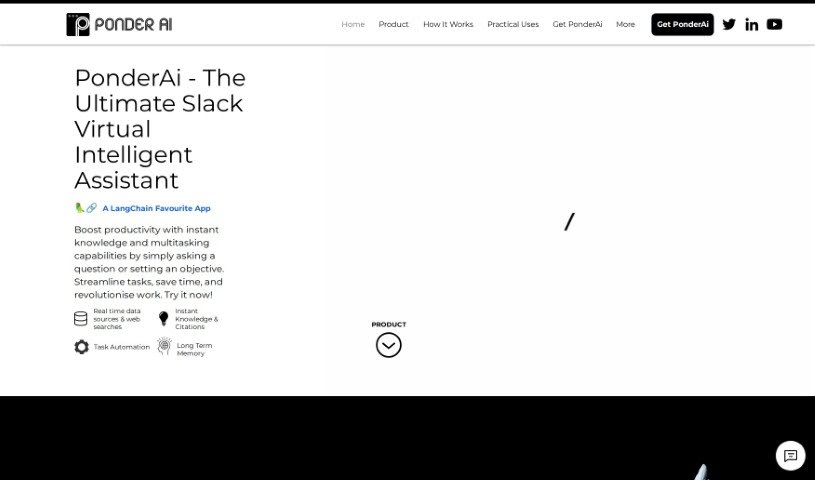
Screenshot of PonderAI

PonderAI

Discover what PonderAI is and learn how to use it effectively in 2025. We'll explore its features and see how it stacks up against other meeting assistants.

Screenshot

What is PonderAI?

PonderAI is a smart AI platform built to help you think more clearly and make better decisions. It uses advanced technology to give you personalized advice and suggestions. What makes PonderAI stand out is its unique way of tackling problems. It uses sophisticated algorithms to quickly sort through complex data. With its easy-to-use design, you can look at issues from different angles, compare your options, and then make choices you feel good about. The goal here is to help you understand challenges better, spark your creativity, and ultimately make smarter decisions in all sorts of situations.

Who created PonderAI?

Eugene Tan is the person behind PonderAI. He launched the company on June 14, 2024. Eugene founded it with a clear vision: to make work smarter and more efficient. His company focuses on creating innovative solutions, like using image analysis, to achieve this.

What is PonderAI used for?

  • Handling repetitive tasks automatically
  • Making processes smoother
  • Getting help tailored just for you
  • Keeping track of what needs to be done
  • Helping with task management
  • Boosting how well teams work together
  • Setting up meetings
  • Keeping your tasks organized
  • Reminding you of important things
  • Managing your schedule
  • Making your workplace run better
  • Handling day-to-day operations
  • Learning and adjusting based on how you use it
  • Organizing tasks right within Slack
  • Supporting your team’s collaboration efforts
  • A handy way to set reminders
  • Features for keeping tasks tidy
  • Assisting with teamwork

Who is PonderAI for?

  • Data Analysts
  • Business Strategists
  • Project Managers
  • Marketing Professionals
  • Educators
  • Healthcare Consultants
  • Financial Advisors
  • Software Developers
  • Research Scientists
  • Legal Consultants

How to use PonderAI?

Here’s a straightforward guide to getting the most out of PonderAI:

  1. Get to Know PonderAI: Think of PonderAI as your AI assistant right inside Slack. It’s designed to boost your productivity and make things run more smoothly. It helps streamline tasks and makes teamwork better, all within the Slack app you already use.
  2. Works Seamlessly with Slack: PonderAI fits right into your Slack environment. It’s built to understand and respond to your commands and questions as you work.
  3. Helpful for Task Management: PonderAI can help you manage your tasks by scheduling meetings, setting reminders, and keeping your to-do lists organized within Slack. For a complete rundown of everything it can do, it’s always best to check the official details.
  4. Benefits for Your Team: You can expect your team’s task management and overall productivity to get a real boost with PonderAI. It takes care of routine tasks, smooths out processes, and really helps teams collaborate better on Slack.
  5. Getting PonderAI Set Up: While the exact setup steps weren’t detailed here, usually, adding PonderAI to your Slack workspace involves a few simple configurations and granting necessary permissions within Slack itself.
  6. What PonderAI Can Automate: PonderAI is great at automating things like scheduling meetings, setting reminders, and organizing your tasks directly within Slack.
  7. It Learns and Adapts: PonderAI gets smarter over time. It learns from how you and your team use it, offering more personalized help as you go.
  8. Boosting Workplace Efficiency: By automating common tasks, simplifying workflows, and learning from user habits, PonderAI can significantly improve how efficient and productive your workplace is.
  9. Making Processes Smoother: PonderAI helps streamline your work by automating routine tasks and fitting neatly into your current workflows on Slack. Plus, it can learn from users to provide even better assistance.
  10. Great for Collaboration: PonderAI can really help your team collaborate more effectively, making interactions smoother and more productive within Slack.

By following these steps, you can really make PonderAI work for you, boosting efficiency, simplifying your tasks, and improving how your team works together on Slack.

Related AI Tools

Discover more tools in similar categories that might interest you

Stay Updated with AI Tools

Get weekly updates on the latest AI tools, trends, and insights delivered to your inbox

Join 25,000+ AI enthusiasts. No spam, unsubscribe anytime.