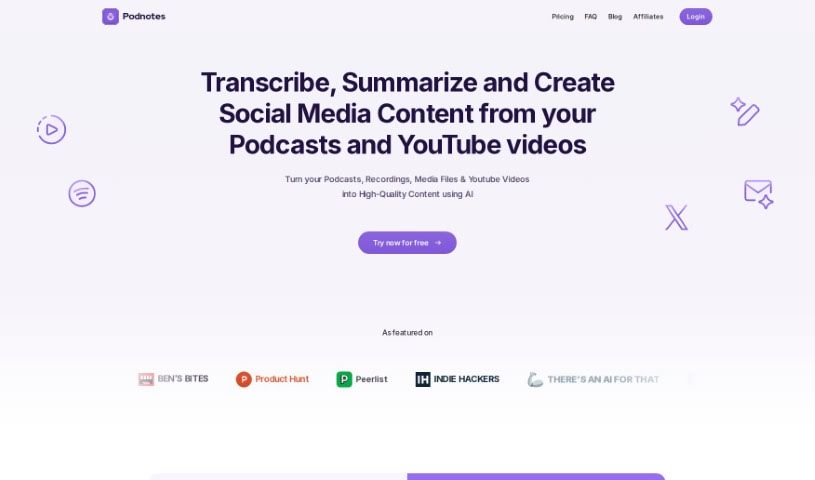
Screenshot of Podnotes

Podnotes

Discover what Podnotes is and how to use it effectively in 2025. Explore its features, compare it with other transcription tools, and learn how it helps content creators repurpose their work.

Screenshot

What Exactly is Podnotes?

Podnotes is a smart AI platform designed to help podcasters and video creators make more content, faster. It is your all-in-one assistant for turning your audio and video into all sorts of useful text and video formats. It’s pretty impressive, supporting over 19 languages, so you can reach a global audience. You can get transcripts, summaries, blog posts, social media updates, and even audiograms. Plus, there’s a “Magic Chat” feature, powered by ChatGPT, that’s great for whipping up articles, social media posts, and SEO-friendly show notes. They even offer a free plan with 50 minutes of transcription, and if you need more, there are subscription plans for unlimited content generation.

Who’s Behind Podnotes?

Podnotes was developed by a company called 1811 Labs. They’re the minds behind this AI platform that really helps content creators transform their podcasts, audio files, and videos into a variety of text and video content. Podnotes comes packed with features like that handy Magic Chat (powered by ChatGPT, of course), support for many different languages, and tools to easily generate transcripts, summaries, blog posts, social media updates, and audiograms. Founded by 1811 Labs, the goal of Podnotes is to make it super easy for content creators to get more mileage out of their existing material.

What Can You Actually Do with Podnotes?

Podnotes is incredibly versatile for content creators. Here’s a breakdown of what you can achieve:

  • Transcribe: Get accurate transcripts of your podcasts and videos.
  • Summarize: Create custom summaries that capture the key points.
  • Create Written Content: Produce show notes, detailed blog posts, and engaging social media updates.
  • Generate Visuals: Make audiograms and other visual assets to share.
  • Repurpose for Social Media: Turn your podcasts into tweets, LinkedIn posts, newsletters, and even SEO-optimized blogs.
  • Craft Custom Assets: Generate things like Instagram captions and Twitter threads.
  • Engage with AI: Use the ChatGPT-powered Magic Chat to interact with your podcast content, generating articles and social media posts.
  • AI-Powered Repurposing: Transform podcasts, recordings, media files, and YouTube videos into high-quality content using AI.
  • Organize Your Content: Keep your podcasts tidy by organizing them into folders and tags for easy access.
  • Global Reach: Support for multiple languages means you can work with both input and output in many different tongues.

Who Should Be Using Podnotes?

Podnotes is a fantastic tool for:

  • Podcasters: To easily create supporting content and reach a wider audience.
  • Content Creators: Anyone looking to maximize their output from audio and video.
  • Ghostwriters & Agencies: To efficiently manage and repurpose content for clients.

How Do I Get Started with Podnotes?

Using Podnotes is pretty straightforward. Here’s a simple guide:

  1. Sign Up: Start by creating a free account on the Podnotes website. This gives you access to their services.
  2. Use Magic Chat: Dive into your podcast content with the Magic Chat feature. It’s powered by ChatGPT and helps you generate great articles and social media posts.
  3. Leverage Multi-Language: Take advantage of the platform’s support for over 19 languages to create content assets that resonate with a global audience.
  4. Automate Transcription & Summaries: Let the platform automatically transcribe your podcasts and videos. You can also create customized summaries and generate various content types like show notes, blog posts, and social media updates.
  5. Boost Your Presence: Create shareable audiograms, high-quality images, videos, and infographics to really make your content stand out.
  6. Explore Plans: Check out the subscription plans if you need unlimited content generation. They offer great flexibility.
  7. Need Help? Connect: If you run into any issues or have questions, just click the ‘Let’s connect’ link on their website to reach out to Podnotes support.
  8. Transcribe YouTube Videos: You can even transcribe YouTube videos directly by simply pasting the video links into the platform.

Podnotes really is a valuable asset for content creators aiming to grow their audience. By offering transcription services, AI-powered content generation, and multi-language support, it makes repurposing content much more manageable.

By following these steps, you can really make the most of Podnotes to improve your content creation process and connect with your audience across all sorts of different platforms.

Related AI Tools

Discover more tools in similar categories that might interest you

Stay Updated with AI Tools

Get weekly updates on the latest AI tools, trends, and insights delivered to your inbox

Join 25,000+ AI enthusiasts. No spam, unsubscribe anytime.