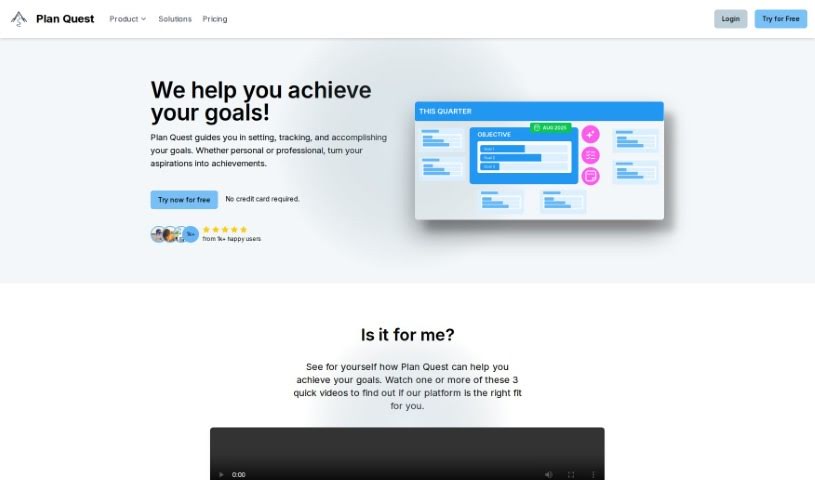
Screenshot of Plan Quest

Plan Quest

Discover what Plan Quest is and how to use it effectively in 2025. We'll explore its features and see how it stacks up against other project management tools.

Screenshot

What is Plan Quest?

Plan Quest is a really thorough platform for planning out your projects. It’s packed with features designed to help you set and actually reach your goals. It is your all-in-one project assistant. It offers AI-Powered Plan Creation, a Visual Timeline with Milestones so you can see your progress laid out, and it even helps you track your Objectives and Key Results (OKRs). Plus, there’s a Notion-like Editor for taking super detailed notes, a Canvas of Reflection to look back on what you’ve achieved and plan ahead, and Plan Evolution Snapshots that show you how your plans have changed and grown over time.

How does the AI plan creation work? Well, Plan Quest uses artificial intelligence to build detailed plans just for you. You tell it your goals or what you want to achieve, and the AI creates a clear, step-by-step roadmap to get you there.

With the visual timeline, Plan Quest helps you organize your objectives. It turns those big, abstract goals into concrete, measurable steps. This makes it way easier to keep an eye on your progress and see how you’re doing against specific milestones.

Need to jot down lots of details for your objectives and key results? The Notion-like Editor is perfect for that. You can manage lists, add all sorts of media, and even use AI to help auto-complete your notes, keeping everything super clear and organized.

Plan Evolution Snapshots are pretty neat, too. They keep a record of how your plans change over time. You get a visual history showing all the updates, progress, and adjustments made at every stage, really highlighting how your strategies have evolved since you first started planning.

Keeping track of your plan’s progress is straightforward with Plan Quest’s OKR tracking. It updates how far along each key result is and links it to its milestone, giving you a current snapshot of how your project is moving forward.

Who created Plan Quest?

Human Quest developed Plan Quest back in 2024. They launched this innovative platform on March 24, 2024, with the main goal of helping people turn their aspirations into real accomplishments. It does this through features like AI-Powered Plan Creation, a Visual Timeline with Milestones, OKR tracking, a handy Notion-like Editor, a Reflection Canvas, and Plan Evolution Snapshots. Human Quest is the company behind this intuitive tool, built to empower everyone to plan, execute, and reflect on what they want to achieve.

What is Plan Quest used for?

Plan Quest is used for a bunch of things, including:

  • Creating plans with AI assistance
  • Visualizing your project timeline with key milestones
  • Tracking your Objectives and Key Results (OKRs)
  • Taking detailed notes with a Notion-like Editor
  • Using a Reflection Canvas to review achievements and plan future strategies
  • Capturing Plan Evolution Snapshots to see how plans change over time
  • Monitoring progress through Objectives and Key Results Tracking

Who is Plan Quest for?

Plan Quest is designed for a wide range of users, including:

  • Anyone working on personal goals or professional projects, across all professions.
  • Project managers
  • Strategists
  • Executives
  • Business owners
  • Consultants
  • Entrepreneurs
  • Individuals focused on personal goals
  • Professionals working on professional projects
  • Team leaders
  • Students
  • People setting New Year’s resolutions

How to use Plan Quest?

To get the most out of Plan Quest, here’s a simple guide:

  1. AI-Powered Plan Creation: Just type in your goals or project objectives in your own words. Plan Quest’s AI will then create a detailed, actionable plan specifically for what you want to achieve.
  2. Visual Timeline with Milestones: Map out your plan on an interactive timeline. This turns your big goals into clear, measurable steps. You can start from scratch or get ideas from plans you’ve already made.
  3. Objectives and Key Results Tracking (OKRs): Keep tabs on how each key result is progressing. It automatically links to its milestone, so you always know where your overall plan stands in real-time.
  4. Notion-like Editor: Use this editor to create really detailed notes for every objective and key result. You’ll find it helpful for checklists, adding multimedia, and using AI auto-completion to make your notes clearer and more efficient.
  5. Canvas of Reflection: Take time to reflect on what you’ve accomplished, figure out any challenges you faced, and plan how to get even better results next time. It’s a great space for personal growth and learning from your project experiences.
  6. Plan Evolution Snapshots: Save visual snapshots that show how your plans have changed, progressed, and adapted over time. You can track how your strategies have developed from the very beginning right through to execution.

By following these steps, you can really make the most of Plan Quest’s features to set, track, and achieve your goals with accuracy and clarity.

Related AI Tools

Discover more tools in similar categories that might interest you

Stay Updated with AI Tools

Get weekly updates on the latest AI tools, trends, and insights delivered to your inbox

Join 25,000+ AI enthusiasts. No spam, unsubscribe anytime.