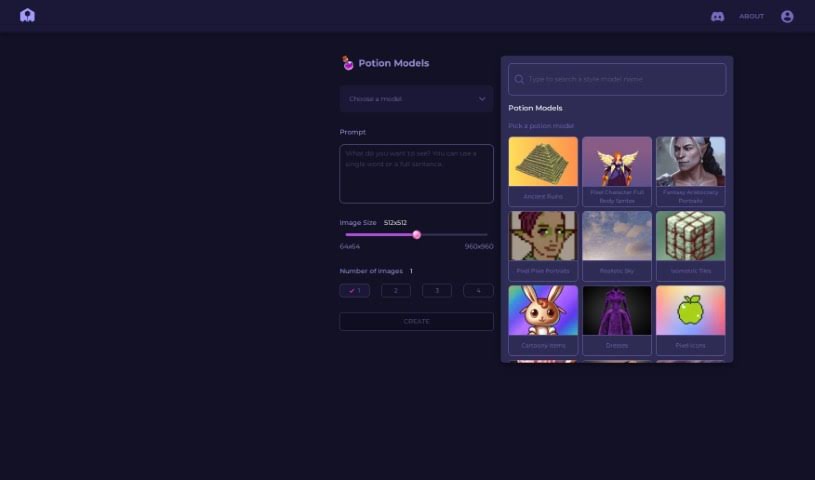
Screenshot of PixelVibe

PixelVibe

Discover PixelVibe in 2025! Learn what this AI-powered tool is, how to use its features for game asset creation, and how it stacks up against other game development tools.

Screenshot

What is PixelVibe?

PixelVibe is a really handy, flexible tool that runs right in your browser and uses AI to help game developers and creators. It makes it simple to create great-looking game assets without needing complicated software or a ton of technical know-how. You can easily generate assets by picking the options you like – think choosing models, setting image sizes, and deciding how many images you want. It supports JPG and PNG formats, and you can even tweak your assets with effects like pixelation or outlining. Plus, there’s a cool ‘re-vibe’ feature that lets you create masks from your own images, opening up even more creative avenues for your assets. Once you sign in and pick your images, PixelVibe can really speed things up, like making background removal a breeze so you can easily isolate foreground elements. Honestly, with all the ways you can customize it, PixelVibe is a fantastic asset for anyone making games.

Who created PixelVibe?

Pixelvibe got its start as a browser-based tool on June 25, 2024. The whole idea behind it was to give game developers and creators a simpler way to make high-quality game assets using AI. It really cuts down on the complexity by letting you customize things like which model to use, the size of your images, and even adding cool pixelation effects. Pixelvibe also has this neat trick where you can generate masks from images you provide, which is super helpful for things like removing backgrounds or really making specific elements pop.

What is PixelVibe used for?

  • It helps you create high-quality game assets.
  • You can generate game assets without needing complex software or deep technical skills.
  • It offers lots of customizable options for asset creation, like choosing models, image sizes, and how many images you generate.
  • It works with JPG and PNG image formats.
  • You can use modification options like pixelation and outlining effects to fine-tune your assets.
  • There’s a unique ‘re-vibe’ function that lets you create masks from an input image.
  • It makes background removal much simpler, helping you easily separate foreground elements.
  • It’s a user-friendly tool designed specifically for game developers and creators.
  • Being browser-based means it’s really easy to access and use.
  • With its wide array of customizable options, it’s great for making top-notch game assets.

Who is PixelVibe for?

  • Game developers
  • Creators

How to use PixelVibe?

PixelVibe is a super user-friendly tool that lives right in your browser, using generative AI to help you craft awesome game assets. Here’s a simple rundown of how to get started:

  1. First off, just sign in to PixelVibe through your web browser.
  2. Next, pick the image you want to work with. You can use it to generate masks or make modifications.
  3. Now, customize your asset creation! You get to choose the model, the size of your image, and how many images you’d like to generate.
  4. Feel free to play around with different modification options, like pixelation, to adjust the pixel size and create cool visual effects.
  5. You can also use outlining effects to really make certain parts of your assets stand out.
  6. Don’t forget the re-vibe functionality! It lets you generate masks based on an image you input, which really opens up your creative possibilities.
  7. Need to remove a background? PixelVibe makes it easy to separate foreground elements from the background efficiently.
  8. Finally, just experiment with all the different features and customization settings. This is how you’ll create unique, high-quality game assets that are perfect for your projects.

Seriously, PixelVibe’s easy-to-use interface, all the ways you can customize it, and its clever features make it a genuinely valuable tool. It’s perfect for game developers and creators who want to speed up how they make assets and get great results without a lot of fuss.

Related AI Tools

Discover more tools in similar categories that might interest you

Stay Updated with AI Tools

Get weekly updates on the latest AI tools, trends, and insights delivered to your inbox

Join 25,000+ AI enthusiasts. No spam, unsubscribe anytime.