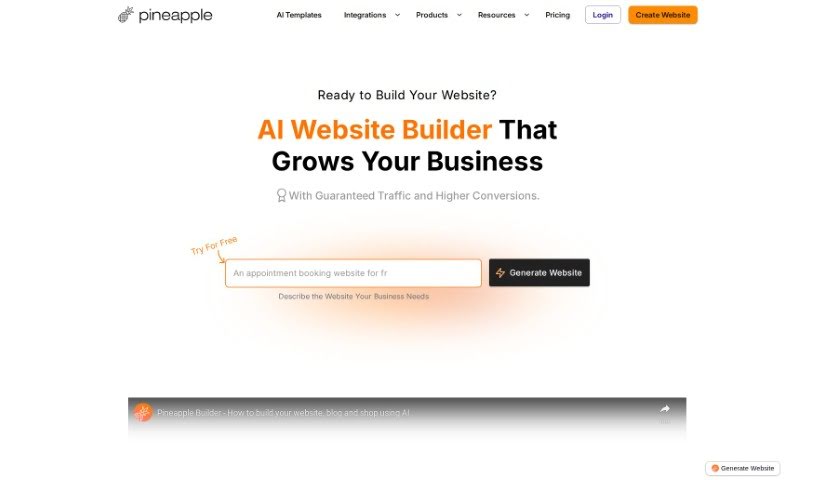
Screenshot of Pineapple Builder

Pineapple Builder

Discover what Pineapple Builder is and how to use it effectively in 2025. We'll explore its features and see how it stacks up against other website builders.

Screenshot

What is Pineapple Builder?

Pineapple Builder is an AI website builder designed specifically for busy entrepreneurs who want to boost their online presence without a fuss. This platform uses smart AI technology to help you create a fully working website with just one click. It comes with built-in features like a blog, newsletter sign-up forms, and ways to process payments. Forget the headaches of website management – things like design, hosting, and security certificates are all handled for you. This means you can easily focus on building your online brand. Plus, with better SEO and AI-powered writing assistance, Pineapple Builder helps you make your website content work harder for you, keeping visitors engaged and improving your site’s overall performance. It’s a really efficient and effective way to get your website up and running.

Who created Pineapple Builder?

Mattia R., a marketer, founded Pineapple Builder. The company is well-known for its AI websites, and over 50,000 businesses around the world trust it. If you want to learn more, you can check out Pineapple Builder’s social media pages on Instagram and TikTok.

What is Pineapple Builder used for?

  • Websites for Businesses: Create a professional online home for your company.
  • Personal Websites: Build a site to showcase your personal brand or resume.
  • Digital Products Platform: Easily set up a space to sell your digital creations.
  • Beauty Services Showcase: Display your beauty services and let clients book appointments.
  • Freelancers Portfolio Presentation: Show off your skills and experience to potential employers or clients.
  • Showcase skills and experiences for potential employers or clients: Present your professional abilities clearly.
  • Platform to showcase and sell digital products: A dedicated space for your digital goods.
  • Showcase beauty services and facilitate appointment bookings: Make it simple for clients to book your services.
  • Present skills for freelancers and attract potential clients: Highlight your expertise to land new work.
  • Collect emails using the membership form: Gather leads and build your mailing list.
  • Create and manage multiple membership categories: Offer different levels of access or content.
  • Integrate custom forms into the website: Add specific forms for surveys, sign-ups, or contact.
  • Add custom code to the website for enhanced functionality and design control: For those who want to fine-tune their site with specific code.
  • Connect a custom domain to the website: Use your own unique web address.
  • Optimize blog posts for SEO and quick ranking on Google: Help your content get found more easily.
  • Tagging customers and grouping them into segments based on interests and preferences: Organize your audience for better marketing.
  • Adding custom forms to websites: Integrate specific data collection tools.
  • Adding custom code to websites: Implement unique features or styling.
  • Managing invoices: Keep track of billing and payments.
  • Upgrading or downgrading plans: Adjust your subscription as needed.
  • Getting VAT invoices: Receive necessary tax documentation.
  • Canceling plans: Manage your subscription settings.
  • Collecting emails through membership forms: Build your contact list efficiently.
  • Managing multiple membership categories: Organize different subscriber groups.
  • Creating and customizing AI-driven websites: Build unique sites with AI assistance.
  • Creating and managing multiple membership categories: Offer varied access levels.
  • Integrating custom code to websites: Add specific functionalities or designs.
  • Managing invoices through payment provider: Streamline your billing process.
  • Obtaining VAT invoices: Get your required tax documents.
  • Building websites for personal use: Create a site for your own projects or interests.
  • Showcasing and selling digital products: Offer your digital goods to customers.
  • Collect emails for website: Gather contact information from visitors.
  • Manage multiple membership categories: Organize different tiers of membership.
  • Integrate custom forms: Add tailored forms for specific needs.
  • Add custom code to website: Implement unique features or styling.
  • Manage invoices via payment provider: Handle billing through your chosen payment system.
  • Upgrade or downgrade plans: Adjust your subscription level.
  • Obtain VAT invoice: Receive your tax invoice.
  • Cancel plan: Manage your subscription.

Who is Pineapple Builder for?

  • Entrepreneurs: Great for starting and growing new ventures.
  • Small Business Owners: Perfect for establishing a strong online presence.
  • E-commerce Managers: Ideal for managing online stores and sales.
  • Digital Marketers: Useful for creating landing pages and marketing sites.
  • Bloggers: Easily set up and manage a blog.
  • Freelancers: Showcase your portfolio and attract clients.
  • Consultants: Present your expertise and services.
  • Non-Profit Organizations: Build a site to share your mission and collect donations.
  • Real Estate Agents: Display properties and attract buyers/sellers.
  • Event Planners: Promote events and manage RSVPs.

How to use Pineapple Builder?

Here’s how to get started with Pineapple Builder:

  1. Segment Customers: You can tag your customers using categories like ‘ebook,’ ‘newsletter,’ or ‘lead.’ This helps you group them into segments based on what they’re interested in, making it easier to manage and target your audience effectively.
  2. Add Custom Forms: Want to add your own form? Just use the embed code provided for your custom form to seamlessly integrate it right into your Pineapple Builder website.
  3. Generate Customized Website: Creating a personalized website is super quick with Pineapple Builder – it only takes a few clicks! Many users find it really easy to use and highly recommend it for making unique, tailored websites.
  4. Get Started: Head over to the official Pineapple Builder website. You can explore all the different templates they offer to help you kickstart your website creation journey.
  5. Additional Resources: If you need more guidance, check out Pineapple Builder’s documentation. It has detailed instructions to help you get started, and you can also explore the various AI tools available to make your website building experience even better.

Following these steps will help you effectively use Pineapple Builder to create websites that are both personalized and engaging.

Related AI Tools

Discover more tools in similar categories that might interest you

Stay Updated with AI Tools

Get weekly updates on the latest AI tools, trends, and insights delivered to your inbox

Join 25,000+ AI enthusiasts. No spam, unsubscribe anytime.