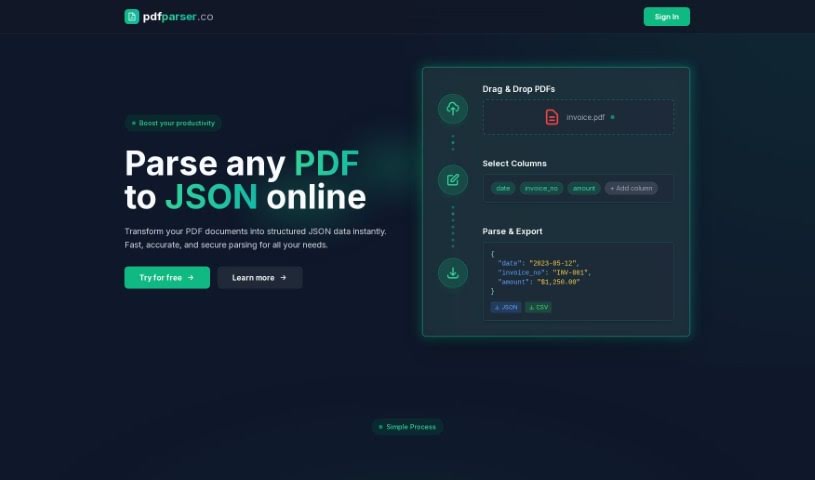
Screenshot of PDF Parser

PDF Parser

Discover what a PDF Parser is and how to use it effectively in 2025. We'll explore its features and compare it to other PDF tools.

Screenshot

What Exactly is a PDF Parser?

A PDF parser is a smart tool that uses AI to turn your PDF files into organized JSON data. It is a digital assistant that makes pulling out important information super simple. You just upload your PDF documents – you can even upload several at once – and tell it which specific pieces of data you’re looking for. The parser then automatically finds and extracts that information for you. This means you can say goodbye to the tedious work of manually sorting through things like invoices or support tickets. It really simplifies handling PDFs and makes your work much more efficient by automating the data extraction process in just a few easy steps.

Who’s Behind PDF Parser?

PDF Parser was developed by Agus Makmun, who also founded pdfparser.co, the company that offers this handy tool. Agus is an experienced developer and entrepreneur. PDF Parser itself is a service designed to help you extract text and data from PDF documents quickly and efficiently. It’s also a really cost-effective option, with prices ranging from just $0.05 to $0.10 per document parsed. All in all, PDF Parser is a convenient and affordable way to manage your PDF content.

What Can You Use PDF Parser For?

PDF Parser offers different plans to suit various needs:

  • Lite tier: This is perfect for people who only need to parse a few documents now and then. It lets you parse up to 10 documents.
  • Standard tier: If you use PDF parsing more regularly, this tier is a great fit. It allows you to parse up to 60 documents.
  • Premium tier: For those who have a lot of PDF documents to process, this tier is designed for high parsing needs, allowing you to parse up to 500 documents.

Who Would Benefit from PDF Parser?

This tool is ideal for a range of users:

  • Casual users who need occasional document processing.
  • Moderate users who handle PDFs more frequently.
  • Users with higher parsing needs who process large volumes of documents.

How Do I Use PDF Parser?

Using the PDF Parser tool is straightforward. Just follow these simple steps:

  1. Upload your PDFs: Start by uploading one or more PDF files that you need to parse. It’s a really effortless process.
  2. Select your fields: Next, choose the specific pieces of information or fields within the PDF that you want to extract. PDFParser will handle the rest automatically.
  3. Get your data: Finally, just sit back and relax! The tool will process your data and present it in a structured JSON format, saving you a ton of time and hassle.

With these three easy steps, PDF Parser can efficiently convert any PDF file into a structured JSON format, making data extraction a seamless and efficient experience.

Related AI Tools

Discover more tools in similar categories that might interest you

Stay Updated with AI Tools

Get weekly updates on the latest AI tools, trends, and insights delivered to your inbox

Join 25,000+ AI enthusiasts. No spam, unsubscribe anytime.