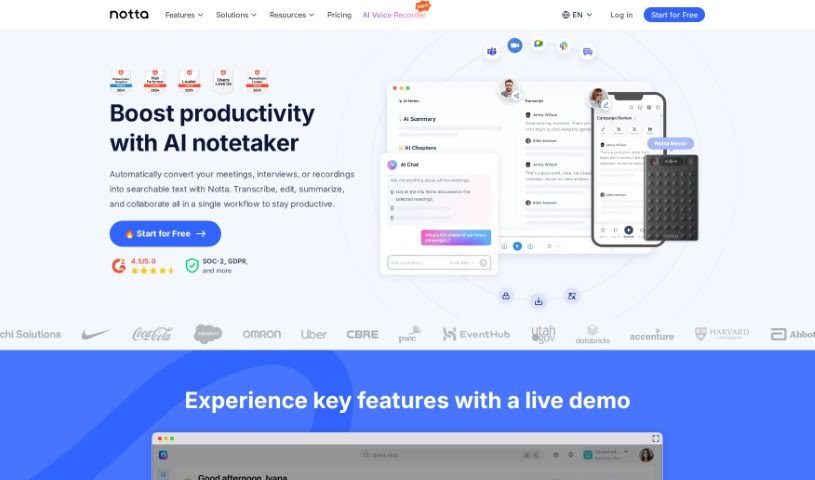
Screenshot of Notta

Notta

Discover what Notta is and how to use it in 2025. We'll cover its features, compare it to other AI note-takers, and show you how to get the most out of it.

Screenshot

What is Notta?

Notta is a really handy tool that blends human ingenuity with Artificial Intelligence to offer automated note-taking. It is your personal assistant for meetings and conversations. It can automatically create summaries of your meetings, share those notes easily, turn key moments into shareable clips, and export everything into formats like TXT, Word Doc, PDF, and SRT. The main idea behind Notta is to help you and your team save precious time, stay focused during discussions, and ultimately boost your productivity and get better results.

You can use it to transcribe audio into text, turn voice recordings into Word documents, transcribe YouTube videos, and even capture what’s said in Zoom meetings. Plus, it comes with features like real-time translation, meeting recording, AI-powered summaries, and schedule automation. Notta is designed to be super simple to use, accessible on pretty much any device, and it’s secure, meeting GDPR and SOC 2 standards. It handles 104 languages, providing fast, accurate transcriptions and summaries that are a breeze to share.

Who created Notta?

Notta was actually started by a team who wanted to combine human creativity with AI to make conversations and note-taking much smoother. They chose the name “Notta” as a nod to “Note Taking,” which really sums up what the platform is all about: using automation to capture information during discussions more effectively. Notta offers features like meeting summaries, makes collaboration simple, and lets you turn important meeting moments into clips you can share. The whole point is to get more value out of your conversations by making things more efficient and productive for everyone involved.

What is Notta used for?

Notta is incredibly versatile! Here’s a look at what you can do with it:

  • Calendar Integration: Connects with Google Calendar.
  • Meeting & Interview Transcription: Automatically transcribes and summarizes meetings or interviews into actionable text.
  • Bilingual Support: Offers transcription and translation for meetings with multiple languages.
  • Time-Saving Minutes: Helps you save time by creating meeting minutes quickly.
  • Language Support: Transcribes in 58 languages.
  • One-Click Summaries: Generates meeting summaries with a single click.
  • Collaboration: Lets you collaborate and share meeting notes with anyone involved.
  • Shareable Clips: Turns key meeting highlights into clips you can share.
  • Export Options: Exports notes to formats like TXT, Word Doc, PDF, and SRT.
  • Tool Integration: Connects with your favorite tools.
  • Client Call Management: Records, transcribes, and summarizes client calls for better follow-ups and closing deals.
  • Education Aid: Supports note-taking in educational settings.
  • Podcast Production: Simplifies transcription for podcasts.
  • Medical Care: Streamlines transcription for medical contexts.
  • Real-time Translation: Offers accessibility with real-time translation in 104 languages.
  • AI Summarization: Provides AI-powered summaries for quick insights.
  • Meeting Recording: Records meetings for easy documentation.
  • Schedule Automation: Helps with event planning.
  • Data Security: Complies with GDPR and SOC 2 for secure data storage.

Essentially, it’s useful for interviews, education, podcasts, and medical care, offering real-time translation in 104 languages. You can record and transcribe from any device without needing to install anything, and the AI summarization condenses text into actionable points. It integrates with Google Calendar for easy scheduling and transcription, and its fast, accurate output can be exported and shared easily.

Who is Notta for?

Notta is a great tool for a wide range of people and professions:

  • Sales Teams: To summarize client calls, making follow-ups and closing deals more effective.
  • Individuals: To help you focus on strategic insights and solutions rather than note-taking.
  • Students: For transcribing lectures to reinforce learning.
  • Researchers: To transcribe research interviews into text for easier comprehension.
  • Meeting Note-takers: To streamline the process of documenting meetings.
  • Interviewers: To capture detailed notes during interviews.
  • Language Interpreters: To assist with bilingual conversations.
  • Content Creators: For transcribing interviews or audio for content.
  • Educators: To help with lecture notes and student interactions.
  • Medical Professionals: For efficient note-taking in healthcare settings.
  • Podcasters: To simplify the transcription of audio content.
  • Team Managers: To keep track of team discussions and action items.
  • Salespeople: For managing client interactions.
  • Researchers: For detailed interview transcription.
  • Teachers: For lecture notes and student feedback.
  • Healthcare Professionals: For efficient patient interaction notes.

It’s also beneficial for general use in interviews, education, podcasts, and medical care settings.

How to use Notta?

Using Notta is pretty straightforward. Here’s a step-by-step guide to get you started:

  1. Sign Up & Log In: First, head over to the Notta website and create an account or log in if you already have one. This gives you access to the platform.
  2. Import Files: Once you’re on the Notta Web dashboard, look for the ‘Import Files’ option. Click it to upload your audio or video files that you want transcribed.
  3. Wait for Transcription: After uploading, the system will process your files. Just give it a little time for the transcription to complete.
  4. Export Your Notes: Once the transcription is done, you can export the text in various formats like DOCX, Word Doc, PDF, and SRT. This makes it super easy to share or use the notes elsewhere.
  5. Voice Recordings: If you have voice recordings, upload them to Notta. The tool will convert them into text, making them easy to access and reference.
  6. Real-time Translation: Need to understand different languages? Use the real-time translation feature, which supports 104 languages.
  7. Calendar Integration: To make things even smoother, integrate Notta with your Google Calendar. This helps streamline event scheduling and ensures your meeting transcriptions are organized.
  8. AI Summaries: Want a quick rundown? Use the AI-powered summarizer to get meeting summaries with just one click.
  9. Share Your Work: Easily share your meeting notes and summaries with your team members or other stakeholders.
  10. YouTube Videos: You can even convert YouTube videos to text! Just paste the video link into Notta’s ‘Upload a YouTube video’ field.
  11. Secure Storage: Rest assured, Notta is secure. It complies with GDPR and SOC 2 standards, keeping your information safe.

By following these steps, you can really make the most of Notta for transcribing, translating, summarizing, and taking notes efficiently, whether it’s for interviews, classes, podcasts, or medical care. Plus, Notta offers secure and user-friendly services to make your experience even better.

Related AI Tools

Discover more tools in similar categories that might interest you

Stay Updated with AI Tools

Get weekly updates on the latest AI tools, trends, and insights delivered to your inbox

Join 25,000+ AI enthusiasts. No spam, unsubscribe anytime.