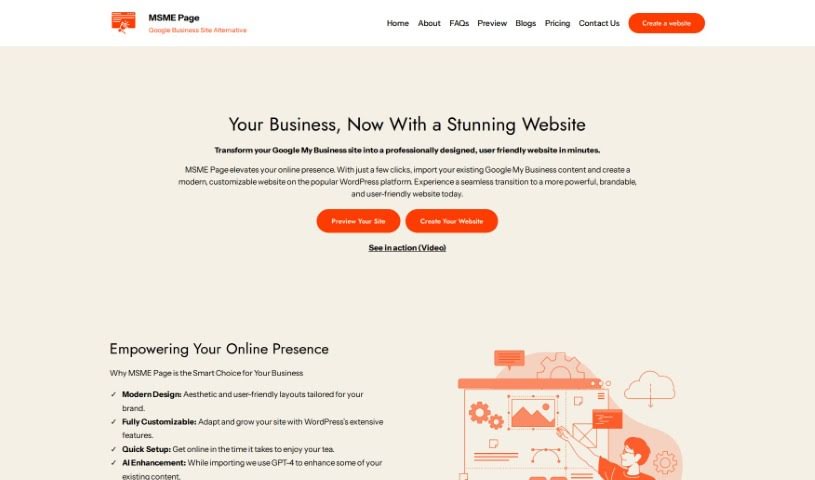
Screenshot of Msme Page

Msme Page

Discover what Msme Page is and how to use it effectively in 2025. Explore its features and see how it stacks up against other website builders.

Screenshot

What is Msme Page?

MSME Page is a platform designed to make things simpler for small and medium-sized business owners. If you’re looking to move from Google My Business to a more flexible and powerful website built on WordPress, this is for you. It lets you bring over your existing content with just one click. You get modern designs, full control over customization using WordPress features, a super quick setup, AI-powered content help from GPT-4, built-in SEO to help people find you, and easy ways to manage your domain, hosting, and track your website’s performance with analytics. The goal is to give you a smooth upgrade to a site packed with features, without getting bogged down in technical stuff. It’s all about helping entrepreneurs boost their online presence effectively. MSME Page really focuses on modern design, getting you set up fast, using AI to make your content better, optimizing for search engines, and integrating analytics to grab attention and keep visitors engaged.

At its heart, MSME Page is built on integrity, innovation, and inclusivity. These principles guide us to be open and honest, constantly improve our services to keep up with the digital world, and offer solutions that work for businesses of any size or technical skill level. We offer different plans to fit various business needs, including access to update content, customization options, SEO tools, and the ability to use your own domain name. Plans like Freedom and Expand are designed to meet different business needs, offering affordable ways to get your business online and help it grow.

Who created Msme Page?

MSME Page was created because we wanted to make website creation and management accessible and affordable for small and medium businesses all over India. The founder and the team behind MSME Page are dedicated to providing easy-to-use, cost-effective, and efficient solutions that help businesses build a strong online presence. The platform makes it easy to switch from Google My Business sites to fully customizable WordPress websites. We focus on features like modern design, quick setup, AI content enhancement, SEO optimization, simple domain and hosting management, and analytics integration to keep track of how your website is doing.

What is Msme Page used for?

  • Get set up quickly: The setup process is designed to be very fast.
  • Build and manage client websites: You can create and manage websites for your clients, using all the powerful features MSME Page offers.
  • Focus on your business: We handle the technical side, so agencies can concentrate on their clients’ business needs.
  • White-labeling for agencies: Agencies can rebrand the platform as their own.
  • Manage many sites at once: Create and manage multiple websites in bulk.
  • Custom pricing: We offer pricing options tailored to specific needs.
  • Dedicated support: Agencies get a dedicated account manager.
  • Advanced customization: Enjoy extensive customization and integration options.
  • Easy GMB import: Quickly import your existing content from Google My Business with a simple one-click process.
  • Modern, customizable design: Websites feature modern layouts that can be adjusted to match your brand’s look and feel.
  • AI content boost: We use GPT-4 to enhance your content during the import.
  • SEO optimized: Your site will be optimized for search engines to help attract more customers.
  • Track performance: Analytics integration makes it easy to monitor how your website is doing.
  • White-labeling: Rebrand the platform for your agency.
  • Use your own domain: Connect your custom domain name.
  • Migrate from Google My Business: Move from Google My Business to a more flexible and powerful WordPress platform.
  • One-click content import: Bring over your existing content easily with a single click.
  • Modern design aesthetics: Websites look contemporary and can be customized.
  • Modern Design: Layouts are customizable to fit your brand’s style.
  • Quick Setup: Get your online presence established fast.
  • AI Enhancement: GPT-4 helps improve your content during import.
  • SEO Optimized: Boost your visibility on search engines to attract more customers.
  • Analytics Integration: Easily monitor your website’s performance.
  • WordPress Customization: Take advantage of WordPress’s vast features for customization.
  • Technical Support: We’re here to help with significant changes.
  • One-click GMB to WordPress migration: Seamlessly move your site.
  • Hassle-free domain & hosting: We manage the technicalities for you.
  • Agency features: White-labeling and bulk site management are available.
  • Boost online presence: Especially helpful for small to medium-sized business owners.
  • Migrate from Google My Business: Transition to a more powerful WordPress platform.
  • One-click content import: Quickly bring over your existing information.
  • Modern design & customization: Websites look great and can be tailored to your needs.
  • Track website performance: Use analytics to see how your site is doing.
  • SEO for visibility: Improve your search engine ranking.
  • For agencies and resellers: Create and manage client websites.
  • GMB to WordPress migration: A smooth transition for your business.
  • One-click import: Simple content transfer.
  • Modern design & customization: Flexible options for your website’s look.
  • Analytics for performance tracking: Understand your website’s impact.
  • Dedicated account manager: Personalized support for agencies.
  • GMB to WordPress migration: Enhance your online presence by moving to a WordPress platform.
  • Simple one-click import: Easily transfer your existing content.
  • Modern design & WordPress customization: Get a great-looking, flexible site.
  • SEO for better visibility: Improve your search engine ranking.

Who is Msme Page for?

  • Web agencies
  • Resellers
  • Small to Medium-sized Business Owners
  • Entrepreneurs
  • Small Business Owners

How to use Msme Page?

Using MSME Page is straightforward. Just follow these simple steps:

  1. Enter Your GMB URL: Start by pasting the link to your current Google My Business site.
  2. Preview Your New Site: See a preview of how your new website will look using your existing data.
  3. Go Live: With just a few more clicks, your new website will be live and ready to go.

Once you’ve done these quick steps, you’ll have successfully moved your Google My Business site to a professionally designed, customizable WordPress website. It will feature modern layouts perfectly suited to your brand. You can then further personalize your site using WordPress’s many features, benefit from AI content enhancement with GPT-4 during the import process, attract more customers with SEO optimization, and easily keep an eye on performance with integrated analytics. If you have any questions or need a hand, the MSME Page support team is always ready to help. Start improving your online presence today with MSME Page!

Related AI Tools

Discover more tools in similar categories that might interest you

Stay Updated with AI Tools

Get weekly updates on the latest AI tools, trends, and insights delivered to your inbox

Join 25,000+ AI enthusiasts. No spam, unsubscribe anytime.