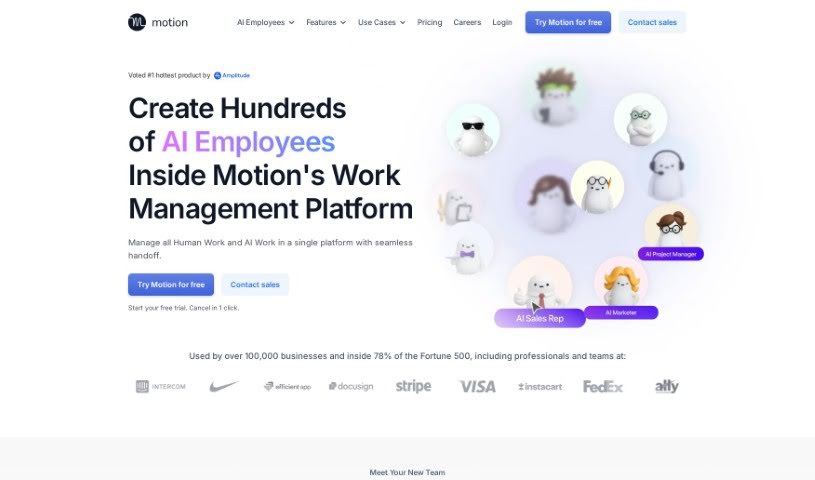
Screenshot of Motion

Motion

Discover what Motion is and how to use it effectively in 2025. We'll explore its features and see how it stacks up against other project management tools.

Screenshot

What is Motion?

Motion is a productivity platform that uses artificial intelligence to help you plan your daily tasks and schedule. It is your smart assistant, constantly keeping an eye on your to-do lists and calendars. It helps you figure out what’s most important, so you can tackle your workload without feeling completely swamped. Motion’s goal is to help professionals actually make time for the crucial tasks, avoid missing deadlines, and handle meeting interruptions more smoothly. It’s built to boost your productivity, make your work schedule smarter, and ensure you hit those important deadlines.

With features like automatic task prioritization, effortless rescheduling, and timely deadline reminders, Motion really aims to simplify how you manage tasks and organize projects, whether you’re working solo or with a team.

Who created Motion?

Motion was actually founded by Patrick Lee, the same person behind Rotten Tomatoes! The company offers a comprehensive platform that brings together tasks, projects, and meeting management, all designed to boost your productivity and save you precious time. Motion’s AI system is pretty clever; it automates scheduling, prioritizes your tasks, and handles project management to make your workflows smoother and ensure your team stays coordinated. The platform is built to help you focus on deep work, cut down on the time you spend planning manually, and importantly, protect your personal time for relaxing and doing things you enjoy.

Over 40,000 paying users from leading companies already trust Motion, and its user base is growing fast.

What is Motion used for?

Motion is incredibly versatile. Here’s a look at what it can do:

  • Team Workload Management: It helps plan your team’s workload and optimize capacity.
  • Staffing Predictions: You can predict if your team might be short-staffed or over-staffed down the line.
  • Workflow Automation: Automate those repetitive daily routines and standard operating procedures.
  • Seamless Integration: Team members don’t need to change their habits to use Motion; it fits right in.
  • Chaos Prevention: Organize and prioritize your work to keep things from getting chaotic.
  • Centralized Communication: Talk about projects without having to jump between different apps.
  • Focus on Critical Tasks: Ensure your team is always working on what’s most important and urgent.
  • Deadline Management: Get automated reminders and have tasks rescheduled automatically when needed.
  • Optimal Daily Planning: It automatically figures out the best daily plan for each person on your team.
  • Meeting Scheduling: Automates the process of setting up meetings.
  • Daily Schedule Building: Creates your daily schedule automatically.
  • Task Prioritization: Automatically figures out which tasks to tackle first.
  • Personalized Daily Plans: Get a unique schedule every day, no manual planning required.
  • Clear Next Steps: Always know exactly what you should be working on next.
  • Taming Task Lists: Turns those overwhelming lists of tasks into a clear, actionable plan, all by itself.
  • The Happiness Algorithm: It uses a special algorithm for automated planning that aims for your satisfaction.
  • Feeling Accomplished: Prioritize your important work and feel that sense of accomplishment.
  • Efficient Task Completion: Get serious tasks done efficiently.
  • Better Rest: Track your tasks and relax, knowing things are managed.
  • Never Miss a Deadline: Get proactive alerts so you don’t miss deadlines.
  • Calendar Consolidation: Combine all your different calendars into one master view.
  • Realistic Deadlines: Set deadlines that are actually achievable and avoid overcommitting yourself.
  • Project Management: Manage and organize all your projects effectively.
  • Team Coordination: Track and organize your team’s projects and tasks.
  • Productivity Boost: Automate your productivity management for better results.
  • Work Optimization: Optimize how work is spread across tasks and projects.
  • Adaptable Re-planning: Automatically re-plans when changes happen.
  • Meeting Support: Get assistance with meeting productivity.
  • Collaboration & Visibility: Improve team collaboration and make sure everyone knows what’s going on.
  • Tool Integration: Pass data between your favorite tools.
  • Personal & Work Balance: Combine your personal and work calendars.
  • Time Savings: Save time by cutting out manual planning and coordination.
  • Effortless Re-planning: Never waste time re-planning when things change.
  • Team Task Awareness: Know what everyone on the team is working on.

Who is Motion for?

Motion is a great tool for a variety of professionals, including:

  • Sales Representatives
  • Team Managers
  • Directors of Operations
  • Knowledge Professionals
  • Marketing Coordinators

How to use Motion?

To get the most out of Motion, here’s a simple guide:

  1. Get Started: Sign up for Motion and take advantage of their free trial.
  2. Automate Your Day: Let Motion automatically plan your day based on your tasks and priorities. Users often see a productivity boost of around 137%!
  3. Ditch Manual Planning: Stop wrestling with endless to-do lists. Let Motion handle the prioritization for you.
  4. Meet Deadlines Early: Finish tasks ahead of schedule because Motion makes sure deadlines are met, without you needing to constantly replan.
  5. Track Everything: Use Motion to keep track of all your priorities so nothing gets missed.
  6. Focus on Deep Work: Minimize meetings and dedicate time to uninterrupted work using Motion’s smart scheduling features.
  7. Centralize Your Work: Bring all your tasks and projects into one place for easy access and better organization.
  8. Seamless Adaptation: Let Motion automatically prioritize and reschedule tasks, so it adapts smoothly when things change.
  9. Proactive Deadline Alerts: Benefit from Motion’s deadline reminders and get ahead of tasks that might be at risk of being late.
  10. Teamwork Made Easy: Use Motion’s team collaboration features for efficient project management and task coordination.

By following these steps, you and your team can really make the most of Motion’s AI capabilities. It’s designed to help you optimize your schedule, prioritize tasks effectively, and manage projects better, ultimately leading to more productivity and less workplace stress.

Related AI Tools

Discover more tools in similar categories that might interest you

Stay Updated with AI Tools

Get weekly updates on the latest AI tools, trends, and insights delivered to your inbox

Join 25,000+ AI enthusiasts. No spam, unsubscribe anytime.