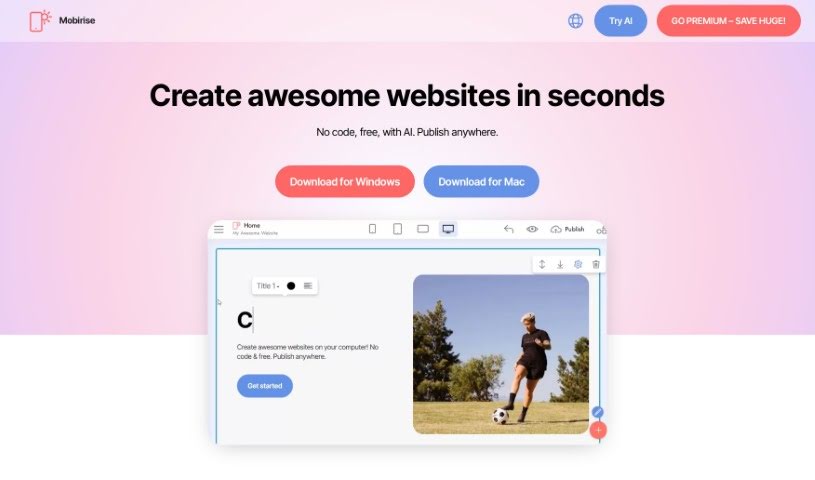
Screenshot of Mobirise

Mobirise

Discover what Mobirise is and how to use it effectively in 2025. We'll explore its features and see how it stacks up against other website builders.

Screenshot

What is Mobirise?

Mobirise is your go-to website builder software. It’s designed so you can create websites that look great on any device (that’s what “mobile-friendly” means!) and are also good for search engines, all without needing to write a single line of code. It uses a simple drag-and-drop interface, which is fantastic for beginners. You can easily build attractive websites using customizable templates and themes. The best part? Mobirise itself is free to use. If you want a truly unique look, you can always opt for premium themes and extensions. People really like it because it’s so easy to get started, offers a wide variety of pre-built sections (called “blocks”) and templates, and it’s constantly updated to keep pace with the latest web design trends.

If you’re ready to dive in and build a website with Mobirise, here’s a straightforward way to do it:

  1. First, grab Mobirise from its website and get it installed on your computer.
  2. Then, just launch the app.
  3. You can either pick a template that catches your eye or start building your site from scratch, perhaps using text prompts to guide you.
  4. Editing content within the blocks is a breeze. You can swap out media like images or videos, and tweak settings using the handy Parameters Panel.
  5. Want to see how it looks on different devices? Just use the Mobile View feature to preview it.
  6. Once you’re happy, you can publish your site. You have options: save it to your computer, send it via FTP, or use a Mobirise subdomain.
  7. Finally, share your website link with the world!

Mobirise also packs in other useful features. You can customize your own domain name, create beautiful galleries for your portfolio, add image sliders, set up a blog, build pop-up windows, and even integrate social feed extensions. Users consistently praise its intuitive design and how well it works, making it a great tool for both absolute beginners and seasoned web pros. With over 2 million users worldwide, Mobirise has earned its spot as a top website builder, recognized as one of the most popular web development tools not just globally, but also in regions like South America.

Who created Mobirise?

Mobirise was actually founded back in 2015. The main idea was to create a website builder that let people build mobile-friendly websites visually, without all the technical hassle. The company then released its software for Windows, Mac, and Android operating systems. Key features right from the start included support for Bootstrap 3, that easy drag-and-drop functionality, inline editing so you can type directly on the page, and those helpful block parameters.

What is Mobirise used for?

Basically, Mobirise is your go-to for:

  • Creating websites even if you’ve never coded before.
  • Building sites super fast thanks to its drag-and-drop capabilities.
  • Getting access to a bunch of pre-made website themes and templates.
  • Customizing your site with all sorts of different blocks and options.
  • Making sure your site is mobile-friendly and optimized for search engines.
  • Designing eye-catching portfolios using galleries.
  • Adding shopping cart functionality to create online stores.
  • Easily incorporating blog features into your site.
  • Creating pop-ups for special offers or announcements.
  • Using social feed extensions to display your social media content.
  • Helping graphic professionals, hobbyists, and web designers build sites without needing to become coding experts.
  • Making it simple to create and update websites without having to change your hosting provider.
  • Boosting freelance work for graphic designers who don’t code.
  • Quickly generating websites tailored for specific types of businesses.
  • Building really unique websites by mixing and matching different modules.
  • Creating mobile-friendly, SEO-optimized sites without any coding knowledge.
  • Designing websites faster using drag-and-drop templates.
  • Easily setting up online stores with dedicated shop blocks.
  • Utilizing ready-made blocks to quickly build blog sections.
  • Adding pop-up windows for special deals and advertisements.

Who is Mobirise for?

Mobirise is a fantastic tool for:

  • Graphic designers
  • Web designers
  • Photographers
  • Illustrators
  • Graphic Designers (yes, again, it’s that useful!)
  • Website designers
  • Web Developers
  • Graphic professionals
  • Hobbyists

How to use Mobirise?

Here’s a simple, step-by-step guide to get you started with Mobirise:

  1. Get Mobirise: First things first, download and install Mobirise from its official website. It’s a straightforward process.
  2. Launch the App: Once installed, open up the Mobirise app on your computer. You’re ready to go!
  3. Choose a Template: You have two main options here: either pick a template that you really like for your website, or you can start with a completely blank page and build from the ground up.
  4. Edit Content: This is where the magic happens. You can easily modify the content within each block. Just use the drag-and-drop functionality. You can also swap out media elements like your own images, videos, or icons.
  5. Set Options: Need to tweak specific settings? You can do that through the Parameters Panel. Just click on the blue “gear” button that appears on the block.
  6. Mobile View: It’s crucial to see how your site looks on different devices. Click on ‘Mobile View’ to check it out. After that, you can publish your site to a local drive, send it via FTP, or use a Mobirise subdomain.
  7. Publish: When you’re happy with everything, click on ‘Publish’. This lets you choose your preferred publishing option or simply save the site to your computer.

Beyond these steps, Mobirise offers even more cool features. You can get custom domain options, create beautiful galleries, add image sliders, set up online shops with dedicated blocks, build blog sections, create pop-up windows for promotions, and much more. The software is really user-friendly and doesn’t require any coding skills, which makes it super easy for beginners to create attractive websites. Mobirise offers both free and premium themes, so you can get that customized look you want. Plus, it makes editing and updating existing sites that you’ve created within the app a breeze.

Related AI Tools

Discover more tools in similar categories that might interest you

Stay Updated with AI Tools

Get weekly updates on the latest AI tools, trends, and insights delivered to your inbox

Join 25,000+ AI enthusiasts. No spam, unsubscribe anytime.