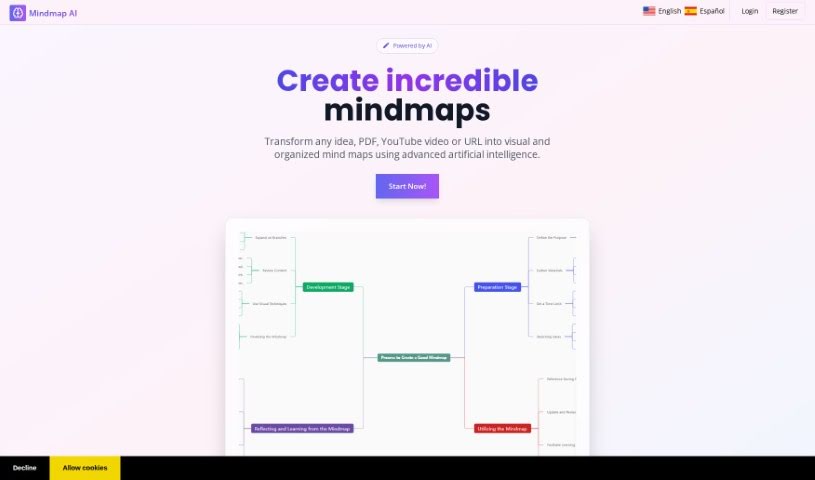
What is MindmapAI?
MindmapAI is a smart platform that uses artificial intelligence to make creating mind maps much easier and faster. You can start a mind map from scratch, and then really make it your own. This means adding custom notes, linking different ideas together, using icons to make it visually appealing, and even connecting it to other pages. Plus, you can keep everything organized with custom tags. When you’re ready, you can share your mind maps instantly with others in real-time or save them as PDF, PNG, or JPEG files.
The main goal here is to help you learn and absorb information better, and boost your productivity. By using AI to simplify the mind map creation process, MindmapAI lets you concentrate on understanding the map’s content instead of getting bogged down in the creation itself.
So, in a nutshell, MindmapAI offers a straightforward and efficient way to create, customize, share, and export mind maps. It’s a great fit for professionals who need to use them in meetings or during brainstorming sessions.
Who created MindmapAI?
MindmapAI was developed by a founder who prefers to remain anonymous. It first launched on January 1, 2024. The platform’s core function is using artificial intelligence to automate and simplify the process of creating mind maps. It also offers some neat personalization options, like letting you add your own notes, link different ideas together, include icons for visual flair, and use custom tags to organize your content.
What is MindmapAI used for?
- It helps you create mind maps automatically and easily using AI.
- It’s designed to improve how you absorb information and boost your overall productivity.
- You can speed up the creation process significantly by using handy keyboard shortcuts.
- It makes presenting your ideas easier by allowing you to export mind maps.
- You can share your mind maps in real-time, which is perfect for working together with others.
- It helps you keep your content well-organized using custom tags.
- It’s really useful for professionals, especially during meetings and brainstorming sessions.
- You get to personalize your mind maps with custom notes, link different ideas together, add icons, and connect them to other pages.
- You can easily start creating mind maps from scratch.
- You can export your finished mind maps as PDF, PNG, or JPEG files.
- It automates and simplifies the entire mind map creation process with AI.
- This lets you focus more on understanding and absorbing the information, rather than spending all your time building the map.
- You can even create mind maps directly from PDF files.
- Keyboard shortcuts are available to help you create mind map nodes more quickly.
- AI wizards are there to help automate the mind map creation process for you.
- You can make presentations by exporting your mind maps as PDF, PNG, or JPEG files.
- Sharing mind maps in real-time allows for instant collaboration.
- Custom tags are a great way to help organize your content.
- You can add icons to your mind maps to make them more visually appealing.
- Connecting nodes to other pages is seamless, creating a better flow of information.
- Again, the focus is on helping you understand and absorb content, not just on building the map.
- Using keyboard shortcuts makes creating mind map nodes much faster.
- AI wizards are available to automate the creation of your mind maps.
- Real-time sharing of mind maps facilitates instant collaborative work.
- Organizing content through custom tags keeps everything neat.
- It’s really well-suited for professionals in meetings and brainstorming sessions.
- You can elevate your entire mind mapping experience with personalized features.
- It uses AI technology to automate and simplify mind map creation.
- You can personalize mind maps with custom notes, linked nodes, icons, and tags.
- Starting a mind map from scratch is straightforward.
- You can upload PDF files to kickstart your mind map creation.
- Sharing mind maps in real-time is easy with a public link.
- Exporting mind maps as PDF, PNG, or JPEG files is great for presentations.
- It enhances knowledge absorption and productivity through AI-powered mind maps.
- Keyboard shortcuts help you create nodes and navigate faster.
- AI wizards can automate mind map creation.
- Connecting nodes to other pages ensures a smooth flow of information.
Who is MindmapAI for?
- It’s great for professionals who attend meetings.
- It’s also ideal for professionals involved in brainstorming sessions.
- Essentially, it’s perfect for professionals who participate in meetings and brainstorming sessions.
- If you’re a professional who benefits from meetings, brainstorming, or presentations, MindmapAI is a tool you’ll find very useful.
How to use MindmapAI?
To get the most out of MindmapAI, here’s a simple step-by-step guide:
- Start Creating: You can begin by creating a mind map from scratch. Alternatively, if you have a PDF file, you can upload it, and MindmapAI will help generate a mind map from its content.
- Make It Yours: Once you have your basic map, you can really personalize it. Add your own custom notes, link different ideas together, use icons to make it visually engaging, and organize everything with custom tags.
- Share Your Work: Sharing is easy. You can generate a public link to share your mind map in real-time with colleagues, or you can export it as a PDF, PNG, or JPEG file, which is perfect for presentations.
- Boost Productivity: Take advantage of helpful keyboard shortcuts. They’re designed for quick node creation and easy navigation, helping you speed up the whole process.
- Let AI Help: MindmapAI includes AI wizards that can automate mind map creation. Just input your sentences or upload your files, and let the AI do the heavy lifting.
- Focus on Learning: The best part is that MindmapAI’s streamlined, AI-driven process lets you concentrate on understanding and absorbing the information in the map, rather than spending too much time just building it.
By following these steps, MindmapAI becomes a really valuable tool for organizing, sharing, and presenting information efficiently, especially in professional settings like meetings and brainstorming sessions.