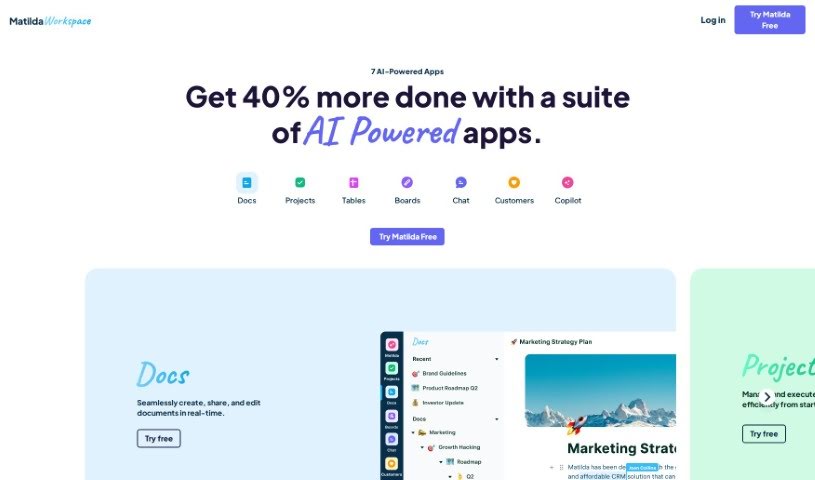
Screenshot of Matilda Workspace

Matilda Workspace

Discover what Matilda Workspace is and how to use it effectively in 2025. We'll walk through its features and see how it stacks up against other project management tools.

Screenshot

What is Matilda Workspace?

Matilda Workspace is an all-in-one platform powered by AI, designed to really boost your project management and team collaboration. It tackles the common issues found in older project management tools by offering a whole bunch of features. Think documentation, managing tasks, handling meetings, and even keeping track of customer interactions, all in one place. It works in a pretty straightforward three-step process:

First, it makes creating projects and tasks super easy, even automatically generating them for you. Second, it helps you build prioritized to-do lists by automatically scheduling tasks and giving you real-time forecasts for your projects. And third, it introduces the Matilda Co-Pilot feature, which helps you finish tasks much faster by using your workspace’s existing knowledge and what it’s learned from past tasks.

Basically, Matilda Workspace is built for all sorts of teams, no matter their industry or size. It’s all about helping you stay organized, be more productive, and collaborate better. Plus, they make it cost-effective with a clear pricing model and a 90-day money-back guarantee, so you can try it out with confidence.

Who created Matilda Workspace?

Matilda Workspace first launched on October 17, 2023. The details about its founder and the company behind it aren’t available in the information provided.

What is Matilda Workspace used for?

Matilda Workspace is a versatile tool that can help with a lot of things:

  • Managing your tasks
  • Serving as an all-in-one workspace for managing projects and collaborating with your team
  • Handling all your documentation
  • Organizing and managing meetings
  • Keeping track of customer interactions
  • Automatically creating project plans, timelines, and tasks
  • Building priority to-do lists, complete with automatic task scheduling
  • Providing real-time forecasts for your projects
  • Using Matilda Co-Pilot to finish tasks faster by tapping into your workspace’s knowledge and past learnings
  • Offering various modules for different needs, such as managing a knowledge base, acting as a sales CRM, handling personal tasks, planning, customer service, visualizing product roadmaps, taking meeting notes, and automating marketing efforts.

Who is Matilda Workspace for?

This platform is a great fit for:

  • Project managers
  • Team leaders
  • Knowledge workers
  • Customer service representatives
  • Marketers

How to use Matilda Workspace?

Here’s a simple guide to using Matilda Workspace effectively:

  1. Sign Up: Start by visiting the Matilda Workspace website and signing up for an account. This gives you access to all the tools.
  2. Interface: You’ll find the interface really easy to use. It’s designed to be user-friendly, making it simple to navigate and get the most out of the tool.
  3. Cost Optimization: This is a really comprehensive solution that can help you manage your budget better and save money effectively.
  4. AI Assistance: Need an answer fast? Just use the “Ask Matilda” feature. You’ll get instant, intelligent responses from MatildaGPT in under a second.
  5. Productivity Boost: You can expect to see your productivity jump by up to 40%! This is thanks to streamlined processes and the smart integration of AI automation.
  6. Customization: Make the workspace truly yours. You can customize it using powerful blocks and loops to fit exactly how you like to work.
  7. Powerful Applications: Inside Matilda Workspace, you’ll find a suite of strong tools designed to improve your work and make things more efficient.
  8. Harness AI: Let the intelligence of AI work for you. It’s there to streamline your workflows and make your processes smarter and more efficient.
  9. Team Collaboration: Keep your whole team on the same page. The workspace offers live collaboration features to ensure everyone is in sync.
  10. Security: You can count on secure and personalized access. Matilda Workspace uses AI features that are aware of permissions, keeping your data safe.

By following these steps, you can really make Matilda Workspace work for you. It’s a great way to improve your work processes, boost productivity, and make collaboration smoother for your team.

Related AI Tools

Discover more tools in similar categories that might interest you

Stay Updated with AI Tools

Get weekly updates on the latest AI tools, trends, and insights delivered to your inbox

Join 25,000+ AI enthusiasts. No spam, unsubscribe anytime.