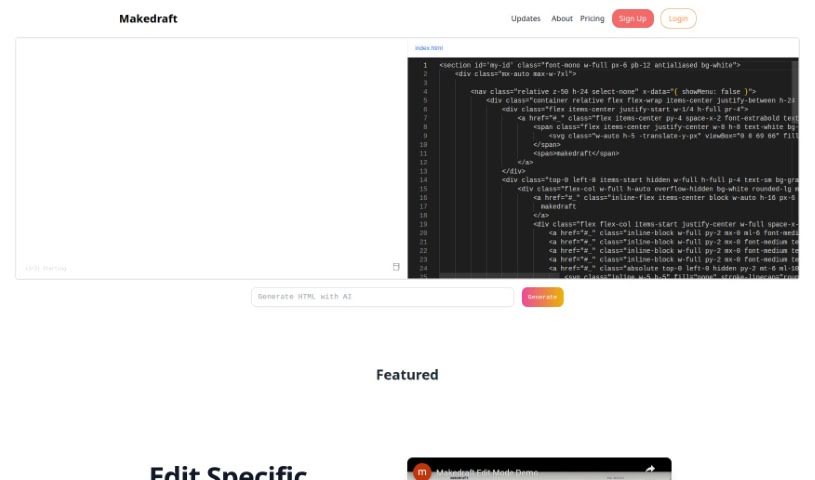
Screenshot of Makedraft

Makedraft

Discover what Makedraft is and how to use it effectively in 2025. We'll explore its features and how it stacks up against other web design tools.

Screenshot

What is Makedraft?

Makedraft is a smart AI tool that helps you create frontend code just by giving it instructions. It is a way to quickly build HTML templates. While it’s especially handy for backend developers who want to speed up frontend work, frontend developers and designers can get a lot out of it too. Right now, Makedraft creates HTML that’s styled with Tailwind CSS. They’re planning to add support for Alpine.js and Vue.js soon, which is pretty exciting. If you want to use the code it generates, you’ll need to add the Tailwind CSS library. Just pop a script tag into the <head> section of your code. It’s currently in an open beta, meaning you can try it out for free. And don’t worry about surprise charges later on – they’re committed to keeping a free tier available even after the beta period wraps up. What’s really neat is that almost everything you see on the Makedraft website – all the HTML components, except for the actual code editor and the text itself – was generated using Makedraft. It’s a cool, self-referential way to show off what the tool can do. Basically, Makedraft makes building HTML templates much simpler by using AI, offering a really convenient way for developers and designers to get the code they need, exactly how they want it.

Who created Makedraft?

Makedraft was actually created by an AI tool, designed to let users generate frontend code based on specific instructions. It first launched on October 27, 2023. The main idea behind it is to help backend developers iterate on frontend projects much faster. It’s currently in an open beta phase, and they’ve made sure there’s a free tier available, even after the beta period ends. It’s worth noting that all the HTML components you see on the Makedraft website itself were generated using the tool – a neat way to demonstrate its capabilities.

What is Makedraft used for?

  • Makedraft is an AI tool that lets you create HTML templates simply by telling it what you want.
  • It’s mainly built for backend developers who need to quickly get the frontend of their projects up and running, but frontend developers and designers will find it super useful too.
  • Currently, Makedraft generates HTML that’s already styled with Tailwind CSS. They’re also planning to support Alpine.js and Vue.js soon.
  • To make the generated code work, you just need to include the Tailwind CSS library. You do this by adding a script tag to the <head> section of your code.
  • Makedraft is in open beta right now, so you can use it for free.
  • Don’t worry about unexpected costs; they’ll keep a free tier available after the beta period ends.
  • Pretty much all the HTML parts on the Makedraft website itself, aside from the code editor and the text content, were actually made using Makedraft.
  • This is a clever, self-referential way the tool shows off what it can do.
  • Overall, Makedraft really simplifies making HTML templates by using AI. It’s a handy solution for developers and designers who need to generate code that matches their exact specifications.
  • It’s used for creating HTML templates based on what users instruct.
  • Backend developers can use it to quickly iterate on the frontend of their projects.
  • Frontend developers and designers can also benefit from using Makedraft.
  • The tool currently generates HTML styled with Tailwind CSS.
  • Future updates will include support for Alpine.js and Vue.js.
  • Users need to add the Tailwind CSS library via a script tag in their code’s <head> to use the generated code.
  • Makedraft is available for free during its open beta phase.
  • A free tier will remain available after the beta to prevent surprise charges.
  • All HTML components on the Makedraft website, except for the code editor and text, were generated using Makedraft itself.
  • Makedraft showcases its abilities by generating its own website elements in a meta, self-referential way.
  • In short, Makedraft streamlines HTML template creation for developers and designers using AI.
  • It helps create HTML templates based on user instructions.
  • Backend developers can use it for quick frontend iterations.
  • Frontend developers and designers can also use it.
  • The tool generates HTML styled with Tailwind CSS.
  • It will soon support Alpine.js and Vue.js.
  • Users must include the Tailwind CSS library via a script tag in their code’s <head>.
  • Makedraft is free during its open beta.
  • A free tier will be available post-beta to avoid surprise charges.
  • Makedraft generates all HTML components on its website (except editor/text) using the tool.
  • This meta approach showcases its capabilities.
  • Overall, Makedraft streamlines AI-powered HTML template creation for developers and designers.
  • Key uses include creating HTML templates for projects.
  • It allows for quick frontend iteration for backend developers.
  • It assists frontend developers and designers.
  • It generates HTML styled with Tailwind CSS.
  • It requires inclusion of the Tailwind CSS library in the generated code.
  • Future support for Alpine.js and Vue.js is planned.
  • Makedraft is free during its open beta.
  • A free tier is available post-beta to avoid surprise charges.
  • The tool can generate HTML components for the Makedraft website itself.
  • It streamlines HTML template creation using AI.

Who is Makedraft for?

  • Backend Developers
  • Frontend developers
  • Designers

How to use Makedraft?

Using Makedraft is pretty straightforward. Here’s how you can get started:

  1. Modify Existing Code: If you have code you want to change, just highlight it and tell the AI exactly what modifications you’re looking for.
  2. Generate New Components: Want something completely new? Just prompt the AI without selecting any text, and it’ll generate entirely new HTML components for you.
  3. Access the Tool: You can easily access Makedraft through the website link provided.
  4. How it Works: Makedraft’s AI generates frontend code based on your instructions. It’s mainly aimed at backend developers who need to iterate quickly on their project’s frontend.
  5. Current Tech Stack: Right now, Makedraft generates HTML styled with Tailwind CSS. They’re also planning to add support for Alpine.js and Vue.js in the near future.
  6. Using the Code: To use the code Makedraft generates, you’ll need to include the Tailwind CSS library. This is done by adding a script tag to the <head> section of your code.
  7. Beta & Pricing: Makedraft is currently in open beta and is available for free during this phase. They plan to offer future free tiers as well, so you won’t face any surprise charges.
  8. Showcasing Capabilities: Interestingly, all the HTML components on the Makedraft website itself were generated using the tool, with the exception of the code editor and the text content. It’s a neat way to show off what it can do.
  9. Streamlined Process: Ultimately, Makedraft makes creating HTML templates much simpler by using AI. It offers a convenient solution for both developers and designers to generate code that perfectly fits their specifications.

These steps should give you a clear guide on how to effectively use Makedraft for generating HTML templates based on your specific instructions.

Related AI Tools

Discover more tools in similar categories that might interest you

Stay Updated with AI Tools

Get weekly updates on the latest AI tools, trends, and insights delivered to your inbox

Join 25,000+ AI enthusiasts. No spam, unsubscribe anytime.