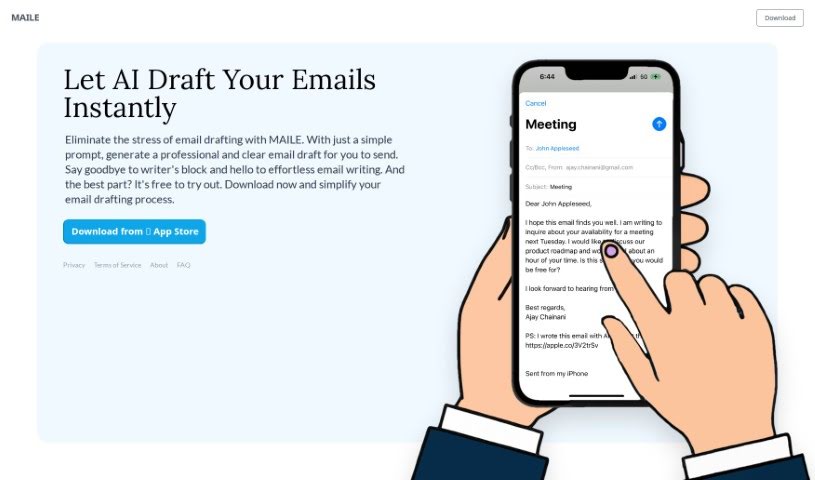
Screenshot of Maile

Maile

Discover what Maile is and how to use it to write better emails in 2025. We'll explore its features and see how it stacks up against other Email Writing Tools.

Screenshot

What is Maile?

Maile is a really neat app for iPhones that helps you write emails much faster. It is your personal email assistant. It uses smart AI to whip up clear, professional-sounding email drafts based on what you tell it. No more staring at a blank screen or spending ages trying to get the words just right! Maile makes email writing simple and stress-free. It’s perfect for anyone who needs to send emails, whether you’re a busy professional, someone juggling a packed schedule, or even if English isn’t your first language. With Maile, you can craft emails that sound great and get your message across clearly and confidently.

Who created Maile?

The company behind Maile set out to make communication easier for professionals, busy folks, and people who aren’t native English speakers. They’ve built this clever app using ChatGPT 3.5 to help users write effective emails quickly. Their goal is to make powerful AI technology affordable and easy for everyone to use, offering ways to personalize your emails so they truly sound like you.

What is Maile used for?

Maile helps you:

  • Communicate more smoothly if you’re a professional.
  • Save time if you’re a busy individual with a packed schedule.
  • Express yourself clearly if English isn’t your first language.
  • Generate email drafts just by giving it a prompt.
  • Beat writer’s block when you’re stuck on an email.
  • Write emails quickly and efficiently.
  • Make email creation simple with AI help.
  • Adjust your writing to fit different styles and situations.
  • Write emails in different languages.
  • Boost your productivity and save time on emails.
  • Streamline communication for professionals.
  • Assist busy individuals with their packed schedules.
  • Help non-native English speakers express themselves fluently.
  • Generate professional email drafts using AI.
  • Make the email writing process easier by overcoming writer’s block.
  • Support writing emails in multiple languages for users around the globe.
  • Simplify creating emails with an easy-to-use interface.
  • Change the way professionals, students, and frequent email writers approach their messages.
  • Offer personalized email writing by letting you choose the tone.
  • Make top-tier AI technology accessible and affordable for everyone.
  • Help non-native English speakers communicate effectively.
  • Generate professional email drafts with AI.
  • Simplify the entire email creation process.
  • Empower you to pick the communication tone you prefer.
  • Provide an affordable AI solution for writing emails.
  • Serve professionals, busy individuals, and non-native English speakers.
  • Understand language nuances thanks to ChatGPT 3.5.
  • Support writing emails in various languages.
  • Help non-native English speakers express themselves perfectly.
  • Generate professional, clear email drafts from a simple prompt.
  • Allow you to choose personalized tones for your emails.
  • Offer an affordable AI email writing tool.
  • Support writing in multiple languages.
  • Eliminate writer’s block and long drafting times.
  • Simplify email creation for professionals, students, or anyone needing to write emails on the go.
  • Improve your productivity and email quality with AI.

Who is Maile for?

Maile is ideal for:

  • Professionals who want to communicate more efficiently.
  • Busy individuals who have packed schedules and need to save time.
  • Non-native English speakers aiming to express themselves clearly and flawlessly.
  • Professionals in any field.
  • Busy individuals managing multiple tasks.
  • Non-native English speakers looking for clear expression.

How to use Maile?

Using Maile is straightforward and helps you draft emails efficiently. Just follow these simple steps:

  1. Download and Install: First, grab Maile from the App Store on your iPhone. It’s free to try, so anyone can give it a go.
  2. Open the App: Once it’s on your phone, just launch Maile to start crafting professional emails without any hassle.
  3. Input Prompt: Tell Maile what you want to say or give it some context for the email. This prompt is what the AI uses to create your draft.
  4. Choose Your Tone: You can also pick the tone for your email – maybe formal, casual, or something else – to make sure it matches how you usually communicate.
  5. Generate Email: Hit the ‘generate’ button, and Maile’s AI will quickly put together a clear, professional draft based on your prompt and the tone you selected.
  6. Review and Edit: After the draft appears, take a moment to read it over. Make sure it says exactly what you want and check for any small edits needed for clarity or accuracy.
  7. Send or Save: Once you’re happy with the edited draft, you can send it straight from Maile or save it for later.
  8. Experience Enhanced Communication: You’ll find you have more time, your emails are better, and your productivity gets a boost thanks to Maile’s easy-to-use process.

Maile, which uses ChatGPT 3.5, is designed for all sorts of users, including professionals, busy people, and those who aren’t native English speakers. It gives a wide range of people the tools they need to write great emails quickly and effectively. Plus, with its support for multiple languages, Maile helps users all over the world get the most out of its powerful email writing assistance. Make sure to try out Maile’s user-friendly interface and AI features to make your email drafting simpler and communicate more efficiently.

Related AI Tools

Discover more tools in similar categories that might interest you

Stay Updated with AI Tools

Get weekly updates on the latest AI tools, trends, and insights delivered to your inbox

Join 25,000+ AI enthusiasts. No spam, unsubscribe anytime.