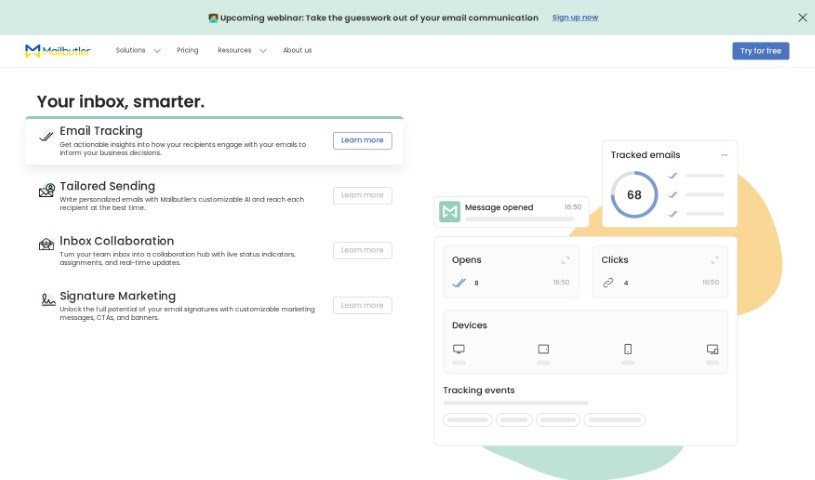
Screenshot of Mailbutler

Mailbutler

Discover Mailbutler, your AI-powered email assistant. Learn its features, how it boosts productivity, and compare it with other Email Writing Tools in 2025.

Screenshot

What is Mailbutler?

Mailbutler’s Smart Email Assistant is an AI-powered tool designed to make your email life much more efficient and productive. It fits right into your favorite email clients like Gmail, Apple Mail, and Outlook, so you don’t have to switch apps. Here are some of the cool things it can do:

  • Email Tracking: Keep an eye on whether your emails have been opened or clicked.
  • Email Signatures: Create and use professional-looking sign-offs automatically.
  • Notes and Tasks: Keep your to-dos and important notes right inside your email.
  • Smart Send Later: Schedule your emails to go out at the best possible time.
  • Collaborators: Work better with your team by sharing inboxes and tasks.

Mailbutler takes your privacy seriously. It’s GDPR compliant, meaning it doesn’t save or process the content of your emails. You can try it out for free for 14 days, and they offer several payment options for their paid plans. Plus, if you ever have questions, their customer support team is available 24/7 to help you out.

People really seem to like this email extension; it gets high marks and recognition, like being named an Industry Leader by GetApp and a High Performer by G2. Users often mention how it helps them communicate more smoothly, get more done, and keep their inbox tidy.

Who created Mailbutler?

Mailbutler’s Smart Email Assistant was actually started by two friends, Tobias and Fabian. Tobias, who’s the CEO, studied Business Administration and Engineering at RWTH University. When he’s not working, he loves being outdoors, especially windsurfing. Fabian, the CTO, is originally from Tanzania but now lives in Berlin. He enjoys traveling, hiking, and spending time with his friends. Together, they’ve built a team of about twenty people from all sorts of different places, all united by a passion for making email simpler and more intuitive for everyone.

What is Mailbutler used for?

Mailbutler helps you with a bunch of things to make your email experience better:

  • Email Tracking: See if your emails are being read.
  • Email Signatures: Set up and use professional sign-offs automatically.
  • Notes and Tasks: Keep your important notes and to-do lists organized right within your email client.
  • Smart Send Later: Schedule emails to arrive at the perfect time.
  • Collaborators: Make teamwork smoother with shared inboxes and tasks.
  • It really improves how you communicate with clients and your team.
  • You’ll find your productivity and organization get a big boost.
  • Personalizing your messages is a breeze with the Email Signatures feature.
  • Customized signatures also give your emails a more professional look.
  • The Notes and Tasks integration helps streamline your workflow.
  • Soon, you’ll even be able to turn your Apple Mail, Gmail, or Outlook inbox into a collaboration hub with Shared Inbox Collaboration!
  • Boost your email efficiency using the AI-powered Smart Email Assistant.
  • Make your interactions feel more personal with easy-to-use Email Signatures.
  • Stay on top of things and organized with the Notes and Tasks integration.
  • Maximize your productivity by scheduling emails with Smart Send Later.

Who is Mailbutler for?

Mailbutler can be a great tool for a variety of professionals, including:

  • Customer Success Managers
  • UX/UI Designers
  • Backend Developers
  • Trainers
  • Authors
  • Keynote Speakers
  • Anyone looking for an Accountability and Productivity Partner
  • Marketing Managers
  • SEO Managers
  • Quality Assurance Managers
  • Product Owners
  • Engineers

How to use Mailbutler?

Getting the most out of Mailbutler’s Smart Email Assistant is pretty straightforward. Just follow these simple steps:

  1. Start Your Free Trial: You can begin with a 14-day free trial – no payment details needed upfront! This lets you explore all the features to see how they fit your needs. Just sign up on the Mailbutler website to get started.

  2. Check Compatibility: Mailbutler works smoothly with the email clients you probably already use, like Gmail, Apple Mail, and Outlook.

  3. Quick Setup: Installing the extension is easy. Once you register for an account, you can start using Mailbutler right away without any complicated setup.

  4. Explore Key Features:

    • Email Tracking: Keep tabs on your emails to see how people engage with them, which really helps make your communication more effective.
    • Email Signatures: Easily create and automate your professional sign-offs.
    • Notes and Tasks: Keep your workflow organized by adding notes and tasks directly within your inbox.
    • Smart Send Later: Schedule your emails so they go out at the optimal time for delivery.
    • Collaborators: Improve how your team works together by sharing inboxes and managing tasks collectively.
  5. Security First: Mailbutler is GDPR compliant, so your data protection and privacy are a top priority. Their servers are located in Germany, and they don’t save or process any of your email content.

  6. Need Help? Customer Support: If you have any questions at all, their dedicated support team is available 24/7 to help you out quickly. You can reach them at [email protected], or check out the Support Center for frequently asked questions and helpful tutorials.

  7. Share Your Ideas: Have a suggestion for how Mailbutler could be even better? You can suggest improvements on their Feature Requests page and help shape its development.

  8. Serving Users Globally: Even though Mailbutler is based in Berlin, Germany, they serve users all around the world. It’s a remote service designed to boost your productivity and help you manage your emails more effectively, no matter where you are.

By following these steps, you’ll be able to use all the great features of Mailbutler’s Smart Email Assistant to make your communication smoother, boost your productivity, and improve how you collaborate with others, all with much less effort.

Related AI Tools

Discover more tools in similar categories that might interest you

Stay Updated with AI Tools

Get weekly updates on the latest AI tools, trends, and insights delivered to your inbox

Join 25,000+ AI enthusiasts. No spam, unsubscribe anytime.