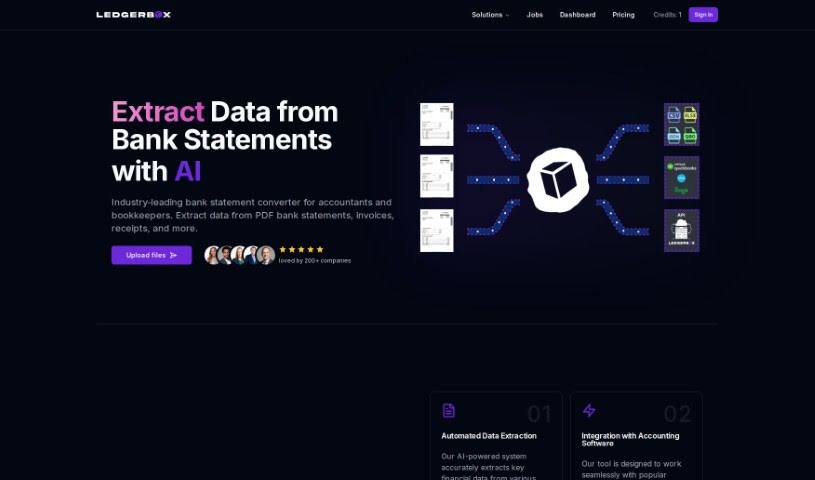
Screenshot of LedgerBox

LedgerBox

Discover LedgerBox, an AI-powered tool for converting bank statement PDFs to Excel CSVs. Learn its features, how to use it effectively in 2025, and compare it to other Excel tools.

Screenshot

What is LedgerBox?

LedgerBox is a smart tool that uses AI and computer vision to make converting your bank statement PDFs into Excel CSV files much simpler. It is a digital assistant for your financial documents. It’s really handy for anyone working in banking, accounting, or even just managing their personal finances. LedgerBox can convert your statements quickly and accurately, meaning you don’t have to spend time manually typing in all that data. Plus, they take data security seriously, using encryption and secure connections to keep your information safe. The tool is also built to grow with your needs, handling large amounts of data efficiently.

What makes LedgerBox stand out?

  • Instant Conversions: Get your documents converted right away.
  • Global Support: Works with statements from banks all over the world.
  • High Security: Your data is protected with strong security standards.
  • Precise Accuracy: You can count on accurate data extraction.
  • Scalable: It can handle growing data volumes easily.
  • Flexible Plans: Available as both a free tool and with paid options.

On top of that, LedgerBox helps automate tasks for things like compliance. It can convert not just bank statements, but also invoices and receipts, making it a versatile tool for many different industries and for keeping your personal finances in order. They’re always testing and improving the tool to make sure the conversions stay accurate, and they’re committed to keeping your user data encrypted and protected.

Ultimately, LedgerBox saves you valuable time. It automates the often tedious process of converting documents, gets rid of manual data entry, and offers different paid plans if you need to convert more than the free tier allows.

Who created LedgerBox?

Sean Lawton, a software engineer and consultant, is the mind behind LedgerBox. He launched the company on October 29, 2023, with a clear mission: to automate document processing using AI and computer vision. LedgerBox focuses specifically on converting PDF bank statements, invoices, and receipts into CSV and Excel formats, ensuring data handling is both efficient and accurate. Security, precision, and scalability are the core principles guiding their services.

What is LedgerBox used for?

LedgerBox is incredibly versatile and can be used for a wide range of financial and administrative tasks:

  • Automating Data Entry
  • Streamlining Financial Auditing
  • Improving Expense Management
  • Simplifying Tax Preparation
  • Assisting in Manufacturing processes
  • Efficient Invoice Processing
  • Organizing Receipt Processing
  • Monitoring Compliance
  • Aiding in Budgeting & Forecasting
  • Optimizing Supply Chain operations

Who is LedgerBox for?

LedgerBox is designed for a broad audience, including professionals and individuals across various sectors:

  • Banking: For professionals in the banking sector.
  • Accounting: For accountants and accounting firms.
  • Personal Finance: For individuals managing their own finances.
  • Manufacturing: For professionals in the manufacturing industry.
  • Supply Chain Management: For those overseeing supply chains.
  • Financial Auditors: To simplify audit processes.
  • Expense Managers: To track and manage expenses efficiently.
  • Tax Preparers: To streamline tax document handling.
  • Accounts Payable Professionals: For managing incoming invoices.
  • Compliance Officers: To ensure adherence to regulations.
  • Budget Analysts & Forecast Analysts: For financial planning.
  • Customer Onboarding Specialists: To process new client information.
  • Financial Analysts: For data analysis and reporting.
  • Manufacturers: To manage operational data.
  • Banking Services: For various banking operations.

How to use LedgerBox?

Getting started with LedgerBox is straightforward. Just follow these simple steps:

  1. Sign Up: First, head over to the LedgerBox website and create your account. It’s a quick process to get you set up.
  2. Convert Documents: Once you’re logged in, you can upload your bank statement PDFs. LedgerBox uses its AI and computer vision technology to convert them into Excel CSV files almost instantly.
  3. Extract Key Data: The tool automatically pulls out the important details from your documents, like transaction dates, amounts, and descriptions.
  4. Trust the Security: LedgerBox really focuses on keeping your data safe. They use high encryption standards and secure connections, so you can feel confident uploading your financial information.
  5. Try the Free Version: You can actually use LedgerBox for free every day! There’s a limit on the number of pages you can convert without needing a subscription, which is great for trying it out.
  6. Explore Paid Plans: If you need to convert more documents or want access to extra features, LedgerBox offers various paid plans designed to fit different user needs and volumes.
  7. Count on Accuracy: They ensure the conversions are precise by constantly testing and improving the tool. You can rely on consistent accuracy.
  8. Handle Big Loads: Because it’s a cloud-based tool, LedgerBox is very scalable. This means it can efficiently handle large amounts of data without any trouble.
  9. Works with Global Banks: LedgerBox supports documents from thousands of different banks worldwide, so it’s likely to work with your bank’s statements.
  10. Automate Your Tasks: Use LedgerBox’s AI technology to automate many document processing tasks. This includes things like data entry, financial auditing, managing expenses, preparing taxes, and much more.

By following these steps, you can make the most of LedgerBox for smooth document conversion and data extraction, whether it’s for your personal finances or for various business industries.

Related AI Tools

Discover more tools in similar categories that might interest you

Stay Updated with AI Tools

Get weekly updates on the latest AI tools, trends, and insights delivered to your inbox

Join 25,000+ AI enthusiasts. No spam, unsubscribe anytime.