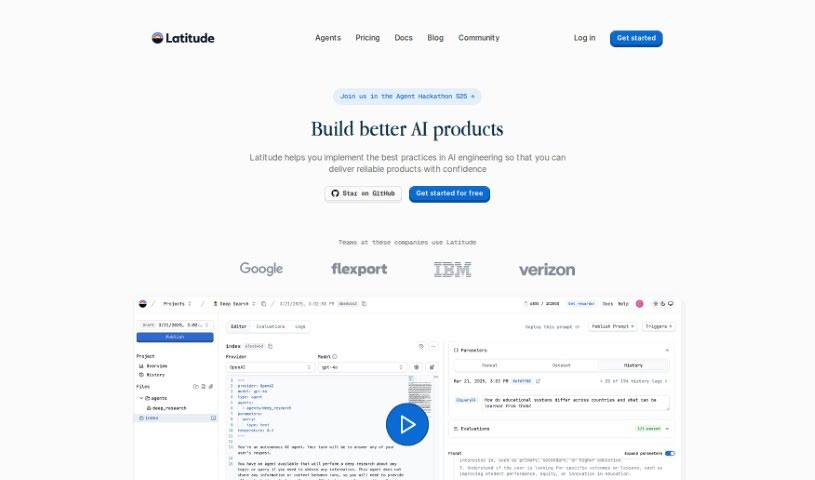
Screenshot of Latitude

Latitude

Discover what Latitude is and how to use it effectively in 2025. Explore its features and see how it stacks up against other documentation tools.

Screenshot

What is Latitude?

Latitude is a workspace built specifically for data analysts. Its main goal is to make your workflow smoother and boost how well your team collaborates. It is a tool that simplifies everything from gathering data to figuring out what it all means. It brings together data modeling, report building, and collaboration features into one easy-to-use place. With Latitude, analysts can really speed up their work. You can connect to different data sources, use a huge, collaborative canvas for your work, and even build interactive data apps without getting bogged down in the usual complexities of data analysis.

Key features include a streamlined workflow, easy integration with various data sources, a collaborative canvas where you can transform data and create charts together, a built-in AI assistant that can write SQL queries for you from simple English commands, and the ability to create interactive data apps for your team to use.

Who created Latitude?

Latitude was developed by an Open-Source Prompt Engineering Platform. This platform itself offers a range of features designed to help with prompt management, collaborative workspaces, custom logic, version control, and various SDK integrations. Essentially, it’s built to simplify data analysis workflows for analysts by bringing together data modeling, report building, and collaboration into a single, user-friendly environment.

What is Latitude used for?

  • Streamlined Workflow: Latitude really speeds up the data analysis process, letting you move quickly from raw data to creating reports.
  • Integrated Data Sources: You can easily connect to different data sources with Latitude. It even lets you drag and drop CSV files, making it super convenient.
  • Collaborative Canvas: Imagine an infinite canvas where you and your team can add data sources, make transformations, and create charts all in one spot. That’s what Latitude offers.
  • Built-in AI Assistant: Need to write a SQL query? Latitude has an AI assistant that can generate performant queries just from plain English instructions.
  • Interactive Data Apps: You can build beautiful, interactive dashboards and reports to share with your team. Plus, you can add annotations for even better collaboration.
  • AI-assisted Prompt Engineering: Work together with your team to build, evaluate, and deploy prompts confidently.
  • Natural Language Processing: This feature lets you create prompts with parameters, snippets, chains, and custom logic, making it more flexible.
  • Version Control: You can work on drafts until you’re ready to go live, and all versions are automatically tracked in logs.
  • Observability: The platform automatically logs context, output, and other important metadata, which is super helpful for evaluations and debugging.
  • Evaluations: You can run evaluations to check your prompts against various metrics like hallucinations, accuracy, compliance, and conciseness.

Latitude really simplifies and speeds up the entire workflow, from collecting data to generating insights, especially for data analysts. It brings together data modeling, report building, and collaboration in a way that’s easy to use. You get integration with various data sources and the ability to quickly build interactive data apps. This helps analysts work more efficiently and unburden themselves from complex data analysis tasks. It streamlines the process, allowing a quick transition from raw data to reporting, and provides that collaborative canvas for adding data sources, transformations, and charts all in one place. The built-in AI assistant is great for generating performant SQL queries from plain English, and you can easily build stunning dashboards and reports with annotations for collaboration.

Who is Latitude for?

  • Data Analysts

How to use Latitude?

Getting started with Latitude is pretty straightforward. Here’s a simple breakdown of the steps:

  1. Sign Up: First, you’ll want to sign up for Latitude. You can do this directly on their website, or if you want to get a feel for it first, you can book a demo to explore its features.
  2. Data Integration: Next, easily connect your existing data sources. It only takes a few clicks, or you can simply upload CSV files if that’s easier for you.
  3. Streamlined Workflow: Once your data is in, use Latitude’s streamlined workflow to really speed up how you move from raw data to creating your reports.
  4. Collaborative Canvas: Take advantage of the infinite collaborative canvas. This is where you can add your data sources, transformations, and charts all together in one convenient spot.
  5. AI Assistant: Don’t forget to use Latitude’s built-in AI assistant! It’s really helpful for generating efficient SQL queries, just by typing in plain English instructions.
  6. Interactive Data Apps: Go ahead and create interactive data apps, dashboards, and reports. They’re easy to build and perfect for sharing with your team, especially with the added annotations for collaboration.
  7. Continuous Improvements: Looking ahead, Latitude will also support integration with dbt projects and offers autopilot observations for evaluation and debugging, which should make things even smoother.

By following these steps, you can really make the most of Latitude’s capabilities. It’s a great way to streamline your data analysis processes and boost collaboration within your team.

Related AI Tools

Discover more tools in similar categories that might interest you

Stay Updated with AI Tools

Get weekly updates on the latest AI tools, trends, and insights delivered to your inbox

Join 25,000+ AI enthusiasts. No spam, unsubscribe anytime.