What is Knowlee AI?
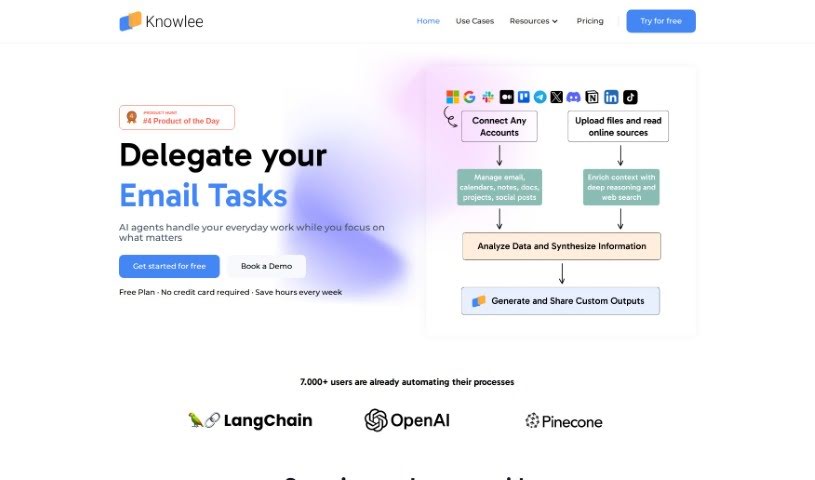
Knowlee AI acts as your smart assistant, designed to really change how you work. It gives you personalized insights and can even create content for you automatically. It is a way to make your daily tasks much smoother. You can connect it to platforms you already use, like Gmail, Google Calendar, Outlook, OneDrive, and SharePoint. Plus, Knowlee AI can link up with online data and other services through APIs, meaning it grows and adapts as your business does. They offer a range of plans, from a free option for individuals to comprehensive enterprise packages for businesses wanting to integrate AI seamlessly.
Who created Knowlee AI?
Ludovic Carli, the CEO of DMIDEVS, is the mind behind Knowlee. It’s an AI assistant that brings together AI analysis, independent AI Agents, and data from multiple sources. This combination allows for quick, accurate data analysis, content creation, and a variety of automated tasks.
What is Knowlee AI used for?
- Streamline your work: Connect Knowlee to Gmail, Google Calendar, Outlook, OneDrive, SharePoint, and more.
- Build your knowledge base: Upload documents, files, and link online data sources.
- Create AI teams: Assemble teams of AI assistants and give them specific tasks.
- Expand AI capabilities: Integrate with any third-party API or data provider to keep your AI up-to-date.
- Automate and schedule: Set reminders, generate reports automatically, and trigger workflows using Knowlee’s scheduling features.
- Boost credibility: Enhance your work’s reliability by including in-text citations that accurately acknowledge your sources.
- Improve customer service: Help customers faster and pull key insights from support tickets.
- Manage social media: Create content tailored to your audience and analyze what your competitors are doing.
- Boost productivity: Perfect your business processes and unlock new levels of productivity across the board with AI automation.
- Transform workflows: Use AI-driven analysis, autonomous AI agents, and data from multiple sources to change how you work.
- Expand your AI’s knowledge: Link online data like social media, websites, and databases to continuously grow your AI’s understanding.
- Automate and schedule tasks: Set reminders, automate reports, trigger workflows, and more with Knowlee’s scheduling tools.
- Ensure accurate sourcing: Enhance the credibility of your work by acknowledging sources professionally and accurately.
- Build AI automation squads: Easily create teams focused on automating processes.
- Assemble and assign AI teams: Put together AI teams, define the specific skills and tasks for each assistant, and then assign them jobs.
- Integrate AI with external tools: Connect AI with other tools for smooth, automated workflows.
- Unlock business intelligence: Perfect processes, increase productivity, and gain intelligence across all business areas with Knowlee’s AI automation.
Who is Knowlee AI for?
Knowlee AI is useful for a wide range of applications and professionals, including:
- AI chatbots
- Crypto tools
- AI coding assistants
- AI Content Detection tools
- AI Infrastructure providers
- Automation tools
- Customer Service departments
- Social Media Management teams
- AI Coders
- Data Analysts
- AI developers
- Financial Analysts
How to use Knowlee AI?
Here’s a straightforward guide to using Knowlee effectively:
- Sign Up: Start by signing up for Knowlee’s free plan. You don’t need a credit card, and you can connect your data and begin automating processes in less than 10 minutes.
- Build Your AI Team: Upload your documents, connect online data sources, and create teams of AI assistants. You can tailor these teams to have specific skills and handle particular tasks.
- Assign Tasks: Once your AI team is ready, simply assign tasks and processes to them for smooth automation.
- Integrate Tools: Make your AI assistants even more capable by linking relevant tools, apps, and data sources. This gives them the context and efficiency they need.
- Knowledge Enablement: Give your AI agents the power of your own data. Upload proprietary information, documents, and knowledge bases to improve their skills and performance.
- Customize AI Interactions: Guide your AI agents by providing clear instructions. Tell them exactly what tasks and workflows you need automated.
- Connect with Popular Productivity Tools: Make your workflows smoother by connecting Knowlee to tools you already use, like Gmail, Google Calendar, Outlook, OneDrive, SharePoint, and many others.
- Utilize Online Data Sources: Beyond uploading files, connect your AI with online data from social media, websites, and databases. This helps your AI’s knowledge base grow continuously.
- Scheduled Interactions: Use Knowlee’s scheduling features to your advantage. You can set reminders, automate reports, trigger workflows, and much more.
- Explore Different Plans: Knowlee offers various plans to suit different needs. There’s the Free plan for individuals, and options like the Enterprise+ plan for companies that need advanced AI integrations.
By following these steps, you can really use Knowlee’s AI automation to boost your productivity, simplify your processes, and effectively transform your business operations.