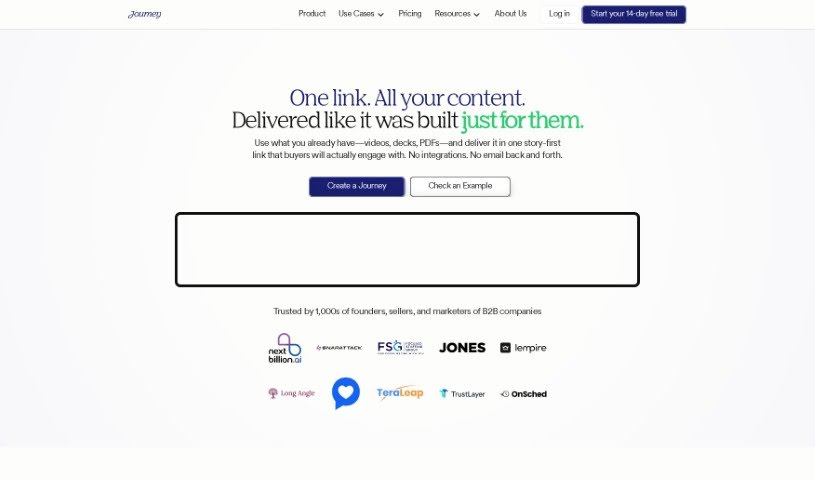
Screenshot of Journey

Journey

Discover what Journey is and how to use it effectively in 2025. Explore its features and see how it stacks up against other presentation tools.

Screenshot

What is Journey?

Journey is a really useful tool designed to help you connect with, convert, and onboard customers smoothly, all through a single link. It’s packed with features like slides that adapt to any screen, built-in video recording, interactive elements, and the ability to embed content from other popular tools. This makes it perfect for creating presentations that really grab attention or for sharing important information in a clear, engaging way. Big names like Reddit, Gumroad, and AngelList trust Journey, and it’s all about helping you tell your story better and leave a memorable impression. What’s cool is that it uses AI for “automagical creation,” meaning it can help draft content for you. Plus, you can create personalized experiences for everyone, customize everything with your brand’s look and feel, use a variety of content blocks to tell your story, and keep an eye on how your presentations are performing with detailed analytics. It’s a great platform if you want to improve your storytelling and get better results.

Who created Journey?

Journey was developed by a dedicated team who built a powerful platform to help businesses engage, close deals, and onboard customers more effectively. The tool offers a range of features, including responsive slides, video recording capabilities, interactive blocks, and easy embedding from popular services. Companies like Reddit, Gumroad, and AngelList rely on Journey, which really stands out thanks to its AI-powered “automagical creation,” personalized experiences for each user, customizable branded themes, a wide selection of content blocks for storytelling, and in-depth performance insights. Businesses and sales teams, such as Gumroad and Insightly, find this tool invaluable for turning prospects into loyal customers, streamlining their sales processes, and boosting overall productivity throughout the entire sales cycle.

What is Journey used for?

  • Turn prospects into enthusiastic supporters by equipping and enabling them.
  • Share all your essential resources in one convenient link, making it simple to get buy-in internally.
  • Easily reach out to prospects and share relevant files, links, and information without worrying about emails getting lost or blocked.
  • Gain insight into what your prospects are looking at and offer them the right support at the right time as they move through the sales process.
  • Give your sales team the power to create new content, update existing materials, and keep track of sales activities, all from one central place.
  • Develop content that covers every stage of the revenue-generating process, from initial outreach to closing deals and keeping customers happy.
  • Take control of the entire sales journey by creating content that supports and empowers your internal champions at every step.
  • Record voice notes directly for your prospects.
  • Allow prospects to leave comments and feedback.
  • Automatically generate presentations, images, and artwork with Journey’s AI, access beautifully designed templates, keep your Journeys secure, and monitor how users interact with them.
  • Convert prospects into champions and provide them with the resources they need.
  • Share everything in a single link, simplifying the process of getting internal approval.
  • Reach out to prospects and share relevant files, links, and resources with ease.
  • Understand prospect engagement and provide timely support.
  • Empower sellers to create and update content, and monitor sales activity, all in one place.
  • Create content for the entire revenue process, from prospecting to retention.
  • Develop content to support your champions throughout the sales process, using a variety of multimedia elements.
  • Leave voice notes for prospects.
  • Enable prospects to leave comments.
  • Personalize experiences at scale by adding the recipient’s logo for a unique touch.
  • Share resources in a single link, making internal buy-in much easier.
  • Understand prospect activity and offer timely, relevant support throughout the sales journey.
  • Create content to support your champions during the sales process. Combine PDFs, text, videos, and more, then share them with prospects in one easy-to-find location.
  • Helps you connect with, close, and onboard customers using just one link. It also provides templates to help you tell your story in a unique and compelling way.

Who is Journey for?

  • Sales teams
  • Companies
  • Sellers
  • Internal champions
  • Sales departments
  • Marketing teams
  • Customer success managers
  • Product management
  • Content creators
  • Customer relationship management professionals

How to use Journey?

To get the most out of Journey, here’s a simple guide:

  1. Create an Account: Start by signing up for a free Journey account. This gives you access to all its features and templates.
  2. Organize Your Workspaces: Use workspaces to keep your Journeys neatly organized and easy to find.
  3. Choose Organization Templates: Select from a variety of templates designed to help structure your content effectively.
  4. Engage with Presentation Mode: Make sure to use Journey’s presentation mode to really capture your audience’s attention.
  5. Benefit from Advanced Analytics: Keep track of key metrics like pageviews, the types of devices and browsers people are using, and more.
  6. Secure Your Journeys: Add extra layers of security with features like password protection, whitelists, blacklists, and email verification.
  7. Leverage AI Power: Take advantage of Journey’s AI-powered “automagical creation” to draft content quickly and efficiently.
  8. Personalize Content: Make each experience unique by inserting the recipient’s logo.
  9. Maintain Brand Consistency: Use the “automagic branding” feature to create branded themes that ensure your brand always looks consistent.
  10. Access Diverse Blocks: Explore a wide range of content blocks, including checklists, tables of contents, Gong embeds, and dynamic logos, to make your storytelling richer.
  11. Analyze Performance: Keep an eye on how your Journeys are performing and how users are engaging with them. Use these detailed insights to refine your storytelling strategies.
  12. Grow Your Prospects: Use Journey to turn prospects into champions by sharing resources in a way that’s easy for them to understand and share internally.
  13. Close More Deals: Get visibility into what prospects are doing and offer them timely support as they move through the sales journey.
  14. Enhance Team Productivity: Empower your sellers with tools that make it easy to create content, update resources, and monitor sales activity.
  15. Support All Milestones: Create content that supports the entire revenue-generation process, from the first prospect contact all the way through closing and customer retention.

By following these steps, you’ll be able to use Journey’s features effectively to connect with, close, and onboard customers smoothly.

Related AI Tools

Discover more tools in similar categories that might interest you

Stay Updated with AI Tools

Get weekly updates on the latest AI tools, trends, and insights delivered to your inbox

Join 25,000+ AI enthusiasts. No spam, unsubscribe anytime.