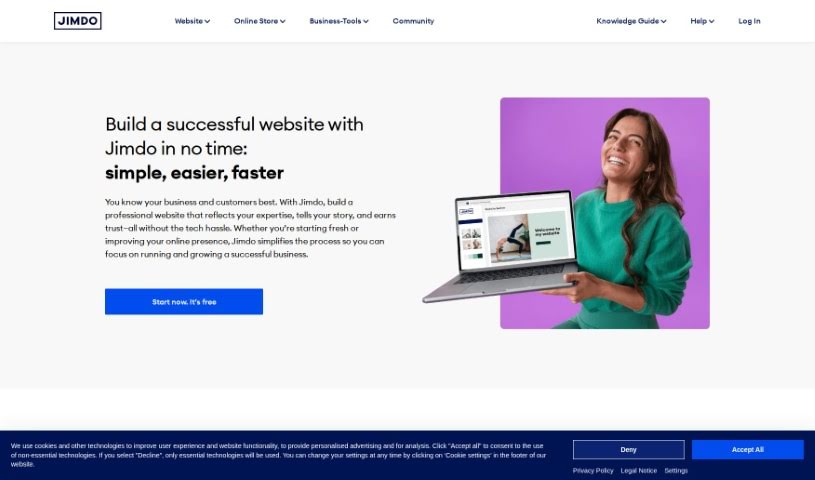
Screenshot of Jimdo

Jimdo

Discover what Jimdo is and how to use it to your advantage in 2025. We'll cover its features, compare it to other website builders, and show you how to get the most out of it.

Screenshot

What is Jimdo?

Jimdo is a really helpful digital toolkit built specifically for small businesses. It is your all-in-one solution for getting your business online and running smoothly. It lets you build a website, set up an online store, manage bookings, design a logo, and even helps with SEO and understanding your business analytics. Plus, it handles all the technical stuff like domain names and hosting for you. If you’re a small business owner looking to get noticed online and connect with more customers, Jimdo makes it pretty straightforward. It’s designed to be easy to use, so creating and keeping your website looking great, including your online shop, is manageable. You get tools for logo design, domain and hosting management, and analytics and SEO to help your site perform better.

What’s great is that Jimdo’s interface is super intuitive. Seriously, you don’t need to be a tech whiz to figure it out. It’s perfect for e-commerce too, with tools that make setting up an online shop, scheduling appointments, and boosting your site’s visibility through SEO a breeze. It also helps with your branding, offering logo design tools, making it a really complete package for small businesses wanting to boost their digital presence.

Who created Jimdo?

Jimdo was actually started by Matthias ‘Matze’ Henze, who’s still the CEO and founder today. He launched Jimdo back in Hamburg in 2007. His main goal was to make it easier for small businesses to handle all their digital needs – from building and maintaining websites and online stores to designing logos, optimizing for search engines, analyzing business data, and managing domains and hosting.

What is Jimdo used for?

Jimdo is incredibly versatile for small businesses. Here’s a rundown of what you can do with it:

  • Boost your online visibility: Get your website found more easily with SEO optimization.
  • Understand your customers: Use business analytics to see how people interact with your site.
  • Create a professional brand: Design eye-catching logos.
  • Build your online home: Create and maintain your website with ease.
  • Sell online: Set up and run your own online store.
  • Manage appointments: Schedule reservations or appointments smoothly.
  • Handle your web address: Manage domains and hosting all in one place.
  • Track performance: Use analytics to see how well your website is doing.
  • Reach more people: Expand your online reach to new customers.
  • Strengthen your brand: Help with your digital branding efforts.
  • Get noticed: Improve your website’s visibility in search results.
  • Branding made easy: It provides a handy logo design tool.
  • Search engine friendly: It incorporates SEO optimization features.
  • Data insights: Includes analytics features to help you understand your business.
  • Web essentials covered: Handles domains and hosting so you don’t have to.
  • Perfect for small businesses: It’s really designed with smaller operations in mind.
  • All your digital needs met: It’s a one-stop solution for getting your business online.
  • Expand your customer base: It helps you reach more people online.
  • Cut down on manual work: Saves you the hassle of many manual tasks.
  • Improve search ranking: Helps improve your website’s visibility.
  • Boost your marketing: Supports your online marketing efforts.
  • Support e-commerce: It’s great for businesses selling products online.
  • Simplify bookings: Streamlines the booking system for appointments or services.
  • Build your brand: Supports your branding needs effectively.
  • Online marketing support: Helps with your online marketing strategies.

Who is Jimdo for?

Jimdo is a fantastic tool for a wide range of individuals and businesses looking to establish or improve their online presence. It’s particularly well-suited for:

  • Small Business Owners: Anyone running a small business who needs a professional online presence.
  • Website Designers: Professionals who create websites for clients.
  • Online Store Owners: People selling products online who need an e-commerce platform.
  • Logo Designers: Individuals who create logos and might need a platform to showcase their work or their own branding.
  • SEO Specialists: Professionals focused on improving website visibility in search engines.
  • Business Analysts: Those who track and analyze business performance.
  • Digital Marketers: People promoting businesses online.
  • Entrepreneurs: Anyone starting a new venture.
  • Freelancers: Individuals offering services independently.
  • Artists: Creatives looking to showcase their portfolios.
  • Designers: Professionals in various design fields.
  • Consultants: Experts offering advice and services.
  • E-commerce Entrepreneurs: Those focused on online retail.
  • Business Consultants: Professionals advising other businesses.
  • Musicians: Artists wanting to share their music and tour dates.
  • Photographers: Visual artists showcasing their work.
  • Authors: Writers promoting their books.
  • SEO Professionals: Experts in search engine optimization.
  • Domain and Hosting Managers: Those who handle web addresses and server space.

How to use Jimdo?

Getting started with Jimdo is pretty straightforward. Here’s a step-by-step guide to help you make the most of it:

  1. Build Your Website: Use the easy-to-navigate interface to create and manage your website. It’s designed to help you expand your online presence without a steep learning curve.
  2. Set Up Your Online Store: If you’re selling products, Jimdo makes it simple to create an online store. This opens up your business to a much wider customer base.
  3. Manage Bookings: Need to schedule appointments or reservations? Jimdo’s booking feature is a great way to handle this efficiently.
  4. Design Your Logo: Give your business a distinct identity with Jimdo’s logo design tool, perfect for your branding needs.
  5. Improve Search Rankings: Make sure people can find you online by using Jimdo’s SEO tools to optimize your website for search engines.
  6. Analyze Performance: Keep an eye on how your website is doing and understand user behavior with Jimdo’s built-in business analytics.
  7. Manage Your Web Presence: Handle everything from your domain name registration to your web hosting all within the Jimdo platform.
  8. Enable JavaScript: To get the full experience and ensure all features work correctly, make sure JavaScript is enabled in your web browser.
  9. Boost Your E-commerce: Jimdo offers great support for e-commerce, making it seamless to set up and manage your online store.
  10. Flexibility with Plans: You can upgrade your plan whenever you need to, or if you change your mind, you can cancel within the first 14 days.
  11. Payment Choices: You have the option to pay monthly, or you can save money by choosing a 12- or 24-month payment term.
  12. Customize with Code (Creator Editor): If you need more advanced customization, the Jimdo Creator editor allows you to use code to tailor your website precisely to your needs.

By following these steps and using Jimdo’s features, you can effectively manage your online presence, improve how your business operates digitally, and connect with a broader audience.

Related AI Tools

Discover more tools in similar categories that might interest you

Stay Updated with AI Tools

Get weekly updates on the latest AI tools, trends, and insights delivered to your inbox

Join 25,000+ AI enthusiasts. No spam, unsubscribe anytime.