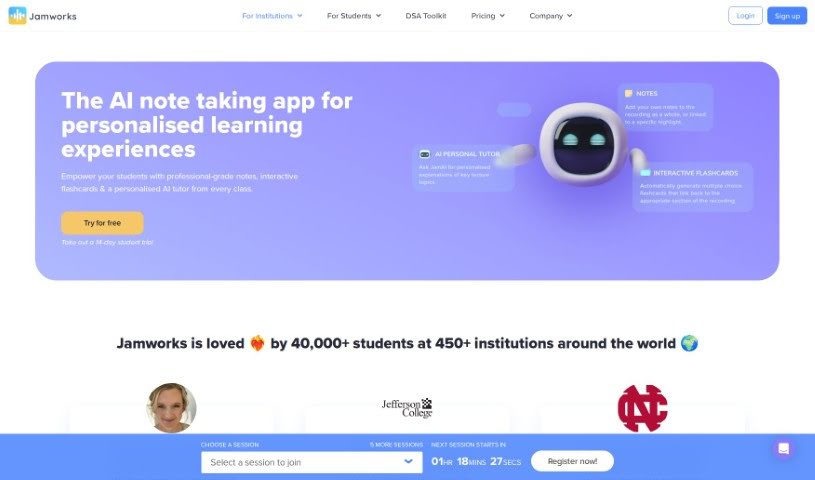
Screenshot of Jamworks

Jamworks

Discover what Jamworks is and how you can use it effectively in 2025. We'll explore its features and see how it stacks up against other AI Note Takers.

Screenshot

What is Jamworks?

Jamworks is an AI-powered app designed to help students with their studies. It is your personal academic assistant. It can automatically create study materials, help you make interactive flashcards, provide live captions during classes, and even has AI chatbots ready to answer your class-specific questions. Plus, it’s built to support students with disabilities, making learning more accessible for everyone. Jamworks works smoothly with major Learning Management Systems and supports many languages, really aiming to give every student a great learning experience.

What’s neat is that Jamworks captures information right after it’s presented in class. This means you can still get great notes even if you zone out for a moment. It also helps you revise by figuring out potential questions and answers from each chapter, which really boosts your understanding and helps you remember the material better.

Who created Jamworks?

Jamworks, this AI note-taking app, was developed to give students a hand with their academic work. It first launched on May 23, 2023, with the founder remaining anonymous. The app uses advanced AI to automatically create study aids like detailed notes, interactive flashcards, and chatbots tailored to your classes. It’s great for online learning, helps students who might lose focus, and is designed to be inclusive with features like live captions and support for 26 different languages.

What is Jamworks used for?

Jamworks is pretty versatile for students:

  • It helps with taking notes using AI.
  • It automatically whips up study materials.
  • You can create interactive flashcards.
  • It keeps you engaged with learning.
  • It offers live captions during lectures.
  • Revision quizzes are built-in.
  • It’s designed for all kinds of students.
  • It helps with challenges in online education.
  • It’s perfect for fitting study into busy schedules.
  • It captures information right after a class ends.
  • It makes learning more interactive.
  • You can generate interactive flashcards.
  • It provides live captions during classes.
  • AI chatbots answer class-specific questions.
  • There’s a one-button highlight for key points.
  • You can create custom revision quizzes.
  • It includes tools to help students with disabilities.
  • It automatically captures and generates essential information from every class.
  • It assists with revision quizzes.
  • It supports online learning.
  • It promotes inclusivity in education.
  • It helps students who have trouble concentrating.
  • It auto-generates study materials.
  • It creates interactive learning experiences.
  • It supports online learning.

Who is Jamworks for?

Jamworks is a great tool for:

  • Students
  • Teachers
  • Educators
  • Academic Professionals
  • Online learners
  • International students
  • Institutions
  • Special needs educators
  • Language Teachers
  • Online educators
  • Students with disabilities

How to use Jamworks?

Using Jamworks is straightforward. Here’s how you can get started:

  1. First, sign up for a free 3-month trial through your institution to get access to Jamworks.
  2. Next, download the Jamworks app onto whatever device you prefer – whether that’s your phone, tablet, laptop, or desktop.
  3. Record your lectures, seminars, or study meetings using Jamworks. This can really help reduce any stress or anxiety you might feel about missing important information.
  4. The AI within Jamworks is smart enough to automatically detect topics and create chapters. This makes it super easy for you to quickly review moments or revisit topics you’re particularly interested in.
  5. After each class, you’ll get professional-quality lecture notes generated by Jamworks.
  6. You can then use the flashcards Jamworks creates to help you study. The AI actually formulates questions and answers from each chapter, which is a big help for revision.
  7. Got questions about a lecture? You can ask your AI personal tutor anytime, 24/7, and it speaks multiple languages.
  8. Make sure to check out all the features Jamworks offers in 26 languages, like live captions, transcription, automatic note-taking, interactive flashcards, and key points highlighting.
  9. For a really smooth experience across all your devices, integrate Jamworks with your institution’s Learning Management System.
  10. You can also use the chatbot feature for academic help based on what was covered in your classes.

By following these steps, you can really make the most of Jamworks to improve how you learn and boost your academic performance. It offers thorough support for taking notes, revising, and includes interactive learning tools, all while making sure it’s inclusive and accessible for every student.

Related AI Tools

Discover more tools in similar categories that might interest you

Stay Updated with AI Tools

Get weekly updates on the latest AI tools, trends, and insights delivered to your inbox

Join 25,000+ AI enthusiasts. No spam, unsubscribe anytime.