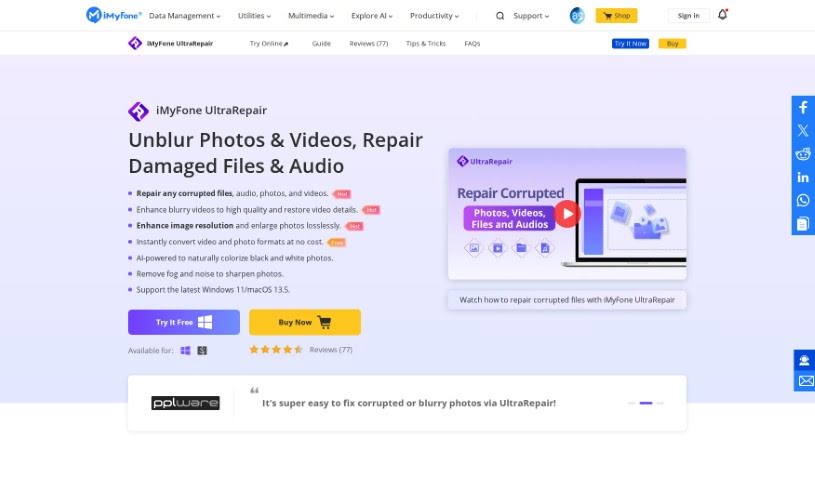
What is iMyFone?
IMyFone is a software company that develops a range of tools designed to help you repair and recover files. They offer solutions for both Windows and Mac users, with specific system requirements clearly outlined for each operating system. iMyFone’s products are great for improving image quality, fixing various image formats like PNG, RAW, TIFF, and CRW, and they support a wide array of image, video, and document file types, including JPEG, JPG, PNG, GIF, MP4, MOV, PDF, DOCX, and PPTX. What’s really helpful is that their software is designed to be user-friendly, often including features like batch processing, which lets you work on multiple files at once, and the ability to add a sample file to help with the repair process.
Who created iMyFone?
The company behind iMyFone was founded back in 2015, and the software itself was launched on June 17, 2024. While the specific founder’s name isn’t publicly shared, the company has built a strong reputation by specializing in data management solutions. This includes data recovery software, such as their D-Back tools for iOS, Windows, and Mac, as well as hard drive recovery and specialized WhatsApp recovery. They also offer a file repair service through one of their key products, iMyFone UltraRepair.
What is iMyFone used for?
Here’s a look at the many things iMyFone can help you with:
- File Repair: It’s excellent for fixing corrupted files, whether they’re photos, videos, audio files, or documents.
- Video Quality: It can address pixelation issues in videos and even repair 4D and 8K videos.
- Photo & Video Enhancement: You can use it to boost the overall quality of your photos and videos, restoring visual clarity and fine details.
- Batch Processing: For photos, it supports batch repairs, saving you a lot of time.
- Specific Photo Fixes: It can repair red-eye issues in photos.
- Brand Support: The software is designed to repair photos and videos from many popular camera brands.
- One-Click Enhancement: For photos, there’s a simple one-click feature to improve their quality.
- Damage Assessment: It uses advanced AI technology to assess how badly a file is damaged.
- Device Compatibility: You can repair photos from a wide variety of devices.
- Unplayable Videos: It helps fix videos that won’t play or are broken.
- Video Troubleshooting: It resolves various video problems, including pixelation, sound issues, and saturation problems.
- High-Resolution Video Repair: It specifically handles the repair of 4D and 8K videos.
- Detail Restoration: It’s great at restoring visual quality and bringing back lost details.
- Versatile Corruption Handling: It can manage a broad range of file corruption types.
- Lossless Enlargement: It allows you to enlarge images without losing quality.
- Automatic Conversion: It includes a feature for automatic format conversion.
- Blurry Image Fixes: It can repair blurry images, making them clearer.
- Device & Source Flexibility: It’s capable of repairing files from many different devices, including phones and cameras, and even from the internet.
- Video Enhancement Features: It offers various features specifically for enhancing videos.
- Free Format Conversion: You can convert video and photo formats for free.
- Instant Conversion: It provides instant conversion of video and photo formats.
- Pixelation Reduction: It can reduce low pixelation in videos.
- Audio & Saturation Improvement: It can enhance sound quality and saturation in videos.
Who is iMyFone for?
iMyFone’s tools are particularly useful for a variety of professionals and enthusiasts:
- Photographers: To restore damaged or low-quality images.
- Graphic Designers: For ensuring high-quality visuals in their projects.
- Videographers: To fix corrupted video files or enhance footage.
- Content Creators: To maintain the quality of their visual media.
- Web Developers: For optimizing images and videos used on websites.
- Digital Marketers: To ensure marketing materials look their best.
- Data Analysts: To recover and repair important data files.
- Software Engineers: For data management and recovery needs.
How to use iMyFone?
Using iMyFone effectively is straightforward if you follow these steps:
- Download and Install: First, head over to the official iMyFone website to download the software. Then, just follow the on-screen prompts to install it on your computer.
- Launch the Program: Once the installation is complete, open the iMyFone software. You can usually do this by double-clicking its icon on your desktop or finding it in your applications list.
- Connect Your Device: If you’re working with files from a phone or other device, connect it to your computer using the correct cable. Make sure the connection is secure so it doesn’t drop.
- Select a Feature: iMyFone has a range of features, like data recovery, data erasing, or system repair. Pick the one that best suits what you need to do.
- Follow On-Screen Instructions: Each feature comes with its own set of clear instructions. Just follow them carefully as you move through the process.
- Initiate the Process: Click the relevant buttons to get things started. For instance, if you’re recovering data, you’ll typically start a scan and then wait for the results to appear.
- Review and Confirm: After the process finishes, take a moment to look over the results. You can preview recovered files or confirm the actions you want to take.
- Complete the Process: Finally, follow any remaining on-screen prompts to finalize the operation. It’s a good idea to safely disconnect your device once you’re all done.
- Explore Additional Features: Don’t forget to check out the other features iMyFone offers. You might find other tools that are really helpful for maintaining and managing your device.
By sticking to these steps, you’ll be able to use iMyFone efficiently to manage your data and keep your device running smoothly.