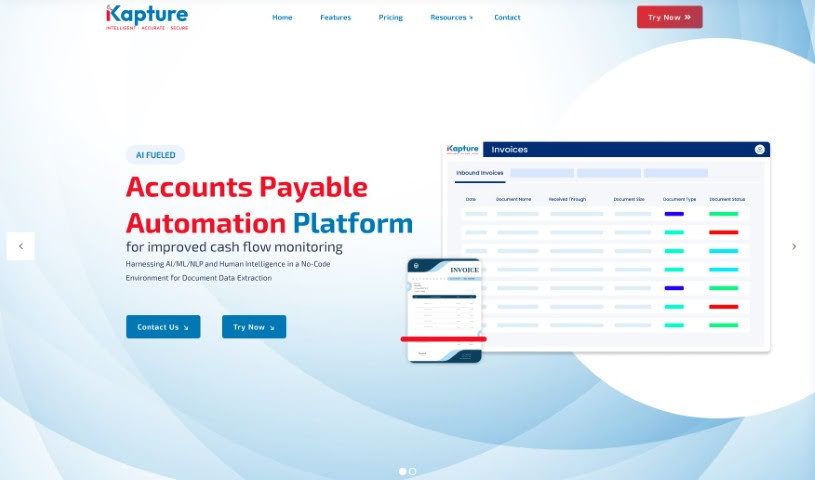
Screenshot of Ikapture

Ikapture

Discover what Ikapture is and how to use it effectively in 2025. We'll explore its features and see how it stacks up against other documentation tools.

Screenshot

What is Ikapture?

IKapture is a smart, AI-powered solution designed to completely change how businesses handle their documents. It uses artificial intelligence and machine learning to automatically pull data from all sorts of documents, turning them into useful information your business can act on. iKapture is known for being highly accurate, keeping your data super secure, and making the whole process of dealing with documents like invoices, patient records, and other paper-based information much more efficient. It really helps streamline your workflows, manage data better, and offers features like easy automation, a user-friendly design, strong security, collaboration tools, and overall efficiency. If your organization needs a document processing system that’s simple to use, safe, and can grow with you, iKapture is a great fit.

Who created Ikapture?

An innovative individual developed iKapture with a clear goal: to transform document processing using artificial intelligence. This company focuses on automating data extraction from various documents, offering secure, efficient, cloud-based processing. With features that cover automation, ease of use, security, collaboration, and efficiency, iKapture is ideal for organizations that want smoother workflows and better data management. You can find their headquarters at 8115 Maple Lawn Blvd. Suite 350, Fulton, MD 20759, and they also have offices in the USA, UK, and India.

What is Ikapture used for?

  • Automation: It automatically extracts data from various documents using AI and ML, providing it in formats ready for immediate use.
  • Usability: You’ll find the interface incredibly easy to use; there’s no need for coding or managing templates yourself.
  • Security: It offers a highly secure and scalable cloud-based API, allowing for efficient processing that can handle multiple tasks at once.
  • Collaboration: The platform includes a portal designed to make collaborating with multiple vendors simple and straightforward.
  • Efficiency: Expect a boost in process efficiency and a positive return on investment (ROI) thanks to data automation and better data handling.
  • Automated Document Collection and Classification: It can handle PDFs, JPGs, and PNGs coming from many different sources.
  • Invoice Life Cycle Management: It supports the entire invoice process, complete with reports, dashboards, and key metrics.
  • Fraud Detection: iKapture can identify fraudulent invoices and alert your Accounts Payable team to any suspicious submissions.
  • Supplier Segmentation: The system helps you categorize suppliers based on specific criteria, which is useful for managing risk and building stronger relationships.
  • Role-Based Access: It ensures that only authorized users can view and perform operations, thanks to centralized governance and strict security measures.
  • Streamlines data extraction processes: Makes pulling information from documents much simpler.
  • Enhances efficiency, security, and data accuracy: Improves how quickly, safely, and correctly data is handled.
  • Improves secure storage and access to data: Ensures your documents are stored safely and can be accessed easily.
  • Handles various document types: Works with invoices in accounts payable, patient records in healthcare, and other types of paper records.
  • Optimizes workflows and data management: Makes your processes run smoother and data organization better.
  • Automated data extraction from various documents: Automatically pulls information from different kinds of papers.
  • Enhanced security in document processing: Provides better protection for your documents.
  • Improved efficiency in processing invoices and patient records: Speeds up how invoices and patient information are handled.
  • Streamlining workflows and optimizing data management: Makes processes smoother and data organization more effective.
  • User-friendly document processing system: A system that’s easy for anyone to use.
  • Efficient and parallel processing with a cloud-based API: Can process many things at once quickly, using a secure online service.
  • Collaboration with multiple vendors: Makes it easy to work with different suppliers.
  • Data automation and improved data handling: Automates data tasks and makes managing information better.
  • Enhancing efficiency, security, and data accuracy in organizations: Boosting how well organizations work, stay secure, and handle data correctly.
  • Highly secure and scalable document processing: Handles documents safely and can grow as your needs do.
  • Provides highly secure and scalable cloud-based API for efficient and parallel processing: Offers a safe, growing online service for fast, simultaneous processing.
  • Automates the extraction of valuable information from documents using AI: Uses AI to automatically get important data out of your papers.
  • Enhances efficiency, security, and data accuracy for organizations dealing with paper-based documentation: Helps businesses with paper records work faster, safer, and more accurately.
  • Streamlines data extraction processes and improves secure storage and access to data: Simplifies getting data and makes storing and accessing it more secure.
  • Provides a highly secure platform for enhanced data security features: Offers a very safe place with advanced security for your data.
  • Designed for document digitization and intelligent data extraction: Built to turn documents into digital formats and intelligently pull out information.
  • Enhanced security for document processing: Better security when handling documents.
  • Improved efficiency in workflows: Makes your work processes run more smoothly.
  • Streamlining data management processes: Simplifying how you manage your data.
  • Optimizing data handling for accounts payable and healthcare records: Making data management better for invoices and patient files.
  • Efficient and parallel processing with a secure cloud-based API: Fast, simultaneous processing using a safe online service.
  • User-friendly interface for easy adoption: An interface that’s simple to learn and use.
  • Scalable document processing system: A system that can handle more documents as your business grows.
  • High accuracy in information extraction: Gets information from documents very accurately.
  • Aids in automating the extraction of valuable information from documents: Helps automatically pull important data from papers.
  • Suitable for organizations dealing with paper-based documentation to enhance efficiency, security, and accuracy: Good for businesses with paper records to improve speed, safety, and correctness.
  • Designed to be highly secure, offering enhanced data security features on a scalable cloud-based platform: Built to be very secure, with advanced data protection on a growing online system.
  • Beneficial for streamlining data extraction processes, increasing efficiency, and improving secure storage and access to data: Helps simplify getting data, makes things faster, and improves how safely data is stored and accessed.

Who is Ikapture for?

  • Organizations that deal with a lot of paper documents.
  • Accounts Payable departments.
  • Healthcare professionals.
  • Any business that handles paper-based documentation.

How to use Ikapture?

To get the most out of iKapture, just follow these simple steps:

  1. Sign Up: Head over to the iKapture website and create your account to start using the platform.
  2. Navigation: Take a look around the interface – it’s designed to be really user-friendly, so you won’t need any coding or template management.
  3. Document Processing: Jump into the automation feature. It uses AI and ML to quickly pull data from all sorts of documents.
  4. Security: You can count on the highly secure cloud-based API for efficient, parallel processing, keeping your data confidential.
  5. Collaboration: Use the interface portal to easily work with multiple vendors, making your workflows much smoother.
  6. Efficiency: You’ll see a real improvement in how efficient your processes are and notice cost savings thanks to data automation and better data handling.
  7. FAQs: Check out the Frequently Asked Questions section if you have any common questions about how iKapture works.
  8. Try iKapture: Go ahead and give it a spin! Just select the ‘Try Now’ option on the website to experience its capabilities firsthand.
  9. Additional Features: Explore everything iKapture offers, like 360-degree visibility, a conversational AI bot, fraud detection, supplier segmentation, and much more to really optimize how you process and manage documents.
  10. Accessibility: Take advantage of role-based access control, central governance, and strict security measures to keep your operations streamlined.
  11. MFA: For extra security, especially if external users are accessing the platform, make sure to enable multi-factor authentication.
  12. Matching: Automate the matching process to cut down on manual work, catch exceptions, and ensure your costs are accounted for accurately.
  13. Non-PO Process: Use the platform for non-Purchase Order invoices for those one-off transactions; it makes things flexible and easy to track.
  14. Explore Resources: Don’t forget to visit the Resources section on the website for extra help and more information about iKapture.

By following these steps, you can really harness the power of iKapture to make your document processing smoother, boost efficiency, and ensure your data is accurate, all within a secure and easy-to-use system.

Related AI Tools

Discover more tools in similar categories that might interest you

Stay Updated with AI Tools

Get weekly updates on the latest AI tools, trends, and insights delivered to your inbox

Join 25,000+ AI enthusiasts. No spam, unsubscribe anytime.