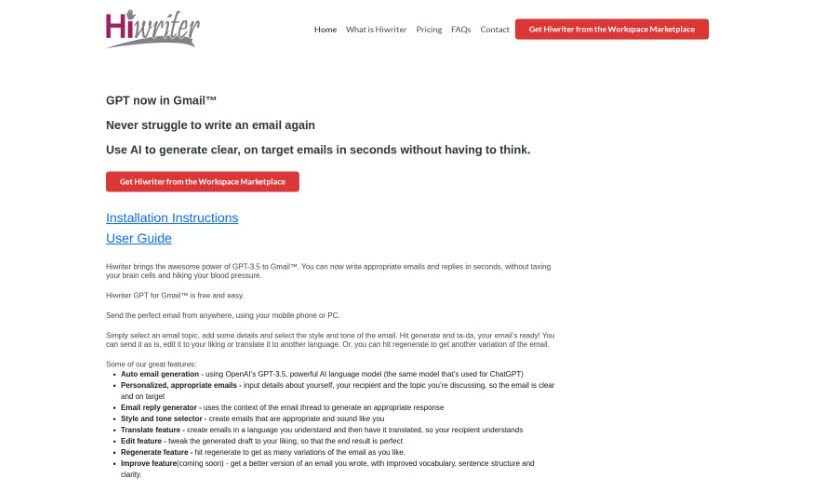
Screenshot of Hiwriter

Hiwriter

Discover what Hiwriter is and how to use it effectively in 2025. We'll explore its features and see how it stacks up against other Email Writing Tools.

Screenshot

What is Hiwriter?

Hiwriter is a handy tool that works right inside Gmail™ to help you write emails. It uses GPT-3.5, a powerful AI, to make crafting emails and replies much quicker. You just pick a topic, add your specific details, choose a style and tone that fits, and Hiwriter generates the email for you. It’s designed to make your email writing more efficient and effective. You get features like automatic email generation, personalized messages, help with replies, style and tone options, translation, editing, and the ability to generate different versions of an email. Plus, it’s optimized for mobile and supports multiple languages.

Who created Hiwriter?

Hiwriter was developed by a company that focuses on integrating GPT-3.5 directly into Gmail™ to simplify email writing. While the founder’s name and specific company details aren’t provided in the document, we know they offer key features like auto email generation, personalized emails, an email reply generator, mobile optimization, and multi-language support. Essentially, Hiwriter’s goal is to give users a powerful AI tool for composing emails more efficiently.

What is Hiwriter used for?

Hiwriter helps you with a variety of email tasks:

  • Auto Email Generation: It uses OpenAI’s GPT-3.5 to create emails automatically.
  • Personalized Emails: You can input details about yourself, the recipient, and the topic to get emails that are just right.
  • Email Reply Generator: It uses the context of your email thread to help you craft suitable replies.
  • Style and Tone Selector: Pick the style and tone that best matches your needs and sounds like you.
  • Translate Feature: Write an email in one language and have it translated for the recipient.
  • Edit Feature: Customize the generated draft to make it perfect.
  • Regenerate Feature: Get multiple different versions of the email if the first one isn’t quite what you’re looking for.
  • Mobile Optimization: It’s designed to work smoothly on your phone, so you can email easily on the go.
  • Multi-Language Support: Generate emails in many different languages.
  • Improve Feature (coming soon): This upcoming feature will help refine your emails with better vocabulary, sentence structure, and overall clarity.

It also offers:

  • Personalized, appropriate emails based on your specific input.
  • Email reply generation that considers the context of the conversation.
  • A style and tone selector to ensure your emails sound just right.
  • A translate feature for sending messages in different languages.
  • An edit feature to tweak any generated drafts.
  • A regenerate feature to get various email options.
  • Mobile optimization for convenient use anywhere.
  • Multi-language support for creating emails in different languages.
  • An upcoming improvement feature to enhance vocabulary and structure.

And again, it provides:

  • Auto Email Generation using OpenAI’s GPT-3.5.
  • Personalized, appropriate emails with your input details.
  • An email reply generator based on the email thread’s context.
  • A style and tone selector to create emails that match your preferences.
  • A translate feature for creating and translating emails in multiple languages.
  • An edit feature to customize generated drafts.
  • A regenerate feature for generating multiple email variations.
  • Mobile optimization for convenient use on mobile devices.
  • An upcoming improvement feature for enhanced vocabulary and clarity.

Who is Hiwriter for?

Hiwriter is useful for:

  • Business professionals
  • Anyone sending personal emails
  • Individuals who frequently send business or personal emails

How to use Hiwriter?

Hiwriter is a great tool that integrates GPT-3.5 right into Gmail™, making email writing much faster and simpler. Here’s a step-by-step guide on how to get the most out of it:

  1. Get Hiwriter: First, head over to the Hiwriter website and install the GPT for Gmail™ extension. It’s a straightforward process.
  2. Pick Your Email Topic: Decide what you want to write about. Choose the main topic or subject for your email.
  3. Add Your Details: Now, provide any specific information needed for the email. This includes details about who you’re sending it to and the context of the message.
  4. Select Style and Tone: Choose the right style and tone for your email. This helps ensure it sounds like you and conveys your message effectively.
  5. Generate Your Email: Click the generate button. Hiwriter will create the email draft for you. You can then send it as is, make edits, translate it, or even generate a different version if you like.

Key Features to Remember:

  • Auto Email Generation: It uses the powerful GPT-3.5 model to create emails quickly.
  • Personalized Emails: It tailors messages based on your input, making them clear and relevant.
  • Email Reply Generator: It crafts suitable responses by looking at the conversation thread.
  • Edit and Regenerate: You can easily modify drafts or get new variations.
  • Mobile Optimization: It works perfectly on mobile devices, so you can email wherever you are.
  • Multi-Language Support: You can generate and translate emails in many different languages.

What’s Coming Soon:

  • Improve Feature: This upcoming feature will help you enhance your vocabulary, sentence structure, and overall clarity.

Important Note:

  • Privacy Policy: Be sure to check out the privacy policy on the Hiwriter website. It explains how they handle your data and keep it secure.

The Benefits for You:

  • Save Time: It makes composing emails effortless, saving you time and reducing stress.
  • Personalized Touch: Each message is tailored to your style, making your communication more effective.
  • Communicate Globally: It helps break down language barriers, allowing for smoother communication with anyone.

Enjoy Effortless Email Writing:

Experience the convenience Hiwriter offers for both your personal and business emails. It truly makes email writing a breeze.

With Hiwriter, you can boost your email writing with AI-driven efficiency and precision, ensuring a smooth and personalized experience every single time.

Related AI Tools

Discover more tools in similar categories that might interest you

Stay Updated with AI Tools

Get weekly updates on the latest AI tools, trends, and insights delivered to your inbox

Join 25,000+ AI enthusiasts. No spam, unsubscribe anytime.