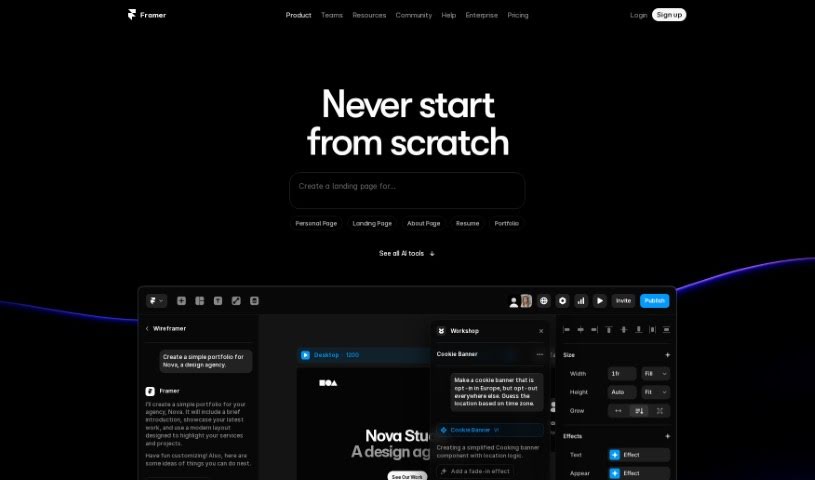
Screenshot of Framer

Framer

Discover Framer, an AI-powered website builder. Learn its features, how to use it for rapid website creation and customization, and how it stacks up against other website builders in 2025.

Screenshot

What is Framer?

Framer AI is a really neat tool that uses artificial intelligence to help you build and publish websites super fast. Imagine taking a basic idea and turning it into a live webpage in just seconds! It gives you lots of control over how your site looks, letting you tweak layouts, styles, and even use a built-in copywriter to make your website’s text shine. Whether you’re a tech whiz or just starting out, Framer AI has something for you. Plus, you can publish your website for free, generate as many AI designs as you need, pick from different themes, and join a community that’s always ready to help with tutorials.

This tool makes creating and improving your website content incredibly easy, making it a top choice for anyone looking for the best AI-driven website development experience. You can really make your website your own by adjusting the layout, styling, and copy for every part of your site. You can also play around with different fonts and color schemes to really nail your theme’s look.

What’s cool about Framer AI is how it creates unique combinations for each section of your website. This means you can craft a really distinctive look and feel that stands out. It works for both Mac and Windows users, and you don’t need any special technical skills to get started. Publishing your website is also completely free.

Who created Framer?

Framer was brought to life by Koen Bok and Jorn van Dijk. They officially launched the company on June 13, 2023, with a clear goal: to offer an AI tool that makes building and publishing websites quick and simple. Framer AI packs in features like rapid website generation, easy customization of layouts and styles, a handy built-in copywriter, unique theme options, a free domain, and a lively community with plenty of helpful tutorials. People of all technical skill levels can really benefit from Framer AI’s user-friendly interface and its ability to speed up website design.

What is Framer used for?

Framer is fantastic for a bunch of things:

  • Speedy Website Creation: Quickly generate and publish websites.
  • Total Customization: Easily adjust the layout, styling, and copy for every section of your site.
  • AI-Powered Copywriting: Use the built-in copywriter to improve your website’s text.
  • Design Exploration: Shuffle through unique combinations of design elements to find the perfect look.
  • Freebies Galore: Get a free domain and enjoy unlimited AI generations for your projects.
  • Community Support: Access an active community with over 50 helpful tutorials.
  • Global Reach: Create adaptive designs and targeted content for different languages.
  • Content Enhancement: Boost your website copy using advanced AI tools.
  • Localization: Efficiently translate your website for different regions.
  • Concept to Reality: Turn your raw ideas into ready-to-use web pages in no time.
  • Dynamic Rewriting: Refine your text for better impact.
  • Theme Variety: Choose from a wide range of theme options.
  • Multilingual Optimization: Adapt your content for global audiences and optimize for multilingual support.

Who is Framer for?

Framer is a great tool for:

  • Designers
  • Developers
  • Marketers
  • Entrepreneurs
  • Content creators
  • Small Business Owners
  • Web designers
  • UX designers
  • Marketing professionals
  • UI/UX Designers
  • UI Designers
  • Website developers
  • Digital marketers
  • Anyone with little to no technical skills!

How to use Framer?

Here’s a simple guide to using Framer effectively:

  1. Get Started with Framer AI: You can jump right into Framer AI using your web browser on either a Mac or Windows computer. No downloads or installations are needed, making it super accessible.
  2. Make Your Website Your Own: Framer AI lets you easily tweak the layout, styling, and copy for each part of your website. Feel free to experiment with different themes by mixing and matching display fonts, text fonts, and color palettes until you get that perfect, unique look.
  3. Publish for Free: Framer AI offers free website publishing. You get unlimited projects and AI generations, plus a free domain and even up to 100 free CMS items to get you started.
  4. Tap into AI Power: Make the most of Framer’s AI features. Use the built-in copywriter to polish your website’s text, take advantage of unlimited AI generations to explore various design ideas, and try shuffling through different layout and styling combinations.
  5. Connect with the Community: Join the active Framer AI community! It’s a great place to get ideas, share your experiences, and find answers to any design questions you might have. Plus, there are over 50 tutorials available to help you master the tool.
  6. AI Translation and Text Generation: Framer’s AI toolkit also includes advanced features like AI translation for localizing your site, customizing your brand’s tone, dynamically rewriting text, and using AI Style integration for accurate content translation.

By following these steps, you can easily create and publish websites with Framer AI, even if you don’t have a lot of technical experience.

Related AI Tools

Discover more tools in similar categories that might interest you

Stay Updated with AI Tools

Get weekly updates on the latest AI tools, trends, and insights delivered to your inbox

Join 25,000+ AI enthusiasts. No spam, unsubscribe anytime.