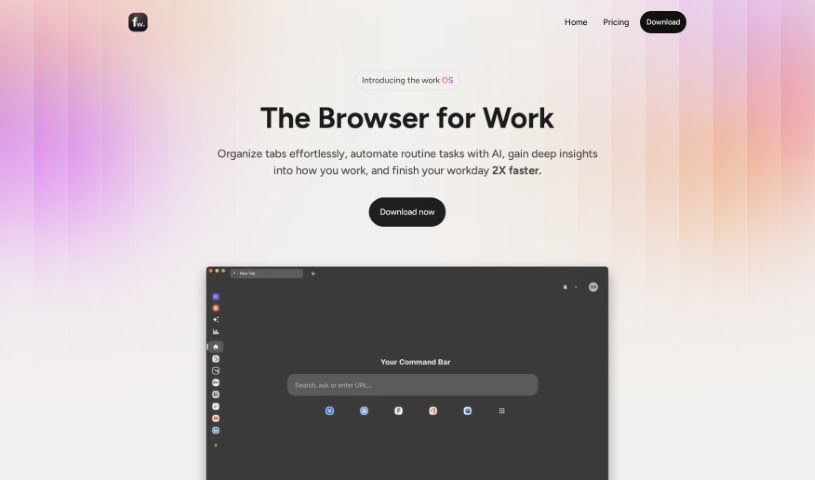
What is Floutwork?
Floutwork is your ultimate productivity sidekick, designed specifically for freelancers. It brings together everything you need to manage your workday: tasks, your calendar, email, goals, notes, and even time tracking. It’s got a special ‘Focus Mode’ to help you tune out distractions, a handy Notes app for all your thoughts, and smart email categorization to keep your inbox tidy. What’s really neat is that Floutwork uses AI to help schedule your tasks more efficiently, makes work a bit more fun by gamifying productivity, and importantly, keeps your data safe and sound right on your own device. Plus, you can even open web apps directly within Floutwork, making your workflow super smooth and boosting how much you get done.
Who created Floutwork?
Kathleen Burnett, from Anywhere League, is the mind behind Floutwork. She launched the company on March 8, 2023, with a clear vision: to create a single browser interface for people who work with information, like founders, freelancers, product managers, and developers. Floutwork’s main goal is to boost productivity by bringing all your tabs, tools, tasks, calendar, notes, and emails into one organized space. This helps cut down on distractions and makes it easier to get things done. The platform offers features like Focus Mode, Task Management, Calendar Management, Email Categorization, Goal Management, Notes Management, Time Tracking, and AI integrations, all aimed at simplifying your work and helping you concentrate better.
What is Floutwork used for?
- Email Management: Keep your inbox organized and efficient.
- Task Management: Handle all your to-dos with ease.
- Calendar Management: See your schedule all in one place.
- Time Tracking: Monitor how you spend your time on different apps.
- Goal Management: Keep track of your objectives.
- Notes Management: Jot down and organize your thoughts.
- Focus Mode: Minimize distractions to concentrate on your work.
- Quick Web App Access: Open web applications directly from the platform.
- Boosting Freelancer Productivity: Designed to enhance the workday for freelancers.
- Inbox Categorization: Sort your emails effectively.
- Minimizing Distractions: Helps you stay focused.
- Efficient Inbox Handling: Categorize emails to manage your inbox better.
- Automated Scheduling: Tasks get scheduled automatically based on how long they take.
- Integrated Calendar: Schedule tasks directly within your calendar view.
- Streamlined Workflow: Improve productivity by accessing web apps easily.
- On-Device Security: Your data is stored securely on your device.
- AI-Powered Scheduling: Uses AI to optimize when tasks get done.
- Gamified Productivity: Makes tracking focus, tasks, and hours feel like a game.
- Focus Mode: A dedicated feature to reduce distractions.
- Unified Desktop Solution: Brings various tools together in one app.
- Gamification Features: Enhances productivity through game-like tracking.
Who is Floutwork for?
Floutwork is a great tool for a variety of professionals, including:
- Founders
- Product Managers
- Executives
- Freelancers
- Knowledge workers
- Researchers
- Software developers
- Data Analysts
- Consultants
- Marketing professionals
- Engineers
- Developers
How to use Floutwork?
Here’s a step-by-step guide to getting the most out of Floutwork:
-
Getting Started:
- First, install Floutwork on your desktop. It’s available for both macOS and Windows.
- Once installed, set up your account and log in to begin exploring all the features.
-
Task Management:
- Adding tasks and reminders is super easy with its user-friendly interface.
- You’ll benefit from Floutwork’s smart algorithms that help schedule your tasks optimally, considering how long each one will take.
-
Email Management:
- Use the email categorization feature to make managing your inbox much simpler.
- You can clean up your inbox efficiently by easily categorizing and handling your emails.
-
Calendar Management:
- Connect your various calendars to get a single, clear view of your entire schedule right within Floutwork.
- Let the intelligent algorithms figure out the best times to complete your tasks, which really helps boost your productivity.
-
Note Management:
- Use the built-in Notes app to quickly jot down ideas and organize them using tags.
- You can access your notes directly from your workspace, which helps reduce distractions and keeps things organized.
-
Focus Mode:
- When you need to concentrate, activate Focus Mode. It helps minimize distractions so you can really focus on your tasks.
- The interface dims slightly, highlighting your current task to help you stay locked in.
-
Time Tracking:
- Floutwork automatically monitors the time you spend on different web apps, giving you insights into your online activity.
- Understanding how you use your time online can really help you become more productive.
-
Security and Privacy:
- You can feel confident knowing that Floutwork prioritizes your privacy by securely storing all your data directly on your device.
- Your interactions within the app are also encrypted for extra security.
-
Mobile Access:
- Need to work on the go? You can access Floutwork from your mobile device.
- Stay productive even when you’re away from your desktop with its seamless mobile integration.
-
Productivity Enhancement:
- Take advantage of Floutwork’s gamification features to track your focus, task completion, and work hours in a fun, game-like way.
- Embrace the all-in-one approach to streamline your work and generally boost your productivity.
By following these steps, you can really make the most of Floutwork’s features. It’s designed to help you work more efficiently and in a more organized, user-friendly way.