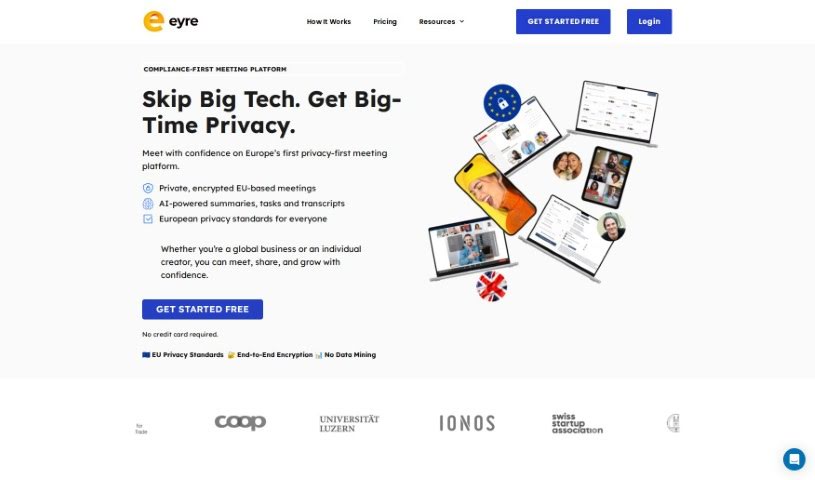
Screenshot of Eyre

Eyre

Discover Eyre, your AI-powered meeting assistant for 2025. Learn about its features like interactive whiteboards, task management, and AI assistant Jane, and see how it stacks up against other meeting tools.

Screenshot

What is Eyre?

Eyre is an AI-powered platform built to make your collaborative meetings much better. It is your all-in-one meeting hub. It offers a really interactive virtual whiteboard where you can brainstorm ideas together. Plus, it helps with task management, securely shares content, and even has an AI assistant named Jane, powered by GPT-4. With Eyre, your team can easily brainstorm, assign tasks, keep an eye on progress as it happens, and quickly create all sorts of meeting content.

When it comes to sharing content, Eyre keeps things super secure. You can set specific permissions so only the right people see what they need to. Your meeting rooms can be personalized, and it uses a zero-knowledge architecture. This means only authorized individuals can access specific data, which is great for confidential discussions. Eyre also makes managing tasks a breeze. You can assign them, set deadlines, track progress, and even sync your workflows with other tools you already use, really boosting productivity during meetings.

Beyond that, Eyre lets you connect with other task management tools you might already be using. You can save your whiteboard sessions and come back to them later, which is handy. It can also generate various meeting materials for you, like agendas and summaries. For improving how you communicate, Eyre offers a personalized speaking coach, a handy AI teleprompter, and speech analytics to help you nail your presentations.

Who created Eyre?

Eyre was brought to life by a team of really experienced professionals. They come from all sorts of backgrounds, including AI, software development, marketing, finance, and business development. The co-founders of Eyre.ai are Yuliia Habriiel and Philip Pristupa. Yuliia has a strong background in product marketing, while Philip brings expertise in cybersecurity-focused system development. Eyre.ai officially launched on March 19, 2024. Their main goal was to create a secure platform specifically for confidential conversations across different industries. The company is guided by a team that’s really committed to privacy, doing excellent work, and pushing innovation in secure communication technology. Ultimately, they aim to be a safe space for secure and confidential conversations, no matter the industry.

What is Eyre used for?

  • Seamless workflow integration: Eyre connects smoothly with your existing workflows.
  • Brainstorm ideas: Use the interactive whiteboard to spark creativity.
  • Meeting content and collateral sharing: Easily share important documents and materials.
  • Whiteboard templates generation: Quickly create professional-looking whiteboard layouts.
  • Workflow visualization: See your team’s processes laid out clearly.
  • Seamless integration with task management tools: Connect Eyre with tools like Asana, Trello, or Jira.
  • Meeting insights capture: Gather key takeaways and action items.
  • Collaborative diagram sketching: Draw and annotate diagrams together in real-time.
  • PDF export functionality: Save your whiteboards and notes as PDFs.
  • Re-visitable whiteboard sessions: Access and review past brainstorming sessions.
  • Content Library building for meetings: Organize and store meeting materials for easy access.
  • Watermark removal capabilities: Get clean, unwatermarked exports.
  • Brainstorming ideas: A core function for generating new concepts.
  • Enhancing real-time collaboration in meetings: Work together more effectively during live sessions.
  • Integrating task management into meetings: Turn discussions into actionable tasks.
  • Seamless synchronization with task management tools: Keep your task lists updated across platforms.
  • Saving and revisiting whiteboard sessions: Never lose a great idea from a past meeting.
  • Ensuring secure content distribution during meetings: Share sensitive information with confidence.
  • Generating meeting contents like agendas, summaries, and tasks: Automate the creation of essential meeting documents.
  • Aiding brainstorming sessions during meetings: Provide tools to make brainstorming more productive.
  • Personalizing the meeting room experience: Customize settings for a better user environment.
  • Exporting whiteboard sessions as PDF or PowerPoint: Share your visual notes in common formats.
  • Improving speaking skills with AI-powered teleprompter: Practice and deliver presentations smoothly.
  • Augment collaborative meetings: Make group discussions more fruitful.
  • Conceptualizing visuals: Sketch out ideas and concepts visually.
  • Assigning tasks: Directly delegate action items to team members.
  • Tracking real-time progress: Monitor task completion as it happens.
  • Content distribution with granular permission assignments: Control who sees what.
  • Organize meeting materials efficiently: Keep all your meeting documents tidy.
  • Create interactive whiteboard templates: Build reusable frameworks for your sessions.
  • Generate meeting agendas, summaries, tasks, and files: A comprehensive suite for meeting documentation.

Who is Eyre for?

Eyre is designed for professionals who need secure and efficient collaboration, especially those dealing with sensitive information:

  • Legal professionals: For confidential client discussions and case strategy.
  • Finance professionals: For secure financial planning and client meetings.
  • Business Development Professionals: For strategizing and client presentations.
  • Financial Professionals: (Repeated, but kept as per original structure)
  • Insurance professionals: For client consultations and policy discussions.
  • Corporate professionals: For team meetings, project planning, and internal discussions.
  • AI professionals: For collaborative development and brainstorming.
  • Software development professionals: For project planning, bug tracking, and team syncs.
  • Marketing professionals: For campaign brainstorming and strategy sessions.

How to use Eyre?

Here’s a simple guide to get the most out of Eyre:

  1. Brainstorming Ideas: Jump onto the interactive whiteboard! You can sketch out diagrams, pop on sticky notes, and really collaborate with your team in real-time. It’s a great way to boost creativity and keep everyone engaged during your meetings.
  2. Task Assignment and Tracking: Need to assign a task? You can do it right from the whiteboard. Plus, you can keep an eye on everyone’s progress seamlessly throughout the meeting, making task management super efficient.
  3. Personalized Meeting Room Experience: Eyre offers a secure platform where you control permissions. You can also use Jane AI to help create intuitive meeting agendas, summaries, and more, all tailored specifically to what you need.
  4. Free Trial Version: If you want to try Eyre out, the trial version is a good start. It lets you get 10 meeting transcriptions, create agendas and minutes, and you get 2 whiteboards (they’ll have a watermark) with PDF export options.
  5. Pro Version Features: Ready for more? Upgrading to the Pro version gives you unlimited whiteboards, lets up to 10 team members collaborate, and includes a Content Library for creating custom meeting agendas. You also get premium support.
  6. Content Management with Jane AI: Let Jane AI do some of the heavy lifting! You can use its AI-generated content for whiteboard templates, brainstorming sessions, organizing your ideas, and managing workflows efficiently.
  7. Enterprise and Agencies Package: For larger teams or agencies, this package unlocks everything. Think unlimited whiteboards, transcriptions, agendas, training for Jane AI, dedicated collaborative workspaces, and professional services to really boost your collaboration.
  8. Export Capabilities: Need to share your work? You can easily export your whiteboards as PDF or PowerPoint files, making it simple to share and continue collaborating outside the meeting.
  9. Speech Enhancement with AI Teleprompter: Eyre can help you deliver focused and clear presentations. Features like real-time speech suggestions ensure you’re precise, clear, and improve your overall speaking skills.
  10. Post-Meeting Feedback: After the meeting, Eyre can give you personalized tips to help you refine your speaking style and delivery. This ensures you communicate with clarity and confidence.

By following these steps, you’ll be able to use Eyre effectively for smooth collaboration, easy task management, efficient content generation, and better speaking in all your meetings.

Related AI Tools

Discover more tools in similar categories that might interest you

Stay Updated with AI Tools

Get weekly updates on the latest AI tools, trends, and insights delivered to your inbox

Join 25,000+ AI enthusiasts. No spam, unsubscribe anytime.