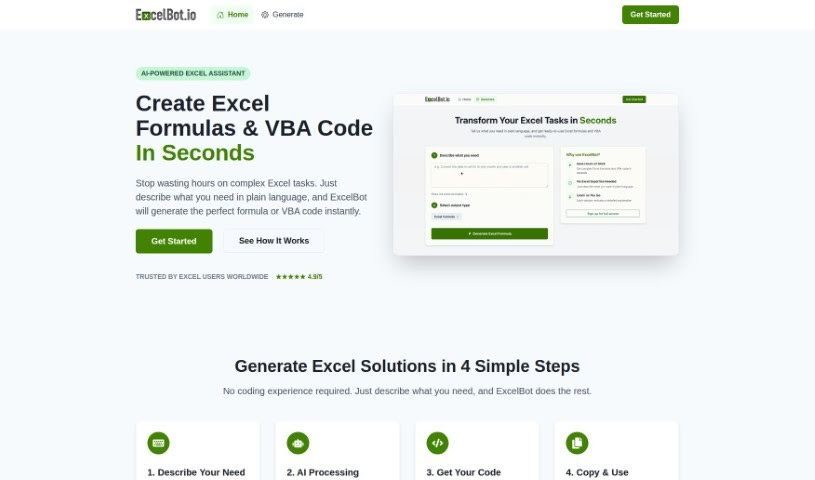
Screenshot of Excelbot

Excelbot

Discover what Excelbot is and how to use it effectively in 2025. We'll explore its features, compare it to other Excel tools, and walk you through how to get started.

Screenshot

What is Excelbot?

Excelbot is your personal assistant for Excel. It lets you create, edit, and copy Excel formulas or even VBA code just by typing what you want in plain English. It’s designed to be super easy to use, whether you’re an Excel whiz or just starting out. Excelbot can whip up Excel formulas and VBA code based on your natural language requests, and it even explains what the code does. This is a real game-changer for everyone, from seasoned coders to absolute beginners. It helps automate your Excel tasks, boost your productivity, makes managing data a breeze, and generally simplifies coding for anyone new to it. However, it’s not perfect. You’ll need an email for the free trial, it doesn’t support many languages, there’s no offline option, and data privacy isn’t explicitly detailed. Plus, there aren’t any built-in learning resources, it doesn’t work with other spreadsheet programs, there’s no mobile app, and you can’t collaborate with others. You also have to manually copy and paste results, and it doesn’t offer guidance if you run into errors.

Who created Excelbot?

Excelbot was developed by the company ExcelBot.io, and it officially launched on February 26, 2023. This handy tool lets you generate Excel formulas and VBA code simply by describing what you need in natural language. It’s built to help both experienced Excel users and those who are new to coding. Excelbot really simplifies coding tasks, supports several languages, and helps boost your productivity by automating everyday tasks and making data management much smoother.

What is Excelbot used for?

Here’s a quick rundown of what Excelbot can do for you:

  • It supports multiple languages, so you can use it no matter your preferred language.
  • It’s great at generating Excel formulas.
  • It can also generate VBA code for more complex tasks.
  • It understands instructions given in natural language.
  • It helps automate your Excel tasks, saving you time.
  • It provides clear explanations for the code it generates.
  • It makes managing your spreadsheets much easier.
  • It’s designed to advance your overall productivity.
  • It really helps with managing your data effectively.
  • It’s perfect for automating all sorts of tasks.
  • Coding becomes simple, even for beginners.
  • You don’t need any prior experience to use it.
  • It’s also very useful for professional coders.
  • The code it generates is ready to be used right away.

Who is Excelbot for?

Excelbot is a fantastic tool for a wide range of users:

  • Professional coders looking for a quicker way to generate Excel-specific code.
  • Existing Excel users who want to expand their capabilities.
  • Beginners in coding who need a gentle introduction.
  • Anyone who is new to Excel and wants to learn faster.
  • Beginners looking to automate Excel tasks without a steep learning curve.
  • Professionals involved in data management who need efficient ways to handle information.
  • Individuals aiming to enhance productivity by automating repetitive tasks.
  • Professionals who frequently work with Excel tasks and data management and want to streamline their workflow.
  • Anyone looking to automate tasks and significantly increase their productivity.

How to use Excelbot?

Getting started with ExcelBot is pretty straightforward. Just follow these simple steps:

  1. Accessing ExcelBot: First, head over to the ExcelBot website. You’ll need to pick a pricing plan that best suits what you need.
  2. Creating Formulas or VBA Code:
    • Simply type your request in plain English, and ExcelBot will generate the Excel formulas or VBA code for you.
    • The tool is smart enough to understand instructions in different languages and will even explain the code it creates.
    • Don’t worry if you’re new to coding – no prior experience is needed, making it perfect for both beginners and seasoned professionals.
  3. Key Features:
    • It accurately generates both Excel formulas and VBA code.
    • It’s great for automating tasks, which really helps with managing spreadsheets and data.
    • You’ll see a boost in productivity because it automates common Excel tasks.
    • There’s a free trial available, so you can test out its capabilities before committing.
  4. Pricing:
    • ExcelBot operates on a pay-as-you-go model. This means you can buy credits as you need them, which is quite flexible.
    • They offer different pricing tiers, each with a different number of credits and features, so you can choose the one that fits your usage best.
  5. Limitations to Keep in Mind:
    • You’ll need to provide an email address to access the free trial.
    • The language support is currently limited.
    • There aren’t explicit details about data privacy measures.
    • It’s not possible to use the tool offline.
    • You won’t find built-in learning resources or guidance for handling errors.
    • You’ll need to manually copy and paste the results you get.

By following these steps, you can really make the most of ExcelBot. It’s a powerful way to generate Excel formulas and VBA code, automate your tasks, and generally improve how you manage your spreadsheet data.

Related AI Tools

Discover more tools in similar categories that might interest you

Stay Updated with AI Tools

Get weekly updates on the latest AI tools, trends, and insights delivered to your inbox

Join 25,000+ AI enthusiasts. No spam, unsubscribe anytime.