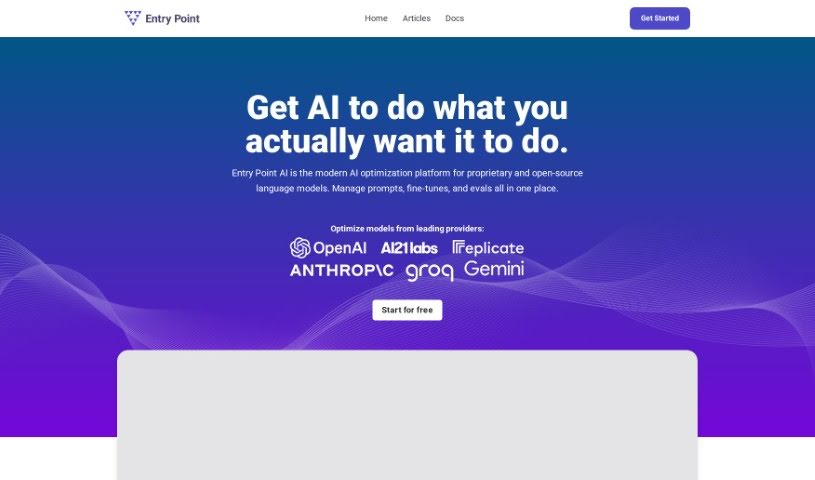
Screenshot of Entry Point AI

Entry Point AI

Discover what Entry Point AI is and how to use it effectively in 2025. We'll explore its features and compare it to other Large Language Models.

Screenshot

What Exactly is Entry Point AI?

Entry Point AI is a platform built to help you train, manage, and test your own custom large language models (LLMs). The best part? You don’t need to write any code to do it. It offers a really straightforward interface where you can upload your data, tweak the training settings, and then easily check how well your model is performing. Because it’s both fast and easy to access, Entry Point AI really helps individuals and businesses make the most of AI language models for all sorts of tasks – whether that’s creating content, handling customer questions, or diving into research.

Who’s Behind Entry Point AI?

Nathan Gyaneshwar is the person who created Entry Point AI. He’s also the founder of PurchasePlus, and he’s been a happy user of the Entry Point platform himself, using it to manage datasets and test performance. Entry Point AI itself is a modern platform focused on optimizing language models. It lets users fine-tune models from major providers like OpenAI. Plus, you can get into prompt engineering and retrieval-augmented generation (RAG) to really get the most out of AI’s capabilities.

What Can You Actually Do with Entry Point AI?

Entry Point AI is incredibly versatile. Here are some of the key things it’s used for:

  • Fraud Detection: Train a model specifically to spot suspicious or high-risk activities.
  • Data Extraction: Pull out key information from unstructured text and put it into a consistent format.
  • Recommendations: Suggest products to customers based on what’s in their shopping cart or their past orders.
  • Data Enrichment: Add new details to your existing data, like industry information or specific customer segments.
  • Producing High-Quality Content: Generate reports, blog articles, social media posts, emails, and much more.
  • Tagging & Classification: Organize your data by segmenting it and tagging content for easier searching, metadata, or specific features.
  • Prioritization: Help sort and prioritize things like customer support issues, bug reports, or leads from forms.
  • Moderation: Identify and flag any inappropriate content found in emails, apps, or chat messages.
  • Scoring & Ranking: Use a fine-tuned large language model (LLM) within a workflow to reorder results based on how relevant they are.

(Note: Some of these use cases were listed multiple times in the original text, so they’ve been consolidated here for clarity.)

Who Should Be Using Entry Point AI?

This platform is a great fit for a wide range of people and roles:

  • Researchers (both professional and general enthusiasts)
  • Content creators and producers
  • Anyone interested in language models (enthusiasts)
  • Specialists in tagging and classification
  • Experts in data extraction
  • Customer support analysts
  • Developers working on recommendation systems
  • Fraud detection specialists
  • Content moderators
  • Analysts focused on data enrichment
  • Professionals involved in scoring and ranking tasks

How Do I Get Started with Entry Point AI?

Using Entry Point AI is pretty straightforward. Just follow these steps:

  1. Sign Up: First, you’ll need to create an account. Head over to the Entry Point AI platform at https://app.entrypointai.com/ to get started.
  2. Choose Your Plan: Pick the plan that best suits what you need. They offer options for Individuals, Startups, and Businesses, each with different numbers of training examples and user seats.
  3. Upload Your Data: It’s time to import and manage your structured data. The platform’s templating engine can help you structure it effectively.
  4. Fine-Tune Your Models: Begin fine-tuning your models by setting the right parameters and providing your training examples. You can actually see impressive results with as few as 50 examples!
  5. Collaborate with Your Team: If you’re working with others, you can invite team members. This lets you all track training data and fine-tuning jobs together in one central place.
  6. Evaluate How Well It’s Performing: Take time to assess your models’ performance. You can also estimate costs and compare different hyperparameters to really fine-tune your results.
  7. Export Your Results: When you’re ready, you can easily export your dataset, usually in JSONL format, for any further analysis or if you need to share it.
  8. Share Your Models: You can deploy your fine-tuned models with just a single click. Share them with others for testing, and save any completions you make to enhance them further.
  9. Make Use of All the Features: Don’t forget to explore features like model validation, the playground for experimentation, unlimited data synthesis, and the premium support available for Business plan users.
  10. Need Help? If you have questions about volume or enterprise pricing, or if you need custom quotes, just reach out to [email protected]. They’re there to assist.

Basically, Entry Point AI offers a no-code way to manage and fine-tune language models. This means you can really get the most out of AI without needing deep coding skills. Its interface is efficient, and it processes things quickly, making it a really valuable tool for anyone, whether you’re an individual or a business, who wants to effectively use custom large language models.

Related AI Tools

Discover more tools in similar categories that might interest you

Stay Updated with AI Tools

Get weekly updates on the latest AI tools, trends, and insights delivered to your inbox

Join 25,000+ AI enthusiasts. No spam, unsubscribe anytime.