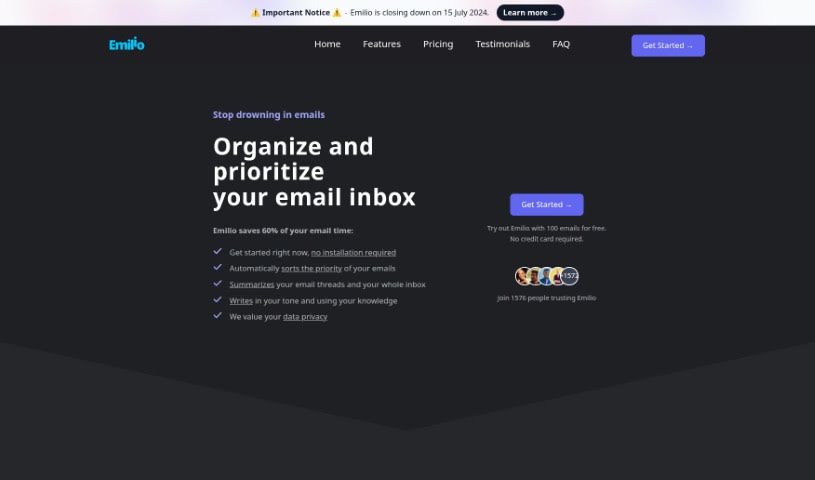
Screenshot of Emilio

Emilio

Discover what Emilio is and how to use it effectively in 2025. We'll explore its features and see how it stacks up against other email writing tools.

Screenshot

What is Emilio?

Emilio is your personal AI assistant, built specifically to make managing your Gmail inbox a breeze. It’s designed to help you reclaim a significant chunk of your time – we’re talking up to 60% less time spent on emails! How does it do this? Well, it’s packed with features like automatically sorting your emails, giving you quick summaries of long threads, and even helping you draft personalized replies. The best part? It works right inside your Gmail account, so there’s no complicated installation needed. Plus, your privacy and security are a top priority; Emilio has earned Google’s CASA Tier 2 Security Certification. And if you’re not completely happy, they offer a 30-day money-back guarantee. Emilio really shines by focusing on making users happy and keeping your inbox organized, all without changing how you normally use Gmail.

Who created Emilio?

Emilio was brought to life by Ricardo Batista and Daniel GarcĂ­a. Ricardo is the CEO and Co-Founder, while Daniel serves as the CTO and Co-Founder. These two met back in 2022 at an event in Madrid. They quickly realized they shared a common goal: to boost productivity for everyone using Emilio, their AI assistant designed to transform email management and save users up to 60% of their email handling time.

What is Emilio used for?

Here’s a rundown of what Emilio can do for you:

  • Summarize emails: Get the gist of long messages quickly.
  • Free Trial: Try it out first!
  • Automatic Email Sorting: Keeps your inbox tidy without you lifting a finger.
  • Personalized Email Drafting: Helps you write replies that sound like you.
  • Easy Starting Process: Getting started is straightforward.
  • No Installation Required: It works directly with your Gmail.
  • Free Trial with 100 emails: Test its capabilities with a good number of emails.
  • Gmail Integration: Seamlessly sorts, summarizes, and helps draft emails within your existing Gmail account.
  • Google’s CASA Tier 2 Security: Your data is kept private and secure.
  • Priority Calculation: Figures out what’s most important based on who sent it and your past interactions.
  • 30-Day Refund: If you’re not satisfied, you can get your money back within 30 days.
  • User Support & Account Deletion: Help is available for new users, and you can easily delete your account if needed.
  • Focus on Important Emails: Helps you zero in on what truly matters.
  • Quick Reviews and Responses: Summaries make reviewing and replying to email threads much faster.
  • Save Writing Time: Crafts replies that match your personal tone.
  • Organized Inbox, No Installation: Manages your inbox without needing any software downloads.
  • Time Savings: Handles your emails efficiently, freeing up your time.
  • Seamless Gmail Integration: Sorts, summarizes, and assists with drafting emails without altering your Gmail interface.
  • Processes Unread Emails: After you sign in, it gets to work on your unread messages, applying labels and creating summaries.
  • Secure Data Processing: Guarantees privacy and security thanks to Google’s CASA Tier 2 Security Certification.
  • Smart Priority Calculation: Determines email importance by considering the sender, your past interactions, and predictive analysis.
  • Satisfaction Guarantee: A refund is available within 30 days if you’re not happy with the service.

Who is Emilio for?

Emilio is a great tool for:

  • Founders
  • Entrepreneurs
  • Freelancers
  • Busy Professionals

How to use Emilio?

Ready to get the most out of Emilio? Just follow these simple steps:

  1. Sign In: Start by signing into Emilio’s platform using your Google account. It’s a quick and easy way to connect.
  2. Automatic Processing: Once you’re signed in, Emilio will automatically begin processing your most recent unread emails. It’ll start applying helpful labels and generating summaries for you.
  3. Focus on What Matters: Emilio helps you by prioritizing your emails. This means you can easily focus on the most critical messages without getting bogged down.
  4. Enjoy the Features: Take advantage of everything Emilio offers, like its automatic email sorting, handy email summarization, and the ability to draft personalized replies.
  5. Seamless Experience: You can expect Emilio to process your emails efficiently. Importantly, it does all this without changing your existing email client, so your familiar Gmail interface stays the same.
  6. Trustworthy Security: Rest assured knowing your privacy and security are protected, thanks to Google’s CASA Tier 2 Security Certification.
  7. Smart Prioritization: Make the most of Emilio’s intelligent priority calculation. It considers who sent the email, your past interactions, and even makes predictions to rank your messages.
  8. Support and Guarantee: You’ll find user-friendly support is readily available. Plus, if you’re not satisfied for any reason, there’s a 30-day money-back guarantee.
  9. Language Agnostic: Explore its functionality, which works across different languages and is compatible with various email platforms.
  10. Help Improve Emilio: Your feedback is valuable! Providing your thoughts will help continually improve Emilio’s services for everyone.
  11. Easy Account Management: Need to delete your account? You can do so easily through the account settings.

Ultimately, Emilio is designed to make your email management much smoother with smart features and secure processing. It’s a really valuable tool for handling your communication needs efficiently.

Related AI Tools

Discover more tools in similar categories that might interest you

Stay Updated with AI Tools

Get weekly updates on the latest AI tools, trends, and insights delivered to your inbox

Join 25,000+ AI enthusiasts. No spam, unsubscribe anytime.