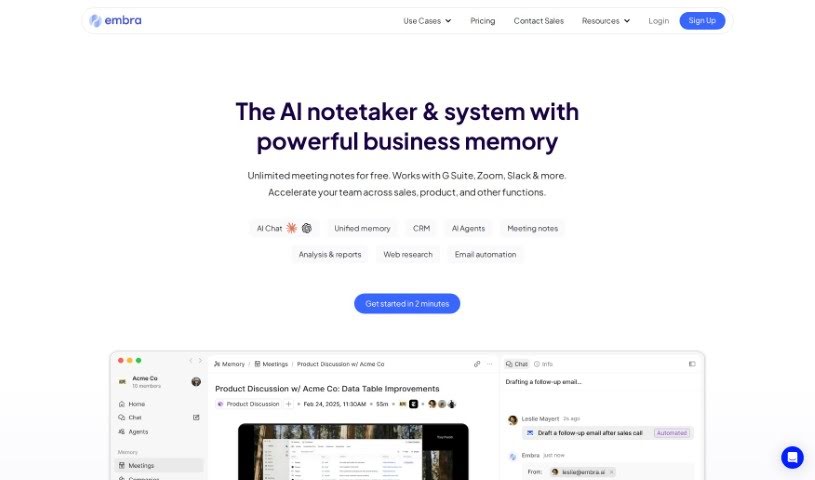
Screenshot of Embra

Embra

Discover what Embra is and how to make the most of it in 2025. We'll dive into its features and see how it stacks up against other meeting assistants.

Screenshot

What is Embra?

Embra is a really fast AI assistant built for professionals. It is your go-to helper for all sorts of tasks. It can automate your emails, whip up summaries from your meetings, help you find information buried in your internal documents, create content, do research, and summarize articles. What really sets Embra apart are its quick commands, its ability to learn your personal automation needs, its collaboration features, and how well it plays with other apps like Chrome, Gmail, and Zoom. Essentially, Embra is designed to make your work smoother, save you precious time, and boost how much you get done, whether you’re working solo or as part of a team in any professional field. People like Andre Pennecooke, who’s the VP of Design at Dave, and Brian Cometa, the Owner at $300 Data Recovery, have both said great things about how efficient and easy to use Embra is.

Who created Embra?

Embra was actually created by a company called Embra, Inc. The person leading the charge as CEO is Andre Pennecooke. Embra officially launched on June 17, 2024, aiming to provide rapid AI assistance for professionals in all sorts of roles – whether you’re a leader, in sales, a consultant, an engineer, or in customer support. The tool’s main goal is to simplify your everyday tasks, make you more productive, and help teams collaborate better, all thanks to its clever AI capabilities. Embra offers personalized ways to automate your work, efficient solutions for your workflow, and it connects smoothly with popular apps you probably already use, like Chrome, Gmail, and Zoom.

How to use Embra?

To really get the most out of Embra, here’s a step-by-step guide:

  1. Getting Set Up:

    • First, you’ll want to install Embra. You can get it for your Mac, your web browser, or even your mobile device.
    • Next, set up a global shortcut. This makes it super easy to pull up Embra whenever you need it, no matter what you’re doing.
    • Then, connect your data, your existing workflows, and your team members. This step is key to really streamlining how you work.
  2. What Can It Do?:

    • Quick Commands: These are fantastic for automating tasks you do over and over. Just a quick command, and the AI handles it.
    • Personalized Automation: You can create your own custom commands. This means Embra can be tailored exactly to your unique needs and how you like to work.
    • Emails: Embra can help you write really good email responses, making your communication much faster and more professional.
    • Meeting Automations: Ever wish you didn’t have to take notes? Embra can turn your meeting transcripts into neat summaries with clear action items.
    • Internal Search: Need to find a document or a piece of information? Embra helps you search your own files and systems quickly, speeding up your tasks and improving how you communicate.
    • Content Creation: Whether it’s for marketing, reports, or something else, Embra can help you produce high-quality content.
    • Research & Summarization: It’s great at gathering information from the internet and summarizing it for you, saving you a ton of research time.
    • Code: If you’re an engineer, Embra can even help boost your productivity with AI-powered coding assistance.
  3. Working with Your Team:

    • You can manage your team within Embra, invite people to join, and set up different permission levels for them.
    • Collaboration is easy with threads where you can review AI interactions together and share what you’ve learned.
    • Plus, you can share the automations you’ve created, which is a great way to boost everyone’s productivity across the team.
  4. Why It’s Great:

    • Efficiency: You’ll find your work processes speed up considerably thanks to these quick AI solutions.
    • Integration: Embra fits right in with the apps and workflows you already use, making the transition smooth.
    • Accessibility: You can get to Embra instantly, no matter where you are or what device you’re using.
    • Customization: The ability to tailor commands and workflows means Embra can be set up perfectly for you and your team.
  5. Ready to Start?:

    • Go ahead and sign up for beta access. It’s a great way to see firsthand how Embra can help.
    • You’ll really get to experience how much more efficient and productive your workflow can be with an AI assistant like Embra.

Don’t forget to share your thoughts and feedback with the Embra team. Your input helps them keep making Embra better for everyone. Remember, Embra’s whole purpose is to make tasks simpler and boost productivity for individuals and teams in all sorts of professional settings.

Related AI Tools

Discover more tools in similar categories that might interest you

Stay Updated with AI Tools

Get weekly updates on the latest AI tools, trends, and insights delivered to your inbox

Join 25,000+ AI enthusiasts. No spam, unsubscribe anytime.