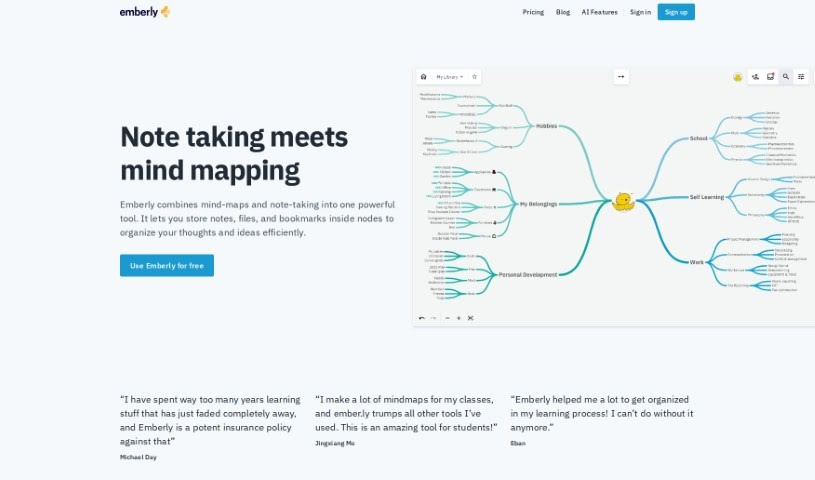
What is Emberly?
Emberly is a handy web-based tool that uses AI to blend note-taking and mind mapping, making it a great way to manage your knowledge. It is a digital space where you can visually arrange your notes, files, bookmarks, and ideas into connected nodes, creating intricate webs of information that are super easy to access and refer back to. It’s packed with features like AI-generated mind maps, automatic quizzes to test your knowledge, an AI writing assistant to help you brainstorm, real-time collaborative editing, and bi-directional links, plus a handy browser plug-in.
One of Emberly’s standout features is its automatic quiz generator. It creates quizzes right from your notes, which is a fantastic way to really lock in what you’ve learned and make sure you remember it. The AI writing assistant is also a big help for brainstorming; it offers prompts and suggestions, and can even pull out and summarize the main points from your notes, helping you organize your thoughts more clearly.
Plus, Emberly lets you collaborate with others. You can all work on the same mind map at the same time, which is perfect for sharing ideas and working together efficiently. And that browser plug-in? It makes saving bookmarks a breeze – just one click, and it’s organized for later.
Who created Emberly?
Emberly was brought to life by Gina Husebø and Leif Andreas Rudlang. They launched it in 2019 after putting in a lot of hard work to build the platform. Their goal was to help people manage their knowledge resources better and cut down on information overload. Gina Husebø is the co-founder and designer, while Leif Andreas Rudlang is the co-founder and developer.
What is Emberly used for?
- It’s a great knowledge library for storing and easily finding information.
- You can create a CV map to really showcase your qualifications and experience.
- It helps manage your belongings by letting you save bookmarks and files.
- It’s a simple way to share content with others.
- It works well as a Team Wiki for collaborative projects.
- You can learn all sorts of topics in a really organized way.
- It helps solidify your knowledge by letting you simulate discussions.
- It boosts learning with AI-driven mind maps and quizzes.
- It makes brainstorming and summarizing notes easier with its AI writing assistant.
- It helps you organize information overload visually.
- It enhances learning through AI-driven mind maps and automatic quizzes.
- It assists with writing, brainstorming, and summarizing your notes.
- It helps manage information overload by visually organizing data into interconnected webs.
- It allows for real-time collaborative work, thanks to features like collaborative editing and bi-directional linking.
- It improves learning and knowledge retention with AI-driven mind maps and automatic quizzes.
- It supports team collaboration through features like collaborative editing and bi-directional links.
- It provides visual organization for bookmarks, notes, and thoughts using nodes.
- It’s useful for storing and retrieving information in a knowledge library.
- You can create a CV map to showcase your qualifications and experience.
- It helps with writing, brainstorming, and summarizing notes using its AI writing assistant.
- It supports team collaboration with features like collaborative editing and bi-directional links.
- It offers visual organization for bookmarks, notes, and thoughts in nodes.
Who is Emberly for?
- Students
- Knowledge workers
- Teams
How to use Emberly?
To get the most out of Emberly, here’s a simple guide:
- Getting Started: First, sign up for a free Emberly account on their website. It’s a straightforward process.
- Navigation: Take a moment to get familiar with the dashboard layout. This will help you find and access all the different features easily.
- Organizing Information: Start using nodes to visually arrange your bookmarks, notes, and files. Don’t forget to use mind maps to connect related ideas; it really helps make sense of things.
- AI-Powered Tools: Dive into the AI features! Try out the AI-driven mind map generation, automatic quizzes, and the AI writing assistant. They’re designed to boost your learning and brainstorming.
- Collaboration: If you’re working with others, use the collaborative editing feature. You can all work on the same map in real-time, and bi-directional links help create those interconnected webs of ideas.
- Browser Plug-in: Make sure to install the browser plug-in. It lets you save bookmarks super easily with just one click, keeping everything organized.
- Knowledge Library: Make good use of the knowledge library feature. It’s perfect for systematic organization and ensures you can quickly find any resource you need.
- Learning Enhancement: Really lean into Emberly’s tools to improve how you learn, boost your knowledge retention, and streamline how you manage information.
- Premium Access: If you find you need more, consider the optional premium pricing for access to additional features.
- Continuous Learning: Use Emberly for all sorts of things – managing information, collaborating, brainstorming, and learning effectively. It’s versatile!
By following these steps, you’ll be able to get the most out of Emberly for managing your information and enhancing your learning. Go ahead and start organizing your thoughts and information effectively with Emberly today!