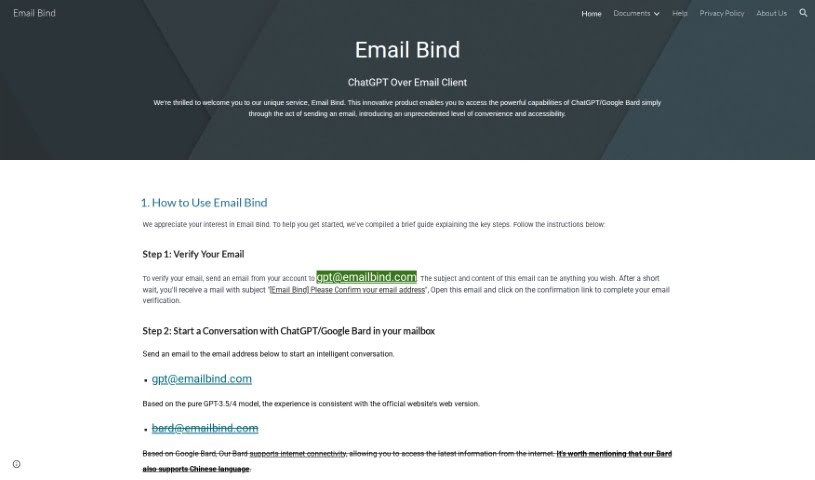
Screenshot of Email Bind

Email Bind

Discover what Email Bind is and how to use it effectively in 2025. We'll explore its features and see how it stacks up against other AI chatbots.

Screenshot

What is Email Bind?

Email Bind is a neat service that lets you have AI-powered chats right from your email inbox. It is a way to use smart AI like ChatGPT and Google Bard without leaving your email. You just need to verify your email by sending a quick message to a special Email Bind address. Once that’s done, you can start chatting with either the GPT-3.5/4 model or Google Bard. There’s also an app that unlocks even more cool stuff, like customizing your chats with templates, tweaking settings, and getting access to the powerful GPT-4 model. It really makes for a personalized AI email experience.

Who created Email Bind?

Email Bind was actually created by EmailBind LTD, a company based in Hong Kong. Their company number is 18165843, and their main office is located at Flat 25, 12/F, Acacia Building, 150 Kennedy Road, Wan Chai, Hong Kong. This company offers a really innovative service that lets people have intelligent conversations with AI chat models, like ChatGPT and Google Bard, directly through their email. All you have to do is send emails to specific Email Bind addresses. The service works with GPT-3.5/4 models, and if you use Google Bard, you get the added bonus of internet access and support for the Chinese language. Plus, if you want to dive deeper and get access to more advanced features, you can grab the Email Bind app. It lets you customize things like prompt templates, use the GPT-4 model, and adjust various settings to suit your needs.

How to use Email Bind?

Getting started with Email Bind is super straightforward. Just follow these simple steps:

  1. Verify Your Email: First things first, send an email to [email protected] from the email account you want to use. You’ll get an email back from us titled “[Email Bind] Please Confirm your email address.” Just click the confirmation link inside, and you’re all set!
  2. Initiate a Conversation: Ready to chat? Send an email to [email protected] if you want to talk to ChatGPT, or to [email protected] for Google Bard. Google Bard is particularly handy because it can access the internet and also speaks Chinese.
  3. Unlock Advanced Features: You can start off in the free trial mode to get a feel for it. Then, if you want more power, download the ‘Email Bind’ App from the App Store on your iPhone. This app unlocks all sorts of advanced features, like setting up your own prompt templates, using the amazing GPT-4 model, and tweaking all the settings. For the full experience, you can upgrade to the Pro version.

With Email Bind, you can have smooth conversations with AI chat models right from your inbox. It really turns your email into a place for smart discussions. You get the convenience of using AI chat models, access to up-to-date web information, and you can even customize your experience with advanced settings, all thanks to the Email Bind platform.

Just a reminder, this service works with GPT-3.5/4 models, supports chats in multiple languages, and offers a really user-friendly way to engage with AI chatbots like never before. You can really open up a new way of communicating by making Email Bind a part of your daily email routine.

Related AI Tools

Discover more tools in similar categories that might interest you

Stay Updated with AI Tools

Get weekly updates on the latest AI tools, trends, and insights delivered to your inbox

Join 25,000+ AI enthusiasts. No spam, unsubscribe anytime.