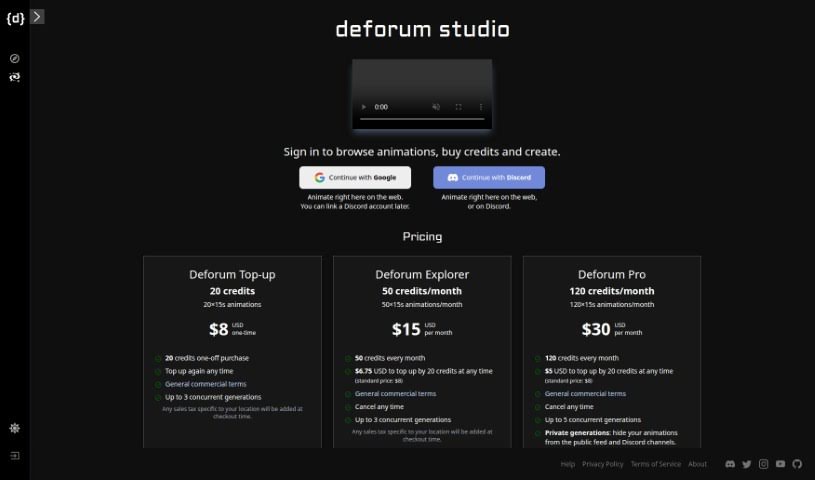
Screenshot of Deforum Studio

Deforum Studio

Discover Deforum Studio in 2025! Learn what this animation platform is, how to use its features effectively, and how it stacks up against other animation generators.

Screenshot

What is Deforum Studio?

Deforum Studio is a really neat online platform that lets you create animations right in your web browser or through Discord. They offer a few different pricing plans, like Deforum Top-up, Deforum Explorer, and Deforum Pro. Each plan gives you a set number of animations each month, plus extra perks like keeping your creations private and getting access to their Discord bot. You can buy credits to keep making animations, depending on the plan you pick.

Who created Deforum Studio?

Luke Montague is the founder behind Deforum Studio, the animation platform. The company provides several subscription options – Deforum Top-up, Explorer, and Pro – which let users create animations for commercial use. Each plan includes a different monthly allowance for animations, and you can always add more credits if you need them. Deforum Studio also offers features like up to 5 simultaneous generations and the option to make your animations private, so they aren’t visible on the public feed or Discord channels.

How to use Deforum Studio?

Here’s a simple, step-by-step guide to get you started with Deforum Studio:

  1. Sign In: First, head over to the Deforum Studio platform and sign in. This is where you can browse animations, buy credits, and start creating your own.
  2. Choose Your Animation Method: You’ve got a couple of ways to go about it: you can create animations directly on the web platform, or you can use Discord. If you choose Discord, you can always link your account later on.
  3. Explore Pricing Options: Deforum Studio has different pricing tiers, each with its own set of benefits. You can choose from Deforum Top-up, Deforum Explorer, or Deforum Pro. Each option gives you a different number of animations per month and comes with its own specific features and pricing structure.
  4. Top-up Credits: Depending on the plan you select, you might need to add more credits if you use up your monthly animation allowance. The cost for these credit top-ups will vary depending on which plan you’re on.
  5. Generations and Features: Your chosen plan determines how many animations you can generate at the same time. For instance, the Deforum Pro plan lets you run up to 5 generations concurrently. It also allows for private generations, meaning your animations won’t show up on the public feed or in Discord channels. Plus, you can use the Discord bot directly through a private message.
  6. Featured Animations: Take a look at the featured animations on the platform. It’s a great way to get inspired and see the kind of quality work other users are creating.

By following these steps, you should be able to easily navigate Deforum Studio and use its features to create the animations you need.

Related AI Tools

Discover more tools in similar categories that might interest you

Stay Updated with AI Tools

Get weekly updates on the latest AI tools, trends, and insights delivered to your inbox

Join 25,000+ AI enthusiasts. No spam, unsubscribe anytime.