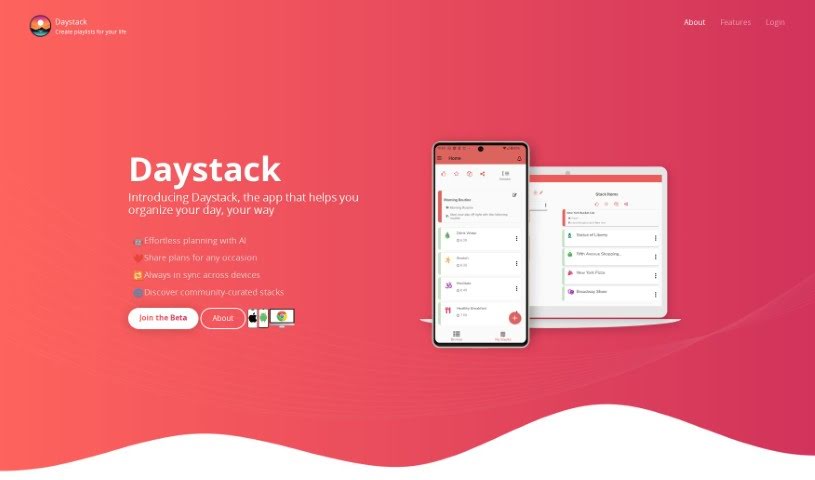
Screenshot of Daystack

Daystack

Discover Daystack in 2025! Learn what this app is, how to use its features for project management, and how it stacks up against other tools.

Screenshot

What is Daystack?

Daystack is a handy app, available on both mobile and the web, that helps you get your day organized. Think of it like creating personalized playlists, which they call “stacks,” for whatever you need to do. Whether you’re planning a trip, mapping out a workout, or just need to manage your to-do list, Daystack has you covered. You can build your own custom stacks from scratch, or if you’re looking for ideas, you can browse through stacks that other users have already created.

One of its really cool features is the generative AI, powered by GPT4. This means you can actually talk to the app using natural language prompts to create and tweak your stacks. It’s available on Android, iPhone, and the web, so you can use it wherever you are. Plus, it has location-enabled features and lets you add media like YouTube videos right into your stacks. By signing up for their waitlist, you can get ready for its upcoming release and start organizing your daily activities in a way that’s both efficient and totally personalized.

Who created Daystack?

Daystack, which launched on October 18, 2023, is a mobile and web-based app developed by an unnamed founder. Its main goal is to help people organize their days by creating personalized playlists, or “stacks,” for all sorts of activities – think trip plans, workout routines, or just your daily tasks. The app boasts some neat features, including AI that helps you build stacks, the ability to customize them, a catalog of stacks made by other users, and it works across Android, iPhone, and the web. Essentially, Daystack is aiming to completely change how individuals manage their daily activities.

What is Daystack used for?

Daystack is incredibly versatile! You can use it to:

  • Plan your trips: Create detailed itineraries for your travels.
  • Structure your workouts: Build custom routines to follow.
  • Manage your tasks: Keep track of your to-do lists efficiently.
  • Build custom stacks: Organize anything you can think of into personalized playlists.
  • Get inspired: Explore and discover stacks created by the Daystack community.
  • Generate stacks with AI: Use natural language prompts to quickly create new stacks.
  • Access anywhere: Use the app seamlessly on Android, iPhone, and the web.
  • Add locations: Search for places and easily include them in your stacks.
  • Integrate media: Link and play YouTube videos directly within your stacks.
  • Stay updated: Join the waitlist for upcoming releases and new features.

It’s all about making daily organization more personalized and efficient.

Who is Daystack for?

Daystack is a great tool for anyone who needs to organize their activities, but it’s particularly useful for:

  • Event Planners
  • Fitness Instructors
  • Task Managers
  • Trip Planners
  • Task Organizers

Basically, if you plan things, Daystack can help you do it better.

How to use Daystack?

Getting started with Daystack is pretty straightforward. Here’s a simple guide:

  1. Create Your Own Stacks: Your first step is to start building custom stacks. They are personalized playlists for your activities, whether it’s for a trip, a workout session, or just your daily tasks. It’s all about organizing your day your way.
  2. Explore What Others Have Made: Don’t know where to start? Daystack has a catalog filled with stacks created by other users. It’s a fantastic place to find inspiration, see how others organize things, and you can even like and share stacks you find helpful.
  3. Chat with the AI: Daystack uses some pretty advanced generative AI, powered by GPT4. This means you can use natural language – just talk to it! You can prompt the AI to create stacks for you or edit existing ones until they’re exactly how you want them.
  4. Use It Anywhere: One of the best things is that Daystack is available on Android, iPhone, and the web. This flexibility means you can plan your day from any device, wherever you happen to be.
  5. Add Locations and Videos: You can easily search for locations and add them directly to your stacks, which is super handy for trip planning. Plus, you can link and play YouTube videos right inside your stacks, making them even more dynamic.
  6. Get on the Waitlist: If you’re excited about Daystack, you can join their waitlist for the upcoming release across all platforms. It’s designed to really change how we all organize our daily lives, making it more efficient and personal.

By following these steps, you’ll be well on your way to using Daystack to organize your day and boost your productivity!

Related AI Tools

Discover more tools in similar categories that might interest you

Stay Updated with AI Tools

Get weekly updates on the latest AI tools, trends, and insights delivered to your inbox

Join 25,000+ AI enthusiasts. No spam, unsubscribe anytime.