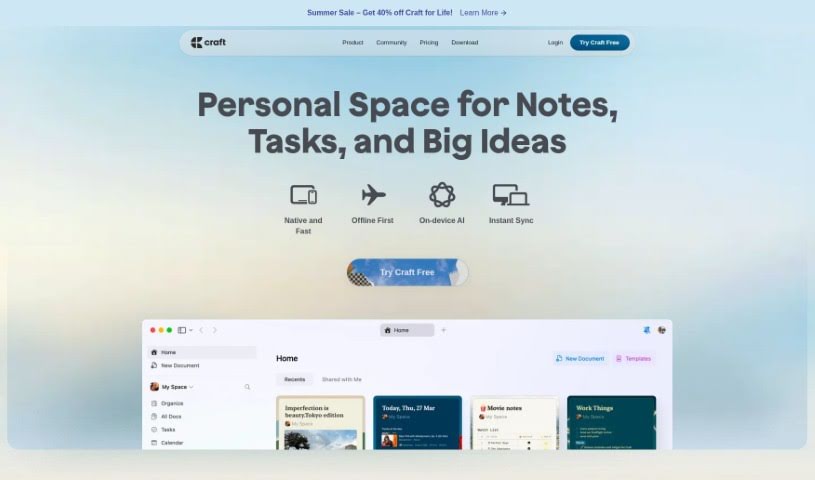
Screenshot of Craft Docs

Craft Docs

Discover Craft Docs in 2025! Learn what it is, how to use its features effectively, and how it stacks up against other project management tools.

Screenshot

What is Craft Docs?

Craft: The Future of Documents is a platform designed to completely change how we manage documents. It offers a simple, all-in-one place where people and teams can brainstorm, work together, and share really great work. People love it for its amazing design, how easy it is to use, and all the cool features it packs, like support for images and videos, a built-in AI helper, comments and reactions, code blocks, structured documents, and previews for links. Craft’s goal is to boost how productive you are, make communication smoother, and help teams make better decisions. It’s useful for all sorts of jobs, whether you’re in engineering, sales, freelancing, or handling internal company stuff. You can also find ready-to-go templates for things like daily team check-ins, updates, or release notes, making it a super valuable tool for personal use, work, and business.

What really makes Craft stand out is how much they care about the small details, how much they enjoy building the tool, and the sheer delight it brings to users, as you can see from what people say in the community.

Who created Craft Docs?

Craft – The Future Of Documents was actually created by Balint Orosz. Balint, who has always been drawn to visual things since he was young, started coding when he was just 12. His main focus was always on building software that feels genuinely good to use. He wanted to connect how things look with how they work, and that’s what led him to create Craft. It’s a tool built to give users a sense of joy and control over what they create digitally.

Craft offers a look that’s easy on the eyes and a user experience that’s a breeze, with features like markdown files, ways to organize tasks, AI that can summarize things for you, and support for lots of different languages.

What is Craft Docs used for?

Craft Docs is incredibly versatile. Here’s a look at what it’s great for:

  • Boosting Decision-Making: Helps teams and individuals make choices more confidently.
  • Custom Branding: Allows you to tailor the look to match your brand.
  • Sales: Supports sales teams in managing leads and proposals.
  • Streamlining Communication: Makes it easier to share information and updates.
  • Internal Communications: Perfect for keeping everyone in the loop within a company.
  • Idea Generation & Collaboration: A fantastic space for brainstorming and working together on ideas.
  • Document Creation & Sharing: Easily create and distribute documents.
  • Team Collaboration: Enhances how teams work together.
  • Professional Needs: Covers a wide range of professional tasks across different fields.
  • Engineering Project Management: Helps manage engineering projects effectively.
  • Sales Team Coordination: Keeps sales teams aligned and organized.
  • Freelancer Workspace: Organizes work for freelancers.
  • Improving Internal Comms: Makes company communication clearer and more efficient.
  • Enhancing Decision-Making Processes: Provides tools to support better choices.
  • Boosting Productivity: Helps you get more done, faster.
  • PDF Export: Easily convert your documents to PDF.
  • Engineering: Supports various engineering workflows.
  • Real-time Collaboration: Work on documents with others simultaneously.
  • Comments & Mentions: Engage with colleagues directly within documents.
  • Doc-Based Sharing: Share documents easily through links.
  • Publishing: Prepare and share your work publicly.
  • Email Sharing: Send documents directly via email.
  • Markdown Import & Export: Works seamlessly with Markdown files.
  • TextBundle Import & Export: Supports TextBundle format.
  • AI Assistant Integration: Get help with summaries, translations, and more.
  • Intuitive Document Management: Offers a clear space for individuals and teams to brainstorm, collaborate, and share their work.
  • Transforming Workflows: It helps bring work together, smooths out communication, and sharpens decision-making.
  • Diverse Professional Applications: Useful for everything from engineering and sales to freelancing and internal company communications.
  • Daily Notes, Wikis, & Collaborative Docs: Helps organize your work and brings clarity.
  • Rich Feature Set: Includes images, videos, an AI assistant, comments, code blocks, and structured documents.
  • Ready-to-Use Templates: Offers templates for daily standups, team updates, employee handbooks, and more.
  • Trusted by Millions: Praised for its excellent design and user experience, suitable for personal, professional, and business use.
  • Boosting Productivity & Speed: Helps you work faster and stay aligned on tasks.
  • Empowering Users: Gives you a sense of joy and pride in your digital work.
  • Enhancing User Experience: Improves productivity with visual elements, structure, and organization.
  • Document Creation: For both individuals and teams.
  • Ideation and Collaboration: Great for brainstorming and working together.
  • Sharing Outstanding Work: Present your best work to others.
  • Freelancing: A helpful tool for freelancers.
  • Organizing Work: Structure daily notes, collaborative documents, and wikis.

Who is Craft Docs for?

Craft Docs is a great fit for a variety of professionals and teams, including:

  • Engineering teams
  • Sales professionals
  • Freelancers
  • Those managing Internal Communications

How to use Craft Docs?

Getting started with Craft - The Future of Documents is straightforward. Just follow these steps:

  1. Sign Up and Log In: First, create your account on Craft’s platform. Once that’s done, log in to access all the features.
  2. Explore the Features: Take some time to see what Craft offers:
    • Folders and Spaces: Keep your notes tidy by organizing them into folders and creating separate ‘spaces’ for different contexts.
    • Tasks and Reminders: You can set reminders for your tasks and get timely alerts.
    • Summarize and Translate with AI: Make use of GPT-4 to get quick summaries or translations of your text.
    • Whiteboards: Use a large, open canvas to visually share your ideas.
    • Create Solo or Collaborate: You can take notes by yourself or work with others to create and publish documents that people can view and comment on.
    • Localized for 9 Languages: The platform is available in multiple languages, making it accessible globally.
  3. Enhance Your Document Creation: Make your documents shine:
    • Images and Videos: Easily drag and drop media files right into your documents.
    • Tables and Styles: Build structured layouts using tables and apply various text styles.
    • Rich Exporting: Export your work in many formats, like Markdown, PDF, Word, and more.
    • Slash Commands: Quickly access features by typing commands with a slash.
    • Privacy: Craft takes your privacy seriously; they won’t access your private notes.
    • Keyboard Shortcuts: Speed up your workflow with handy keyboard shortcuts.
  4. Optimize Your User Experience: Make your work even smoother:
    • Presentation Mode: Turn your notes into slides automatically for presentations.
    • Offline Mode: Keep working even when you don’t have an internet connection.
    • Focus Mode: Enjoy a writing experience with minimal distractions.
    • Touch Features: Use intuitive touch controls for easier interaction.
  5. Choose a Plan: Select the plan that best fits your individual or team needs.
  6. Understand the Founder’s Vision: It’s helpful to know that the founder aimed to blend great design with functionality to create a truly delightful user experience.

By following these steps, you’ll be able to use Craft’s many features effectively to boost your productivity, creativity, and collaboration when managing and creating documents.

Related AI Tools

Discover more tools in similar categories that might interest you

Stay Updated with AI Tools

Get weekly updates on the latest AI tools, trends, and insights delivered to your inbox

Join 25,000+ AI enthusiasts. No spam, unsubscribe anytime.