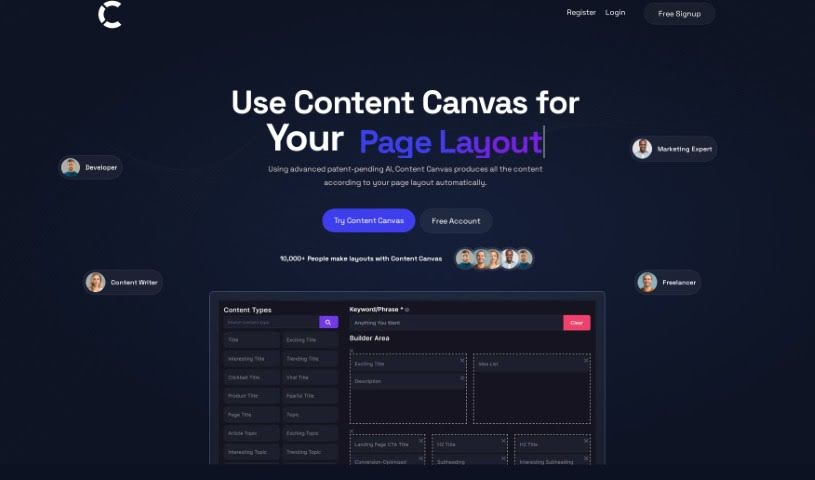
What is Content Canvas?
Content Canvas is an AI tool built to make creating web page content much simpler for developers, marketing pros, and freelancers. It uses smart AI technology to automatically whip up content based on the page layouts you want, really speeding up website design. You can quickly build layouts in the Builder Area, get your content optimized for better SEO with keyword help, and even generate text that sounds just like a human content expert wrote it. Plus, Content Canvas makes teamwork easier by letting you share content snapshots, which really smooths out communication during web development. With its easy-to-use design and focus on AI-powered improvements, Content Canvas offers a fresh way to handle content creation, layout design, and SEO boosts in web development.
Who created Content Canvas?
We don’t have details on who exactly created Content Canvas; the available information doesn’t mention them. It first launched on August 31, 2023. Essentially, Content Canvas is a free AI tool for creating web page content layouts. It’s designed with developers, marketing experts, and freelancers in mind, aiming to simplify the whole process using advanced, patent-pending AI technology. The platform lets you generate content that fits your desired page layouts, making web development smoother. Key features include recognizing your brand’s voice, optimizing content with keywords, and producing text that sounds natural. Content Canvas is all about boosting your SEO rankings, making collaboration easier, and simplifying how web developers and marketers create content and design layouts.
What is Content Canvas used for?
- It automatically generates content based on the page layout you want.
- It helps developers, marketing experts, and freelancers create web page content much faster.
- You can quickly design layouts right in the Builder Area.
- It uses AI to optimize your content with keywords, which is great for SEO.
- It creates content that sounds natural, just like a human wrote it.
- Collaboration is simpler because you can easily share content snapshots.
- You can copy and paste the content you create directly into website builders.
- It helps improve your SEO rankings and drives more website traffic by analyzing things with AI.
- It’s changing website design processes with its advanced AI technology.
- It helps make your web development efforts more successful with less work.
- It automatically produces content for your web pages based on the layouts you choose.
- It’s really changing how websites are laid out and their content is created.
- You can snapshot content to easily share it with clients or your team.
- It boosts SEO rankings by optimizing your content with keywords.
- It generates content that sounds natural, much like what a human would write.
- It makes collaboration easier by letting you share content snapshots.
- You can copy and paste content into website builders efficiently.
- It helps optimize your web development efforts with minimal fuss.
- It’s an innovative approach to creating content, designing layouts, and improving SEO.
- It’s a valuable tool for developers, marketing experts, and freelancers alike.
- It automatically generates content for web pages based on your desired layouts.
- It’s revolutionizing how websites are designed.
- You can quickly create layout designs, keeping your brand’s voice and what users prefer in mind.
- It uses AI for keyword optimization to improve SEO rankings and website traffic.
- It creates content that sounds natural, similar to human-written content.
- It simplifies collaboration by letting you share content snapshots with your team or clients.
- It helps with efficient communication and feedback during the web development process.
- It has a user-friendly interface, making it easy to copy and paste content into website builders.
- It automatically generates content for web pages based on the layouts you want.
- It enhances page layout and content creation for websites.
- It helps understand brand voice, industry terms, and user preferences for design.
- It optimizes keywords for better SEO rankings and traffic.
- It creates natural-sounding content that resembles human writing.
- It makes sharing content with team members or clients for review easy by snapshotting it.
- It helps share content efficiently with your team or clients for review.
- It simplifies collaboration among developers, marketing experts, and freelancers.
Who is Content Canvas for?
- Developers
- Marketing Experts
- Content Writers
- Freelancers
How to use Content Canvas?
Content Canvas is a really user-friendly AI tool for content layout, perfect for developers, marketing experts, and freelancers who want to create webpage content without a hassle. The tool uses advanced AI technology to automatically generate content that fits your preferred page layout. Here’s a simple step-by-step guide to get you started:
- First, head over to the Content Canvas platform at https://contentcanvas.ai/.
- Use the Builder Area to quickly design your layout structures. Think about your brand’s voice, industry terms, and what your audience likes.
- Take advantage of the AI-driven keyword optimization. This helps you analyze search trends, see how your competition stacks up, and understand user intent. It’s all about creating content that boosts your SEO rankings and traffic.
- Generate content that sounds natural, much like text written by a human, to build more credibility.
- Capture a snapshot of your content. This makes it super easy to copy and paste directly into your website builder or webpage.
- You can also share these snapshots with your team members or clients for their review, or even for social media sharing.
- Collaboration becomes much more efficient. Sharing content and getting feedback during the web development process is simplified.
- Seamlessly integrate the content you’ve created into your website builders, which really streamlines your development efforts.
By following these steps, you can really use the power of AI within Content Canvas to make your content creation, layout design, and SEO strategies work better. This guide should help you get the most out of the tool and find success with less effort.