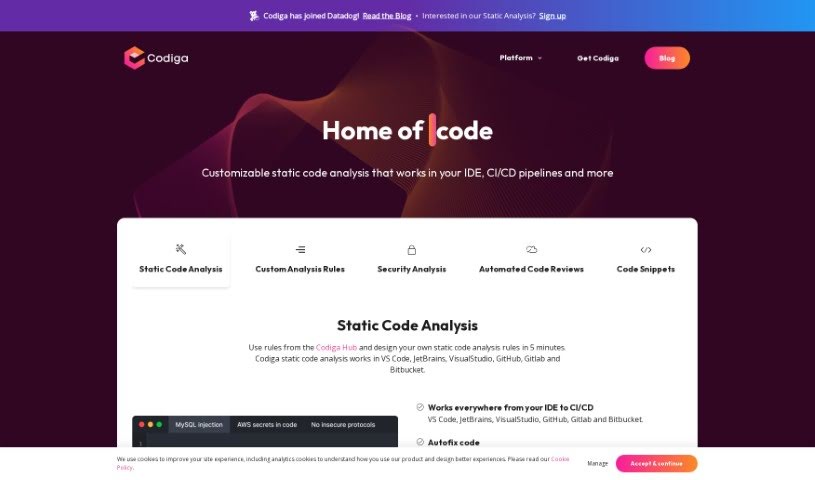
Screenshot of Codiga

Codiga

Dive into Codiga, an AI-powered code analysis tool. Discover its features, how to integrate it into your workflow, and how it stacks up against other code generators in 2025.

Screenshot

What is Codiga?

Codiga is an AI-powered tool designed for static code analysis. It is a smart assistant that checks your code for potential problems. It offers a range of helpful features, including customizable static code analysis, automated fixes for coding issues, and security analysis that keeps an eye on major standards like OWASP Top 10, MITRE CWE, and the SANS/CWE Top 25. It also handles automated code reviews and works with many different programming languages and libraries. You can easily connect Codiga with popular development environments such as VS Code, JetBrains, VisualStudio, and version control systems like GitHub, GitLab, and Bitbucket.

What’s really neat about Codiga is how easily you can create your own static code analysis rules and then use the platform to make sure everyone follows them. If it finds vulnerabilities or other coding problems, Codiga can often fix them with just a single click, which is a big help for keeping your code secure and high-quality. It even analyzes your code in real-time as you type in your IDE, suggesting fixes instantly. Plus, it keeps a history of errors for every change you make to your code.

Codiga also supports over 12 languages, automatically fixes security vulnerabilities, can spot leaked secrets, and analyzes your infrastructure code. You get fast feedback on your code, and it integrates smoothly with GitHub, GitLab, and Bitbucket. You’ll also find features like IDE plugins, Git Hooks integration, and the ability to catch issues like functions that are too long or complex, general code violations, and repeated code sections.

Who created Codiga?

Codiga was actually started by Julien Delange. He’s a former tech lead who worked at big names like Twitter and Amazon Web Services. He teamed up with a group of experienced engineers who have about 15 years of combined experience from both Europe and Silicon Valley. The company officially launched on November 6, 2022. Their main goal is to help developers write better code, faster, by giving them a practical platform to catch defects early in the development process.

What is Codiga used for?

Codiga is a versatile tool that helps with many aspects of coding:

  • Automated Code Reviews: It checks your code automatically.
  • Automated Code Fixes: It can fix common coding issues for you.
  • Exhaustive Code Analysis: It performs a deep dive into your code.
  • Customizable Static Code Analysis: You can set up your own rules.
  • Security-Focused Code Analysis: It specifically looks for security vulnerabilities.
  • Support for 12+ Languages: It works with a wide range of programming languages.
  • Code Snippets Feature: You can save and reuse code blocks.
  • Private Code Snippets Sharing: Share your code snippets securely.
  • Infrastructure Code Analysis: It checks code for things like Docker and Terraform.
  • Fast Code Feedback: Get quick insights into your code’s quality.

Who is Codiga for?

Codiga is a great tool for anyone involved in writing or analyzing code:

  • Software developers
  • Web Developers
  • IT professionals
  • Programmers
  • Code Analysts
  • Security analysts
  • Developers in general

How to use Codiga?

Here’s a straightforward guide to using Codiga effectively:

  1. Writing Code in Your IDE:

    • Start writing your code in your preferred integrated development environment (IDE). Codiga works in real-time, spotting issues as you type and offering suggestions for fixes right there.
  2. Git Hooks Integration:

    • Set up Git Hooks to have Codiga automatically check your code before you push it. This is a great way to catch any problems and maintain high code quality standards before anything even gets committed.
  3. Code Review Checks:

    • When you’re working on code, Codiga will analyze each pull request. It’s designed to identify code violations, find duplicate code, and flag functions that are too long or complex. This automated review process is key to ensuring your code is good quality and follows best practices.
  4. Deployment:

    • Once your code has passed the review and is ready for production, you can deploy it with confidence. Codiga provides historical analysis of errors for each commit, which really supports the entire software development life cycle.
  5. Accessing Code Snippets:

    • You can access a huge library of code snippets directly from your IDE through Codiga’s Hub. These snippets can be public or private, making it super easy to share and reuse code templates or solutions you’ve found or created.
  6. Creating Static Code Analysis Rules:

    • Want to create your own rules for checking code? Codiga makes it quick and easy. You can even use rules from Codiga’s Hub and then enforce them across different platforms like VS Code, JetBrains, VisualStudio, GitHub, GitLab, and Bitbucket.
  7. Utilizing Autofix Feature:

    • Don’t forget about Codiga’s autofix feature! You can resolve vulnerabilities and coding issues with just a simple click. This really boosts your code’s security and quality by applying fixes instantly.
  8. Security-focused Analysis:

    • Take full advantage of Codiga’s security analysis. It supports major standards like OWASP Top 10, MITRE CWE, and SANS/CWE Top 25. It can automatically find and fix security issues, including leaked secrets, and it even analyzes your infrastructure code for things like Docker and Terraform.

By following these steps, you can really make the most of Codiga to improve your coding experience and ensure your codebase stays high-quality and secure throughout the entire development process.

Related AI Tools

Discover more tools in similar categories that might interest you

Stay Updated with AI Tools

Get weekly updates on the latest AI tools, trends, and insights delivered to your inbox

Join 25,000+ AI enthusiasts. No spam, unsubscribe anytime.