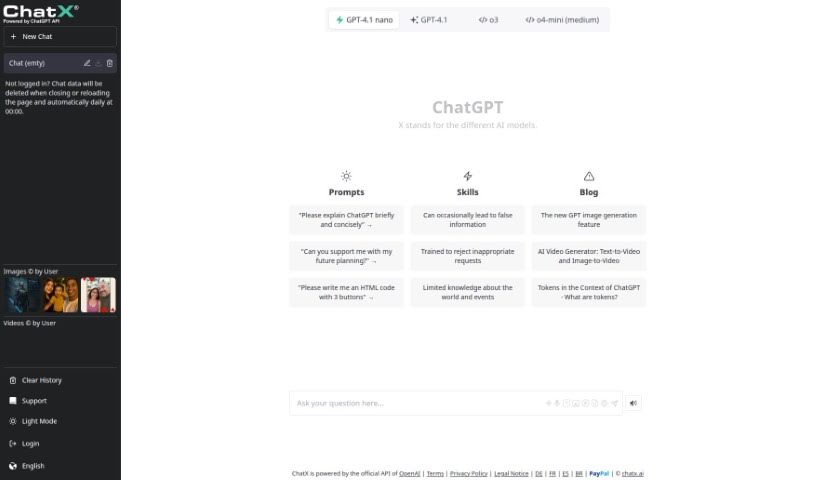
What is Chatx?
Chatx is a central hub for all sorts of AI tools. It’s a place where you can find handy AI prompts, whether you’re looking to generate text with ChatGPT, create stunning visuals with MidJourney, or even brainstorm gift ideas. Essentially, it’s a free marketplace designed to make Generative AI Prompts super accessible for your projects. Chatx really wants to help you tap into the incredible power of AI, offering tools that work with popular platforms like ChatGPT, DALL·E, Stable Diffusion, and Midjourney. They provide the resources you need to explore and effectively use artificial intelligence for all sorts of different things. The platform makes it simple to find just the right AI prompts, whether you’re a beginner or an experienced user looking to boost your projects with AI-generated content.
Who created Chatx?
Alex Shelkovnikov is the mind behind Chatx. His goal is to create smoother communication by using AI technology. Chatx offers services like AI chatbots, virtual agents, and voice assistants, which are a great fit for many industries, including e-commerce, healthcare, and customer service.
What is Chatx used for?
Chatx is incredibly versatile! Here’s what you can do with it:
- Find a fantastic variety of prompts specifically for DALL·E 2.
- Help lower your API costs by reducing the number of tokens you use.
- Get a creative boost for your ideas by using proven prompts for GPT and AI image generators.
- See example responses to prompts so you can get a feel for how the models perform.
- Use prompts and services completely free for any purpose you can think of.
- Tap into generative AI prompts to spark your creativity and bring your concepts to life.
- Access a growing library of free image prompts for popular tools like ChatGPT, DALL·E, Stable Diffusion, and Midjourney.
- Tailor your prompt selection to perfectly match your creative projects.
- Empower everyone – from AI enthusiasts and creative pros to entrepreneurs and developers – with the right prompts to make their projects shine.
- Drive significant change in industries and foster personal growth by using generative AI prompts.
Who is Chatx for?
Chatx is a great resource for a wide range of professionals and creatives, including:
- Content creators
- Marketers
- Graphic designers
- Authors
- Educators
- Developers
- Entrepreneurs
- Product Managers
- Social media managers
- Copywriters
- Artists
- Researchers
How to use Chatx?
Ready to dive in? Here’s a simple guide to using Chatx effectively:
- Sign Up and Log In: First, head over to the ChatX website and create your account. Once that’s done, just log in with your details to start exploring all the features.
- Dashboard Navigation: Take a moment to get acquainted with the dashboard. You’ll find different sections for chatbots, analytics, integrations, and settings – explore them to see what’s available.
- Create a Chatbot: Go to the “Chatbots” section and click “Create New Chatbot.” The platform will guide you through setting up your chatbot, including its name, language, how it looks, and its core functions.
- Design Conversational Flows: Use the visual editor to map out how your chatbot will interact. It’s a drag-and-drop system, making it easy to build conversations, responses, and decision points for a smooth user experience.
- Integrate with Platforms: Check out the “Integrations” section to connect your chatbot with other platforms you use, like your website, social media channels, or messaging apps.
- Testing: Before you launch your chatbot, it’s a good idea to test it right there on the ChatX platform. This way, you can make sure everything works as expected and the conversations flow naturally.
- Analytics: Keep an eye on how your chatbot is performing by checking the analytics data in the dashboard. You can track things like how many users interact with it, how quickly it responds, and what questions people are asking most often.
- Optimization: Use the insights from your analytics to make your chatbot even better. You can tweak conversation flows, responses, and integrations based on what users are telling you and what the data shows.
- Deploy Chatbot: Once you’re happy with how your chatbot looks and works, it’s time to deploy it to your chosen platforms. This is when it can start helping users and automating interactions.
- Maintenance: Remember to regularly review your analytics, gather user feedback, and make any necessary updates. This keeps your chatbot relevant and effective at assisting users.
By following these steps, you’ll be well-equipped to create, launch, and manage chatbots for all sorts of purposes with ChatX.