What is Calendarscan?
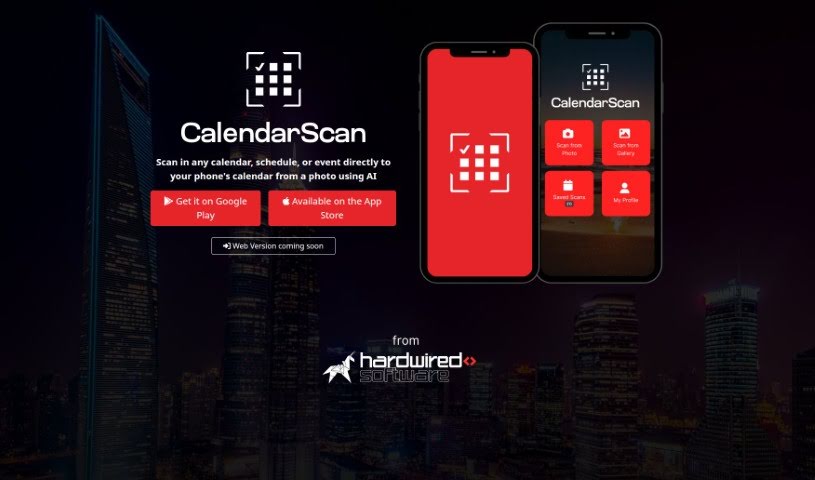
CalendarScan is a smart tool that uses artificial intelligence to help you manage your calendars more easily. It is a digital assistant for your schedule. It’s designed to take your paper calendars, schedules, or event details and turn them into a digital format. All you have to do is snap a photo of your calendar or schedule, and the AI figures out the information from the image. Then, it imports it right into your mobile phone’s calendar. You can grab CalendarScan from Google Play and the App Store right now, and they’re planning to launch a web version soon. It works great on both Android and iOS devices, making schedule management a breeze by cutting out all that tedious manual data entry. It’s a fantastic way to save time and boost your efficiency, no matter where your schedules come from.
Who created Calendarscan?
Calendarscan was developed by a company focused on creating smart tools for efficient calendar management. Their AI-powered solution lets you scan any calendar, schedule, or event directly into your phone’s calendar just by taking a picture. Calendarscan first launched on January 18, 2024, and you can find it on both Google Play and the App Store. The whole idea behind the tool is to make managing your schedule much smoother, get rid of manual data entry, and it works seamlessly with both Android and iOS devices.
What is Calendarscan used for?
Calendarscan is incredibly useful for a variety of tasks:
- It’s a great time-saving tool.
- It helps you turn paper-based calendars into a digital format.
- You can capture photos of your calendars and the AI will interpret the data.
- It imports that data directly into your mobile phone calendar.
- It streamlines schedule management by eliminating the need for manual data entry.
- It enhances efficiency when managing your calendar and schedule.
- It supports various sources for digitizing your calendar information.
- It saves you time by speeding up how you manage your schedule.
- It helps with time management by making schedule handling much simpler.
- You can digitize both physical calendars and digital images for easy importation.
- It simplifies and enhances calendar management using AI technology.
- It transforms paper-based calendars, schedules, or events into a digital format.
- It captures calendar photos and then interprets the data from those images.
- It imports data directly into your phone’s calendar.
- It simplifies and enhances your calendar management overall.
- It supports time management through its efficient data interpretation.
- It enhances schedule management efficiency by converting paper-based schedules into a digital format.
- You can digitize physical calendars or schedules, as well as digital images of these documents.
- It allows you to directly import data into your mobile phone calendar by interpreting text from images.
- It supports the paper-to-digital conversion process.
Who is Calendarscan for?
Calendarscan is perfect for:
- Anyone looking for an easier, more efficient way to manage their schedules digitally.
- People who want to simplify how they handle their digital schedules.
How to use Calendarscan?
Using Calendarscan is pretty straightforward. Here’s how you can get the most out of it:
- Sign up: First, you’ll need to create an account. Just head over to the Calendarscan website and sign up using your email address.
- Upload Your Calendar: Once you’re signed in, you can upload the calendar file you want to analyze. Calendarscan is pretty flexible and supports formats like iCal, Google Calendar, and Outlook.
- Choose Your Analysis: Next, pick the type of analysis you want to run on your calendar data. You’ll typically have options like looking at trends, spotting anomalies, or getting general insights.
- Tweak the Settings: You can also adjust the settings to fine-tune the analysis to your liking. This might involve setting a specific time range or choosing particular metrics to focus on.
- Start the Analysis: Go ahead and kick off the analysis process. Just be patient, as it might take a little while depending on how complex your calendar is and which analysis type you selected.
- Check Out the Results: When the analysis is done, take a look at what Calendarscan found. You’ll usually see visualizations, reports, and the key findings from your calendar data.
- Take Action: Use the insights Calendarscan provides to make changes. This could mean adjusting your schedule, improving how you manage your time, or spotting patterns to help you plan better.
- Export or Share: If you need to, you can export the analyzed data or share these insights with others on your team for collaboration and making decisions.
By following these simple steps, you can really make the most of Calendarscan to get valuable insights and manage your calendar more efficiently.