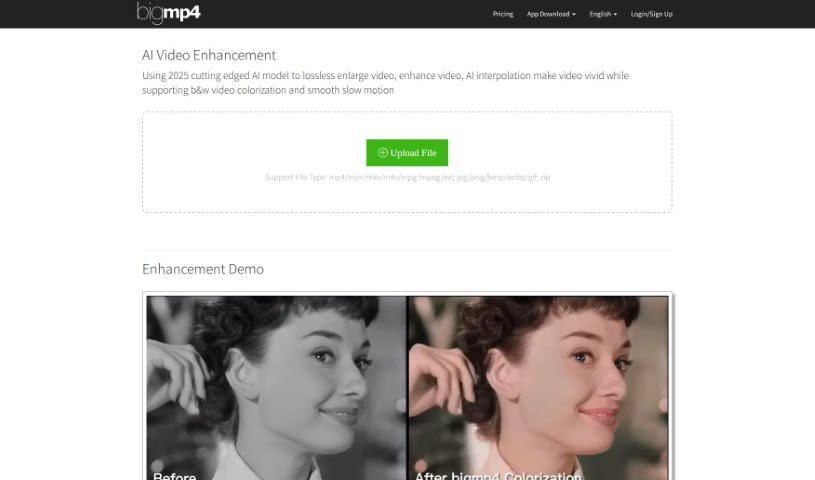
Screenshot of Bigmp4

Bigmp4

Discover Bigmp4 in 2025! Learn about its AI-powered video enhancement features like upscaling, colorization, and frame interpolation, and see how it stacks up against other video enhancers.

Screenshot

What is Bigmp4?

Bigmp4 is a really neat tool that uses advanced AI to make your videos look better. It’s packed with several cool features designed to boost video quality:

  1. Lossless Video Enlargement: Want to make your videos sharper? Bigmp4 lets you upscale them to 2k, 4k, and even 8k without losing any of that crisp detail.
  2. Black & White Video Colorization: Got some old black and white footage? Bigmp4’s AI can bring it to life by adding vibrant, natural colors.
  3. AI Video Interpolation: This feature is great for making action shots or fast-moving scenes look incredibly smooth. It boosts your video’s frame rate, making everything feel more lifelike.
  4. Smooth Slow Motion: You can apply slow-motion effects to your videos, and the best part is, it keeps the playback smooth and seamless, just like the original frame rate.
  5. Batch Mode Support: If you have a lot of images to enhance, Bigmp4 can handle them all at once through zip files, saving you a ton of time.

Your privacy is important, so Bigmp4 automatically deletes any files you upload or process within a week. It’s pretty flexible too, supporting common video formats like mp4, mov, and avi, and image formats like jpg, png, and webp. For those who need to process many files quickly, the paid services offer priority processing and less restricted upload sizes.

One of the standout features is its AI interpolation system. It can crank up video frame rates all the way to 240 fps, giving you a really vivid and lifelike viewing experience. Plus, its lossless video enlargement and effective AI colorization for black and white videos really do improve the overall quality and help cut down on noise.

Basically, Bigmp4 uses the latest AI technology to give your video content a serious upgrade with some truly impressive features, aiming for a smooth and high-quality experience for everyone.

Sources:

  • bigmp4.pdf
  • bigmp4.pdf
  • bigmp4.pdf

Who created Bigmp4?

Bigmp4 was actually started by a team of innovators back in 2023. They really dove into cutting-edge AI technology to build this platform. Their main focus is on giving users great video enhancement tools, like making videos bigger without losing quality, adding color to old footage, boosting frame rates with AI interpolation, and creating smooth slow-motion effects. They’re also serious about user privacy, making sure that any files you upload or results you get are automatically deleted within a week.

What is Bigmp4 used for?

Bigmp4 is your go-to tool for a variety of video and image enhancements:

  • Making videos bigger without losing quality (Lossless Video Enlargement)
  • Adding color to old black and white videos (Black & White Video Colorization)
  • Boosting video frame rates for smoother playback (AI Video Interpolation)
  • Creating smooth slow-motion effects
  • Processing multiple images at once (Batch Mode Support)
  • Reducing noise in videos (AI Noise Reduction)
  • Upscaling videos to HD (AI HD Enlargement)
  • Adding color to black and white footage (AI Colorization)
  • Improving frame rates for GIFs (AI Interpolation for GIFs)
  • Protecting your privacy with a file deletion policy
  • Generally improving video quality
  • Cutting down on video noise
  • Making black and white videos look more colorful
  • Effectively increasing the frames per second (FPS)
  • Efficiently processing many images at once

Who is Bigmp4 for?

If you work with video or images, Bigmp4 could be a great asset for you. It’s particularly useful for:

  • Video editors
  • Film producers
  • Content creators
  • Digital marketers
  • Photographers
  • Graphic designers

How to use Bigmp4?

Using Bigmp4 is pretty straightforward. Here’s a simple step-by-step guide:

  1. First, head over to the Bigmp4 website. That’s where you’ll find all the tools.
  2. Next, upload your video or images. It supports common formats like mp4, mov, and mkv for videos, and jpg, png, and bmp for images.
  3. Now, pick the enhancement you want. You can choose lossless enlargement, colorization, video interpolation to smooth things out, or slow motion.
  4. You can also tweak some settings for your task if you like.
  5. Once you’re ready, start the processing. Just keep in mind that how long it takes depends on your file’s frame count and the settings you’ve chosen. For AI interpolation, it might take a bit longer since it’s essentially doubling the frames.
  6. You’ll need to wait for the processing to finish.
  7. After that, you can download your newly enhanced video or images.
  8. Remember, your uploaded files and the results are automatically deleted from their servers within a week, which is great for privacy.

Bigmp4 really shines with features like lossless video enlargement up to 8k, bringing black and white videos to life with color, making footage smoother with AI interpolation, applying seamless slow-motion effects, and handling multiple images efficiently with batch mode. Using these features can really help you enhance your video content without a hitch.

By following these steps, you can easily use Bigmp4’s advanced AI technology to make your videos and images look their absolute best.

Related AI Tools

Discover more tools in similar categories that might interest you

Stay Updated with AI Tools

Get weekly updates on the latest AI tools, trends, and insights delivered to your inbox

Join 25,000+ AI enthusiasts. No spam, unsubscribe anytime.