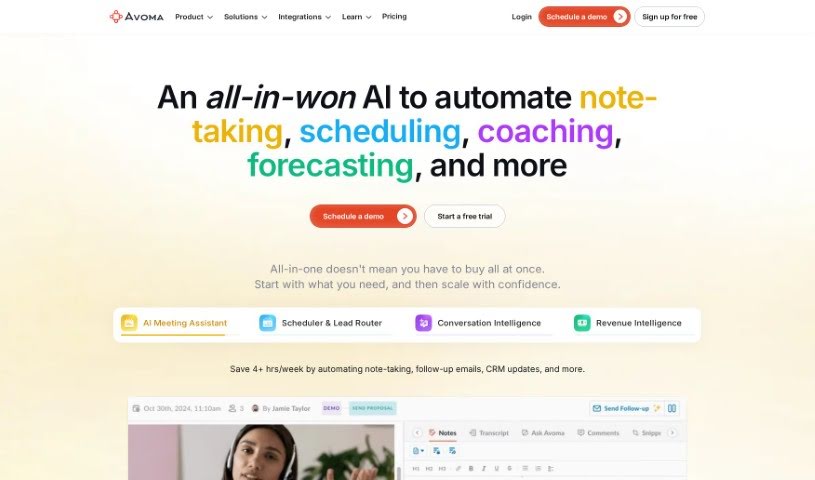
Screenshot of Avoma

Avoma

Discover what Avoma is and how to make the most of it in 2025. We'll walk through its features and see how it stacks up against other meeting assistants.

Screenshot

What is Avoma?

Avoma, which stands for “A Very Organized Meeting Assistant,” was founded in late 2017. Its main goal is to boost meeting productivity by blending human insight with artificial intelligence. The company envisions a future where meetings are completely reimagined, helping people and companies reach bigger goals. Their mission? To make communication better for knowledge workers by handling those low-value tasks automatically and boosting the important work. Avoma really values being open, staying curious, and showing gratitude. They also stick to some key principles, like focusing on the “Jobs To Be Done” – what people actually need the tool to do – taking ownership like an entrepreneur, and always getting better with a growth mindset.

Who created Avoma?

Avoma got its start in late 2017, right in Palo Alto, California. The person who founded it truly believed we could make meetings much more productive by combining human intelligence with AI. Remember, “Avoma” is short for “A Very Organized Meeting Assistant.” The big picture for the company is to rethink how people and businesses conduct meetings so everyone can achieve more. Their core mission is to automate the less important tasks and really enhance the valuable work that happens during communication and meetings.

What is Avoma used for?

Avoma offers a range of capabilities, whether you’re a collaborator, listener, or someone who prefers manual note-taking and scheduling. It provides:

  • Limited AI Meeting Assistant: For basic AI assistance during meetings.
  • Unlimited AI Meeting Assistant: Full AI capabilities for all your meetings.
  • Conversation Intelligence for SMBs: Integrates with CRMs and dialers to offer insights for small to medium-sized businesses.
  • Conversation & Revenue Intelligence for Mid-Market & Enterprise: Deeper insights for larger organizations.
  • Strategic Partnership Opportunities: For collaborations and integrations.
  • Collaborators, Listeners, Manual Note-taking & Scheduling: Core functionalities for basic meeting management.
  • AI Meeting Assistant: It automatically records and transcribes your meetings, even identifying who’s speaking and what topics are being discussed.
  • Lead Routing for Avoma Scheduler: Helps manage leads more efficiently.
  • Conversation Intelligence: Analyzes your meetings to give you actionable insights and support data-driven decisions.
  • Collaborative Note Editor: Makes meetings more engaging with shared templates and the ability to edit notes together in real-time.
  • Revenue Intelligence Features: Boosts sales and customer success strategies with activity dashboards and deal insights.
  • Meeting Scheduler: Lets you schedule meetings instantly with various flexible options.
  • Agenda Templates: Helps you get ready for meetings faster using shared templates.
  • Conversation & Revenue Intelligence: Delivers crucial insights for making smart, data-driven decisions and for coaching purposes.
  • Snippets: Allows you to share important meeting moments contextually in just seconds.
  • Playlists: Lets you gather the best parts of conversations to speed up learning.
  • Centralized Meeting Hub: Prepare, collaborate, and search across all your meetings in one convenient place.
  • AI-Generated Notes: Get complete notes generated entirely by AI.
  • Feedback and Clarity: Provide feedback and get clarity on conversations using Comments and @mentions.
  • Sharing Key Moments: Share important moments and customer feedback using Snippets.
  • Faster Coaching and Onboarding: Help teams learn and get up to speed quicker with curated Playlists.

Who is Avoma for?

Avoma is designed to help a variety of professionals and teams, including:

  • Sales Leaders
  • Sales Managers
  • Account Executives
  • Customer Success Leaders
  • Customer Success Managers
  • Remote Teams
  • Marketing Managers
  • Engineering Managers

How to use Avoma?

Avoma is a powerful AI Meeting Assistant that really helps businesses and teams improve how they handle meetings and collaborate. Here’s a simple, step-by-step guide to using it effectively:

  1. Getting Ready Before the Meeting:

    • Use the Agenda Templates to quickly get your meeting prepared.
    • Schedule your meetings right away with the handy Meeting Scheduler feature.
  2. During the Meeting:

    • Make your meetings easy to search later by recording and transcribing conversations as they happen.
    • Capture important moments as they occur using Live Bookmarks and sort them effortlessly.
    • You’ll benefit from automatic, detailed notes generated by AI.
    • Share your thoughts and give mentions using the Comments feature.
  3. After the Meeting:

    • Share those crucial meeting moments with others using Snippets.
    • Help your teams learn and get up to speed faster by creating Playlists.
    • Use Scorecards for objective coaching and to assess how your team is performing.
    • Improve your meeting results even further with analysis from Conversation Intelligence and Revenue Intelligence.
  4. Other Great Features:

    • Avoma connects smoothly with many other tools you probably already use, like your calendars, video conferencing platforms, dialers, and CRMs.
    • You’ll also get benefits like Lead Routing, Collaborative Note Editing, and Revenue Intelligence to help you make smart, data-driven decisions.
  5. A User-Friendly Experience:

    • Avoma offers a platform that’s easy to use, automating the tasks that take up your time and boosting the work that really matters.
    • The tool is built on values of transparency, curiosity, and gratitude, always keeping customer needs and entrepreneurial ownership at the forefront.
  6. Ready to Get Started:

    • You can sign up for a free trial on the Avoma website – no credit card needed!
    • This gives you unrestricted access to all the features designed to make your meetings more productive and boost your revenue.

By following these steps and exploring Avoma’s many features, you can really smooth out your meeting processes, encourage better teamwork, and make smarter decisions based on solid data.

Related AI Tools

Discover more tools in similar categories that might interest you

Stay Updated with AI Tools

Get weekly updates on the latest AI tools, trends, and insights delivered to your inbox

Join 25,000+ AI enthusiasts. No spam, unsubscribe anytime.