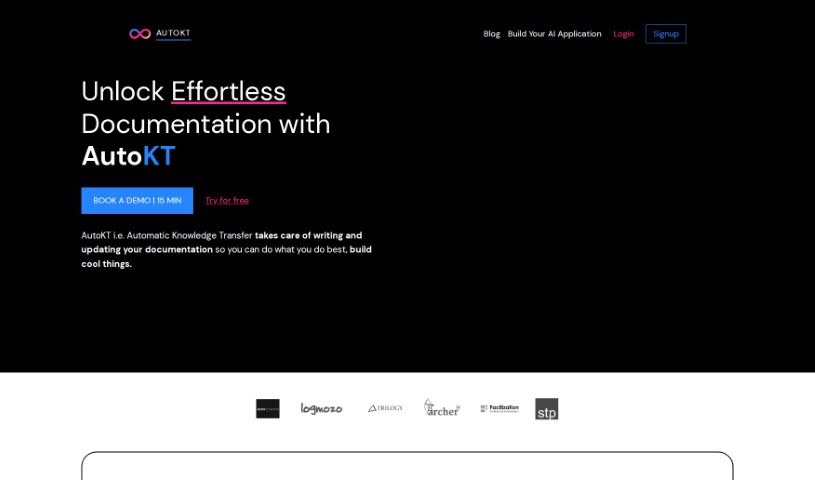
Screenshot of AutoKT

AutoKT

Discover AutoKT in 2025! Learn what this automatic knowledge transfer tool does, how to use its features effectively, and how it stacks up against other documentation tools.

Screenshot

What is AutoKT?

“AutoKT” is your go-to tool for making code documentation a breeze. It’s designed to automatically handle the heavy lifting of writing and keeping your codebase documentation fresh. How does it do this? Well, it keeps an eye on code changes you push to your version control systems. When it spots them, it automatically generates documentation based on how your repository is structured. Developers can then easily review these generated docs using a diff viewer, giving the thumbs-up or suggesting changes. Once approved, all that documentation gets stored as vector embeddings, making it super simple for anyone on your team to find information using semantic search. The whole idea behind AutoKT is to ensure your documentation stays current and useful, even when your code is constantly evolving. This really helps save valuable time for everyone, whether they’re new to the project or have been around for a while.

Who created AutoKT?

AutoKT was actually built by a team of developers who know firsthand how tough it can be to keep documentation in shape. They created it as a documentation engine specifically for developers, aiming to make the whole process much simpler. It works by integrating directly with version control systems, automatically generating documentation whenever code changes are made. AutoKT officially launched on August 15, 2023, born out of the need to solve the persistent problem of outdated or irrelevant documentation in fast-paced development environments. The system generates documentation by analyzing the code changes you push to your version control hub. Plus, it offers a really user-friendly interface so developers can easily review and approve the documentation it creates.

What is AutoKT used for?

AutoKT is incredibly versatile, really streamlining how teams handle documentation. Here’s a breakdown of what it does:

  • It automates the entire documentation process by connecting with your version control systems.
  • It generates documentation specifically for code changes, mapping them to your repository’s structure.
  • It’s smart enough to analyze both code that’s been modified and any new code that’s been added, creating documentation for both.
  • You can set it up to generate documentation automatically whenever code changes are pushed, or you can trigger it manually whenever you need it.
  • It provides a handy diff markdown viewer, along with a feedback loop, to make the review and approval process smooth.
  • All the documentation that gets approved is stored as vector embeddings, which means you can easily query it using semantic search.
  • It offers a semantic search interface, making it simple for team members to find the information they need.
  • AutoKT is designed to adapt as your code changes and team members come and go, ensuring your documentation stays current and relevant.
  • It directly tackles the challenge of writing documentation in dynamic development environments where things move fast.
  • Ultimately, it saves time for both new and existing team members by giving them context-aware documentation right when they need it.
  • It automates the writing and maintenance of documentation for your codebases.
  • It integrates with version control systems to create documentation for code changes.
  • It analyzes both modified and newly added code to generate relevant documentation.
  • Documentation generation can be triggered by code changes or simply when a user requests it.
  • Developers can review and approve the generated documentation using a diff viewer.
  • Approved documentation is stored as vector embeddings, allowing for easy querying via semantic search.
  • It provides a context-aware interface for team members to ask questions about the codebase.
  • It keeps documentation up-to-date and relevant by adapting to code changes and developer turnover.
  • The approval process is streamlined thanks to a built-in feedback loop.
  • It saves time for both new and existing team members by providing documentation that’s relevant and updated.
  • It automates the entire process of writing and updating documentation.
  • It generates documentation based on code changes.
  • It analyzes both modified and new code to create documentation.
  • You can trigger it either by code changes or on demand.
  • Developers can review and approve documentation using a diff viewer.
  • Approved documentation is stored as vector embeddings for semantic search.
  • It offers a context-aware interface for querying documentation.
  • It ensures documentation stays up-to-date and relevant by adapting to code changes.
  • The approval process is streamlined with a feedback loop.
  • It saves team members time by offering a familiar way to view documentation changes.
  • It automates the documentation process by integrating with version control systems.
  • Documentation for code changes is generated based on the overall repository structure.
  • Developers can review and approve documentation using a diff viewer.
  • It offers a diff markdown viewer and a feedback loop to streamline the approval process.
  • Approved documentation is stored as vector embeddings for easy querying using semantic search.
  • It provides a context-aware interface for asking questions about the codebase.
  • It adapts to code changes and developer churn to keep documentation up-to-date and relevant.
  • It helps streamline documentation writing in dynamic development environments where shipping features and fixing bugs are top priorities.
  • It simplifies the process of writing and maintaining documentation for codebases.
  • It generates documentation for code changes by analyzing code changes pushed to the version control hub.
  • It generates documentation based on the overall repository structure, including both modified and newly added code.
  • It provides a diff markdown viewer and a feedback loop for streamlining the approval process.
  • It addresses the challenge of writing documentation in a dynamic development environment.
  • It automates documentation writing for codebases.
  • It integrates with version control systems for documentation related to code changes.
  • It generates documentation based on the repository structure.
  • It analyzes both modified and newly added code for documentation generation.
  • You can trigger documentation generation by code changes or user demand.
  • Developers can review and approve generated documentation using a diff viewer.
  • It stores approved documentation as vector embeddings for easy querying.
  • It provides a context-aware interface for querying codebase documentation.
  • It adapts to code changes and developer churn to ensure documentation stays up-to-date.
  • It streamlines the approval process with a feedback loop.
  • It provides a diff markdown viewer and a feedback loop for documentation approval.
  • It allows for easy querying of documentation through semantic search.
  • It streamlines the approval process for documentation.
  • It automates the documentation writing and updating process for codebases.
  • It analyzes both modified and newly added code to generate documentation.
  • It provides a diff markdown viewer and a feedback loop for developers to review and approve documentation.
  • It stores approved documentation as vector embeddings for easy semantic search.
  • It enables a context-aware interface for querying documentation.
  • It saves time for team members by streamlining the approval process.

Who is AutoKT for?

AutoKT is a fantastic tool for anyone involved in software development and documentation. Specifically, it’s designed for:

  • Developers: To help you spend less time writing docs and more time coding.
  • Technical Writers: To streamline your workflow and ensure documentation stays current with code changes.
  • Team Members in Organizations: To make sure everyone has easy access to up-to-date information about the codebase.
  • Software Engineers: To provide a more efficient and accurate way to manage project documentation.

How to use AutoKT?

AutoKT is an AI-powered documentation tool designed to streamline the process of writing and maintaining documentation for codebases. Here is a comprehensive step-by-step guide on how to use AutoKT:

  1. Integration: AutoKT integrates with version control systems to automatically generate documentation based on code changes pushed to the repository. This means it connects directly to where your code lives.
  2. Code Analysis: The AutoKT engine analyzes both modified and newly added code to generate documentation reflecting the overall repository structure. It looks at what’s changed and what’s new to build the docs.
  3. Generation: The generative engine can be triggered by code changes or on user demand to create and update documentation accordingly. So, it can work automatically or when you ask it to.
  4. Review Process: Developers can review and approve the generated documentation using a diff viewer to ensure accuracy. This is where you check if the generated docs make sense.
  5. Feedback Loop: AutoKT features a feedback loop where approved documentation is stored as vector embeddings, enabling team members to search and query the documentation using a semantic search. It is a smart way to store and find information.
  6. Contextual Interface: The tool offers a context-aware interface for querying the documentation, facilitating quick access to information for both new and existing team members. You can ask it questions directly.
  7. Adaptability: AutoKT adapts to code changes and developer churn, ensuring that the documentation remains up-to-date and relevant in dynamic development environments. It keeps up with your project’s evolution.
  8. Improvement: The engine learns from developer approvals to enhance its output over time, providing an efficient way to maintain high-quality documentation. The more you use it and approve, the better it gets.
  9. Accessibility: AutoKT aims to automate and simplify documentation processes, making it easier for team members to onboard, collaborate, and access necessary information efficiently. It’s all about making knowledge transfer smoother.

By following these steps, users can leverage AutoKT to automate documentation tasks, improve knowledge transfer, and enhance collaboration within development teams.

Related AI Tools

Discover more tools in similar categories that might interest you

Stay Updated with AI Tools

Get weekly updates on the latest AI tools, trends, and insights delivered to your inbox

Join 25,000+ AI enthusiasts. No spam, unsubscribe anytime.