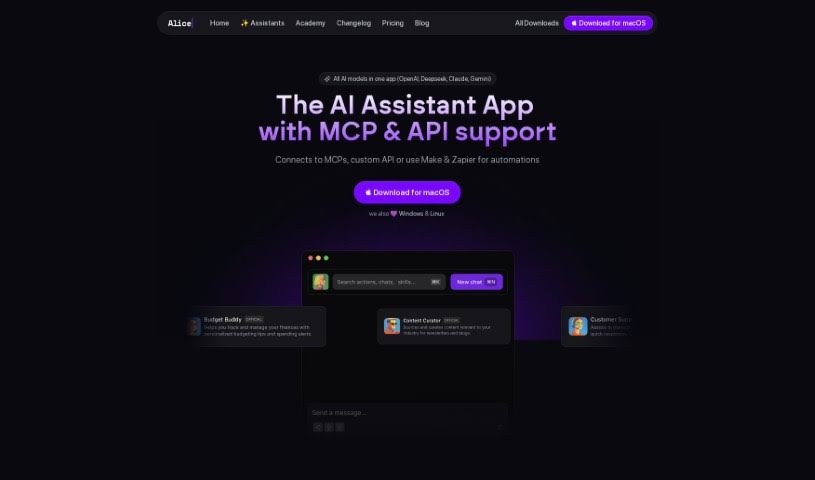
What is Alice?
Alice is a really powerful AI assistant that runs right on your desktop. It gives you quick and reliable access to a bunch of different AI models, like OpenAI, Perplexity, and Claude, among others. With Alice, you can chat with these AI assistants, create and use your own custom templates called Snippets, connect with other apps using Remote Actions, easily switch between different AI models, process images, use your voice to dictate and listen to responses, and really tailor the user experience with things like keyboard shortcuts. Alice also cares about your privacy – it keeps your chat history stored locally. It works with the latest versions of Windows and macOS. What makes Alice stand out from other AI assistants is its focus on desktop use, the flexibility to use many different AI models, its customizable Snippets, the ability to integrate with apps, its strong privacy features, the promise of regular updates, and the option for a lifetime license.
Who created Alice?
Alice was actually created by Michael, who’s the founder of Autonomee. Michael himself uses Alice to automate his social media content creation, which has seriously cut down the time he spends coming up with content ideas. Alice offers a pretty unique experience, with features like access to the best AI models available, specialized assistants for all sorts of tasks, simple ways to communicate with other apps, built-in prompts, and keyboard shortcuts that make using it super efficient. The app is designed specifically for desktop use, supports a variety of powerful AI models like GPT-4 and Claude, and makes user privacy a priority by storing data locally.
What is Alice used for?
Alice can help you with a wide range of tasks:
- Scheduling & Communication: Schedule meetings with people like Anne, send meeting links, and set them up in Google Calendar using Zencal.
- Sales & Business Insights: Check today’s sales figures by connecting to Stripe’s API to get data on different products. Brainstorm business ideas, get insights from your data, or format offers as emails, all within the Alice app.
- Project Management: Check the status of your current sprint by connecting to APIs like Linear or Jira to summarize developers’ activity. It can also connect to apps like Todoist, Asana, Clickup, or Notion to give you a daily briefing on your tasks.
- Social Media & Content Creation: Alice can help manage your social media by automating descriptions, generating titles, and much more. It offers text prompts for tasks like fixing grammar and spelling, translating text, extending or shortening content, and rewriting it in any style or length you need. You can also generate marketing copy for social media or blog posts, brainstorm channels, and polish your copy for better engagement.
- Productivity & Efficiency: Create productivity prompts for things like writing invitations, accepting or refusing proposals, brainstorming ideas, critical thinking, and coding tasks. You can also map file prompts to custom keyboard shortcuts and use the app in the background while it performs actions on text you’ve copied.
- AI Model Flexibility: Get the fastest GPT experience with shortcut access. Alice offers a selection of best-in-class models, including GPT-4, Vision, Perplexity, Claude, Groq, and Ollama. You can also create specialized assistants for tasks like marketing, sales, and legal work.
- App Integration: Communicate with apps through Remote Actions for task execution. This includes connecting to apps like Todoist, Asana, Clickup, or Notion for task management, or Zencal for scheduling meetings.
- Privacy: Alice is privacy-focused, storing your API keys and chat history locally.
- Purchasing & Licensing: You can buy the newest version of Alice with a one-time payment and choose from different plans. It offers regular updates for a full year after purchase and a lifetime license for indefinite app use.
Who is Alice for?
Alice is designed for a variety of professionals and individuals who want to boost their productivity and streamline their workflows:
- Marketing Professionals
- Sales Professionals
- Legal Professionals
- Makers
- Creators
- Founders
- Explorers
- Social Media Managers
- Content Creators
- Business Professionals
How to use Alice?
To get the most out of Alice, here’s a straightforward guide:
- Get Your OpenAI API Key: First, you’ll need an OpenAI API key. You can sign up on the OpenAI website, navigate to the API section, and create a new key. Make sure to keep it secure and then enter it into Alice’s app settings under the “General” tab.
- Access and Pricing Options: You don’t need a ChatGPT Plus subscription to use Alice. You have two main options: you can use your own OpenAI API key, or you can purchase AI Credits for token-based usage.
- Assigning Licenses for Teams: If you buy a multi-user plan, you’ll need to fill out a form with your team members’ email addresses. This will grant them access to Alice.
- Staying Updated: Alice will notify you within the app when new updates are available. Just follow the on-screen instructions to install them easily.
- Exploring Alice’s Features: Dive into chatting with AI, create custom Snippets for tasks you do often, integrate with your favorite apps, switch between different AI models, process images, use voice dictation and listen to responses, and customize the app to perfectly fit your workflow.
- Understanding the Software License: The license agreement provides important details about usage restrictions, conditions for termination, and disclaimers related to the software.
- Choosing a Pricing Plan: Alice offers different plans to suit your needs, including Solo, Small Team & Family, and Big Team & Enterprise options, catering to different numbers of devices or team members.
Essentially, using Alice efficiently means interacting with its AI assistants, customizing your prompts, integrating it with your apps, and managing updates smoothly. All of this is designed to help you enhance your productivity and make your tasks more efficient.