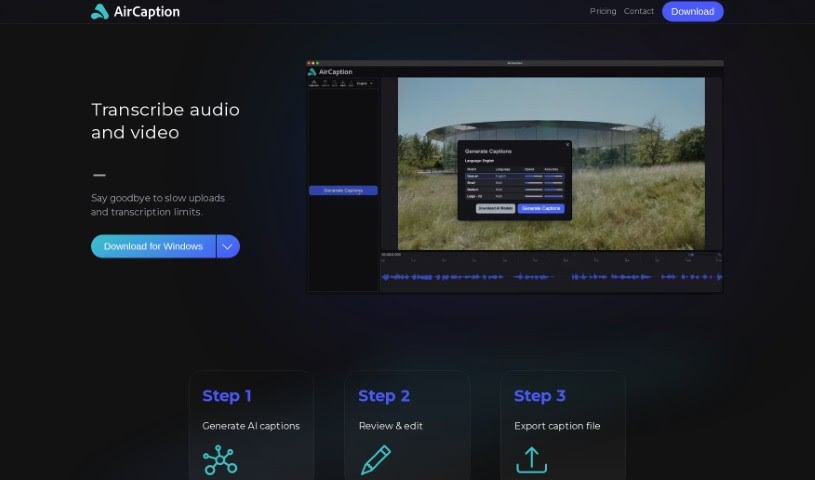
Screenshot of AirCaption

AirCaption

Discover AirCaption in 2025: learn what this AI transcription tool is, how to use its features for captions, transcripts, and subtitles, and how it stacks up against other transcription tools.

Screenshot

What is AirCaption?

AirCaption is a smart transcription software that uses AI models from OpenAI to create captions, transcripts, and subtitles for your audio or video content. You can easily review and edit these captions, then export them in various formats like SRT, VTT, TXT, or even directly onto your video. It’s built for both Mac and Windows, and a really great feature is that it works offline. Plus, your privacy is protected because all transcriptions happen right on your own computer. AirCaption supports up to 60 languages and includes helpful hotkeys to speed up your workflow. It’s a fantastic tool for all sorts of professionals – think video editors, podcasters, language learners, legal folks, marketers, researchers, event organizers, online course creators, and journalists. Basically, anyone who needs to transcribe content can use it to make their work more accessible and easier for their audience to understand.

Who created AirCaption?

We don’t know exactly who developed AirCaption, as the creator or team behind it hasn’t been publicly disclosed. The software first launched on July 26, 2024. At its core, AirCaption is an AI-powered transcription tool. It lets you generate captions, transcripts, and subtitles for any audio or video content you have. It uses OpenAI’s AI models for the actual transcription process. You can then review and edit the captions, and it supports a wide range of languages – up to 60! Importantly, it ensures your privacy by processing all transcripts locally on your machine.

What is AirCaption used for?

  • Supports Many Languages: Works with up to 60 different languages.
  • Fast Transcription: Gets your audio transcribed quickly.
  • Accurate Transcription: Provides reliable transcriptions.
  • Legal Transcription: Specifically helpful for legal documents and proceedings.
  • Marketing Aid: A great advertising tool for marketers.
  • Research & Journalism: Ideal for researchers and journalists needing to analyze interviews or reports.
  • Education: Effectively supports e-learning and online courses.
  • Event Management: Helps with organizing and making event recordings accessible.
  • Accessibility: Makes content more accessible to a wider audience.
  • Language Learning: A useful tool for language learners.
  • Audience Reach: Helps connect with a broader audience.
  • Subtitling: Supports adding subtitles to videos.
  • Review Option: Lets you check and edit captions after they’re generated.
  • Content Enhancement: Improves both audio and video content.

Specific Use Cases:

  • Video Editors: Transcribe raw footage to easily search through it, and accurately add subtitles to your final videos.
  • Podcasters: Transcribe your episodes to create blog posts or add captions for your listeners.
  • Language Learners: Subtitles are incredibly helpful for understanding spoken content and improving comprehension.
  • Legal Professionals: Transcribe depositions, court hearings, and other legal proceedings accurately.
  • Marketers: Caption promotional videos to boost engagement, reach more people, and improve SEO.
  • Researchers: Transcribe interviews and audio recordings for detailed analysis.
  • Event Organizers: Make recorded event videos more accessible by adding captions.
  • Online Course Creators: Enhance the learning experience by adding captions to course videos, which really helps students understand the material.
  • Journalists: Transcribe interviews or press briefings to ensure accurate reporting.

Who is AirCaption for?

AirCaption is designed for a variety of professionals, including:

  • Video editors
  • Podcasters
  • Language Learners
  • Legal professionals
  • Marketers
  • Researchers
  • Event organizers
  • Online course creators
  • Journalists

How to use AirCaption?

Using AirCaption is pretty straightforward. Here’s a quick rundown:

  1. Generate AI Captions: Start by uploading your audio or video content into AirCaption. Then, just let the AI do its magic and transcribe everything for you.
  2. Review & Edit: Once the transcription is done, take a moment to review it. You can easily make any necessary edits to ensure it’s perfect.
  3. Export Caption File: When you’re happy with the captions, you can export them. Choose from formats like SRT, VTT, TXT, or even have them directly embedded onto your video.
  4. Explore Extra Features: You’ll also find handy hotkeys to speed up your editing process. You can import and edit existing caption files too. And remember, all the processing happens locally, so your privacy is well-protected.
  5. See the Benefits for Different Users:
    • Video editors can transcribe footage and subtitle final videos accurately.
    • Podcasters can transcribe episodes for blog posts or audience captions.
    • Language learners will find subtitles really helpful.
    • Legal professionals can accurately transcribe depositions and court proceedings.
    • Marketers can use it for captioning videos to boost engagement.
    • Researchers benefit from transcribing interviews for analysis.
    • Event organizers can improve accessibility by captioning recorded event videos.
    • Online course creators can enhance learning experiences with captions.
    • Journalists can transcribe interviews for accurate reporting.
  6. Availability: AirCaption is available for both Mac and Windows computers.

Overall, AirCaption is a really versatile AI transcription tool that works well for lots of different users. It offers fast, accurate transcription and makes sure your data stays private. Plus, the ability to customize captions and support for many languages makes it a super valuable tool for anyone creating content or working professionally across different industries.

Related AI Tools

Discover more tools in similar categories that might interest you

Stay Updated with AI Tools

Get weekly updates on the latest AI tools, trends, and insights delivered to your inbox

Join 25,000+ AI enthusiasts. No spam, unsubscribe anytime.